

 Программирование
Похожие презентации:



Systems Programming. Socket Programming. Week #14, Lecture 22
1.
Systems ProgrammingSocket Programming
Week # 14, Lecture 22
Dr. Muhammad Bilal Qureshi
m.qureshi@centralasian.uz
Central Asian University, Tashkent, Uzbekistan
2.
Introduction to Sockets• A socket is a communication mechanism that allows
client/server systems to be developed either locally, on a
single machine, or across networks. E.g. A Web browser
uses sockets to communicate with web server.
Network Addresses
• Every host on a network has, at a minimum, two unique
addresses.
• The first unique address is a 48-bit media access control
(MAC) address that is assigned to its network interface
card (NIC). The manufacturer of the card assigns this
address. e.g. 00:50:56:8A:01:0D
• The MAC address is written in hexadecimal notation,
broken into six 8-bit numbers. The first three groupings
(bytes) of this number identify the hardware
manufacturer.
5/1/2025
2
3.
Network Addresses• Run this command to see the recently resolved addresses
( Internet addresses and their hardware address )
cat /proc/net/arp
ifconfig –a //To see MAC and IP Address of your PC
• The second unique address for a host is a 32-bit Internet
(IP) address. e.g. 192.168.10.254
• A 32-bit IP address is broken into four 8-bit numbers, each
separated by a dot (.), each of the four sub-numbers can
range from 0 to 255.
• An IPv4 Internet address may be subdivided into a network
and local portion. The network portion, or netid, occupies
the leftmost portion of the IP address, and the local
portion, or hostid, the rightmost portion. Using the leading
bits of the netid value, networks can be divided into five
classes .With IPv6, the 32-bit IP addresses will become
128-bit.
5/1/2025
3
4.
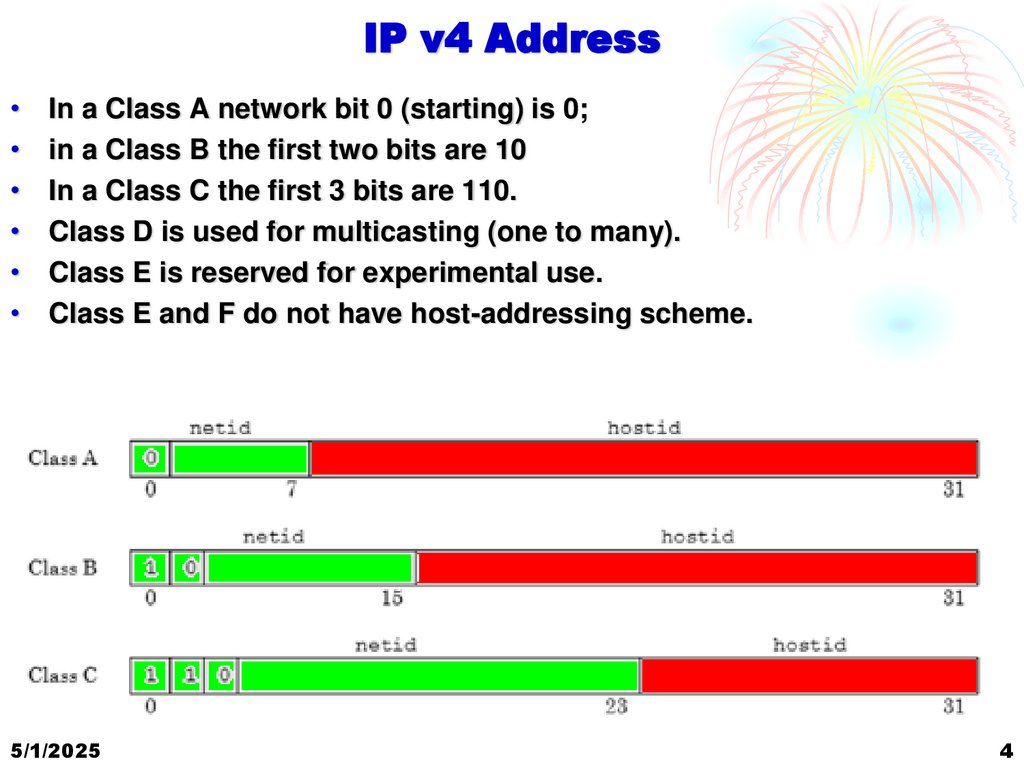
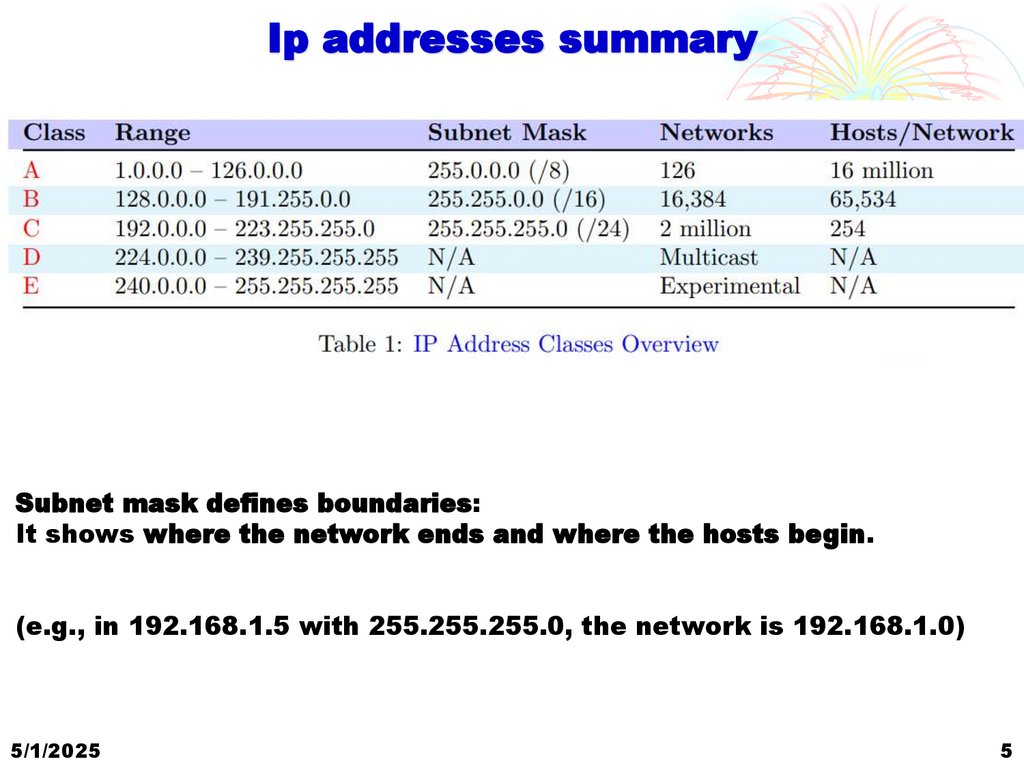
IP v4 AddressIn a Class A network bit 0 (starting) is 0;
in a Class B the first two bits are 10
In a Class C the first 3 bits are 110.
Class D is used for multicasting (one to many).
Class E is reserved for experimental use.
Class E and F do not have host-addressing scheme.
5/1/2025
4
5.
Ip addresses summarySubnet mask defines boundaries:
It shows where the network ends and where the hosts begin.
(e.g., in 192.168.1.5 with 255.255.255.0, the network is 192.168.1.0)
5/1/2025
5
6.
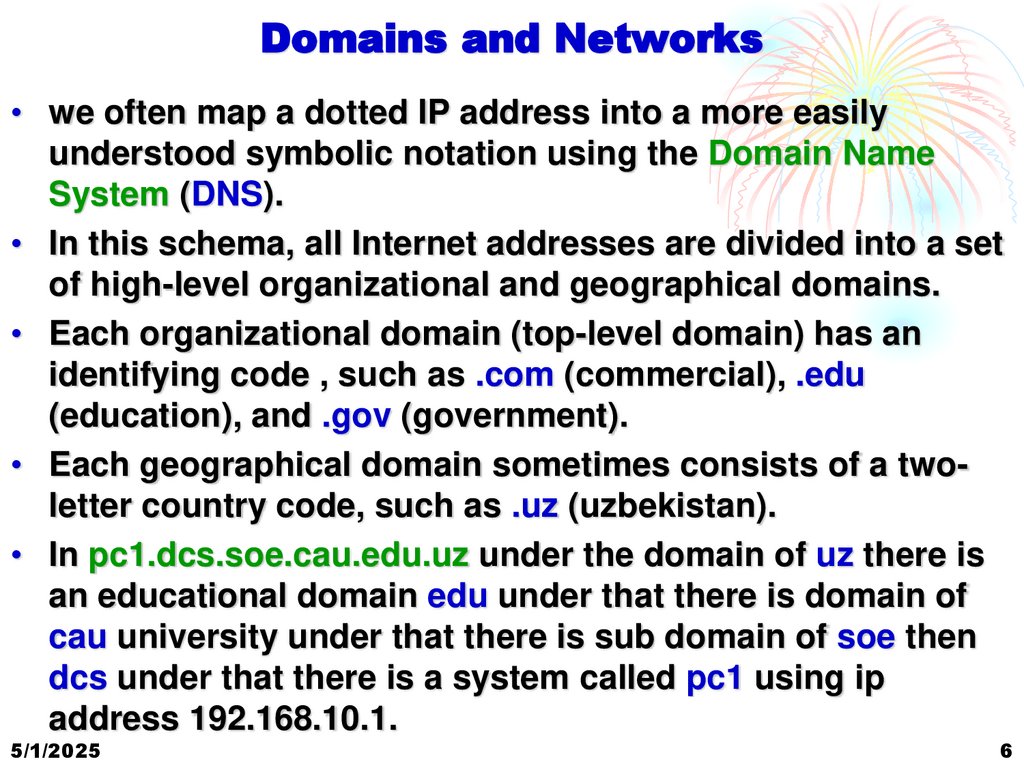
Domains and Networks• we often map a dotted IP address into a more easily
understood symbolic notation using the Domain Name
System (DNS).
• In this schema, all Internet addresses are divided into a set
of high-level organizational and geographical domains.
• Each organizational domain (top-level domain) has an
identifying code , such as .com (commercial), .edu
(education), and .gov (government).
• Each geographical domain sometimes consists of a twoletter country code, such as .uz (uzbekistan).
• In pc1.dcs.soe.cau.edu.uz under the domain of uz there is
an educational domain edu under that there is domain of
cau university under that there is sub domain of soe then
dcs under that there is a system called pc1 using ip
address 192.168.10.1.
5/1/2025
6
7.
Domains and Networks• The last name in the sequence (the leftmost) is usually the
name of the host.
• A DNS Server using distributed DNS database information
dynamically maps a domain-name reference to its
corresponding Internet (IP) address.
• Go to www.network-tolls.com or Network Tools:
DNS,IP,Email and find the IP Address of
www.centralasian.uz
• In Linux you can use host, nslookup and dig commands for
DNS queries. See the man pages for help.
5/1/2025
7
8.
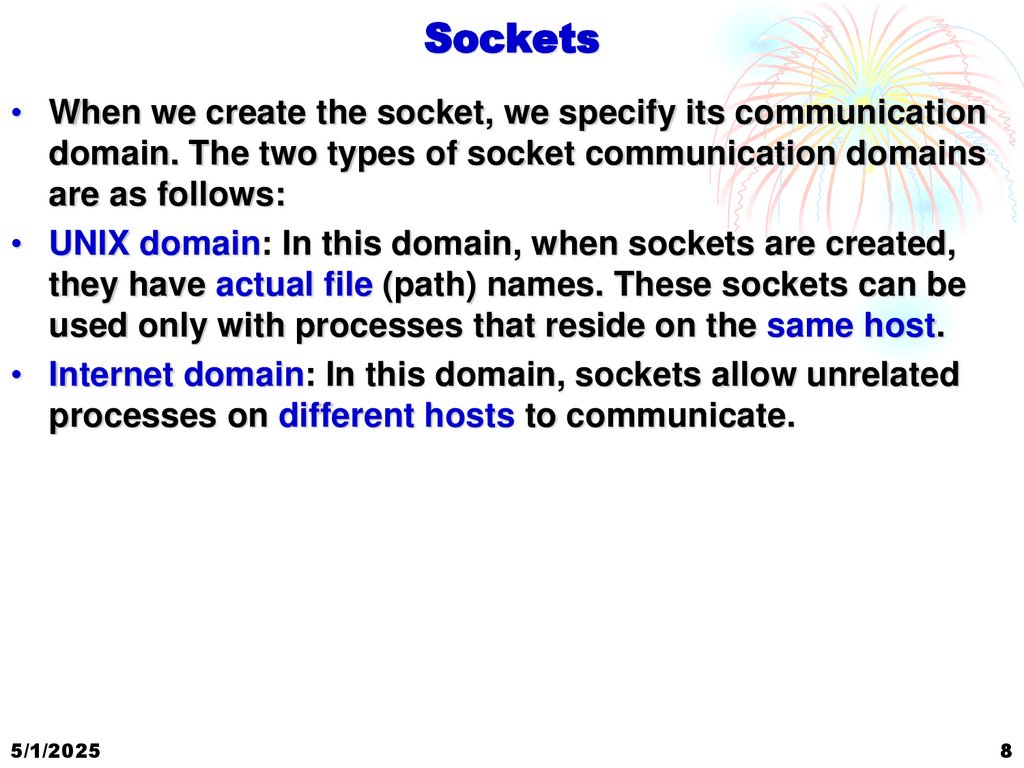
Sockets• When we create the socket, we specify its communication
domain. The two types of socket communication domains
are as follows:
• UNIX domain: In this domain, when sockets are created,
they have actual file (path) names. These sockets can be
used only with processes that reside on the same host.
• Internet domain: In this domain, sockets allow unrelated
processes on different hosts to communicate.
5/1/2025
8
9.
Layered Model of Networking• Sockets programming uses the layered model of packet
communication
• Using socket APIs we make a program of some application
that runs at application layer.
• The Transport layer provides the transport protocols. TCP
(Transmission Control Protocol) and UDP (User Datagram
Protocol)
• The Network layer provides among other things routing
over the Internet. This layer is
occupied by the Internet
Protocol, or IP.
• Physical layer driver provides
the means to introduce
packets onto the physical
network.
5/1/2025
9
10.
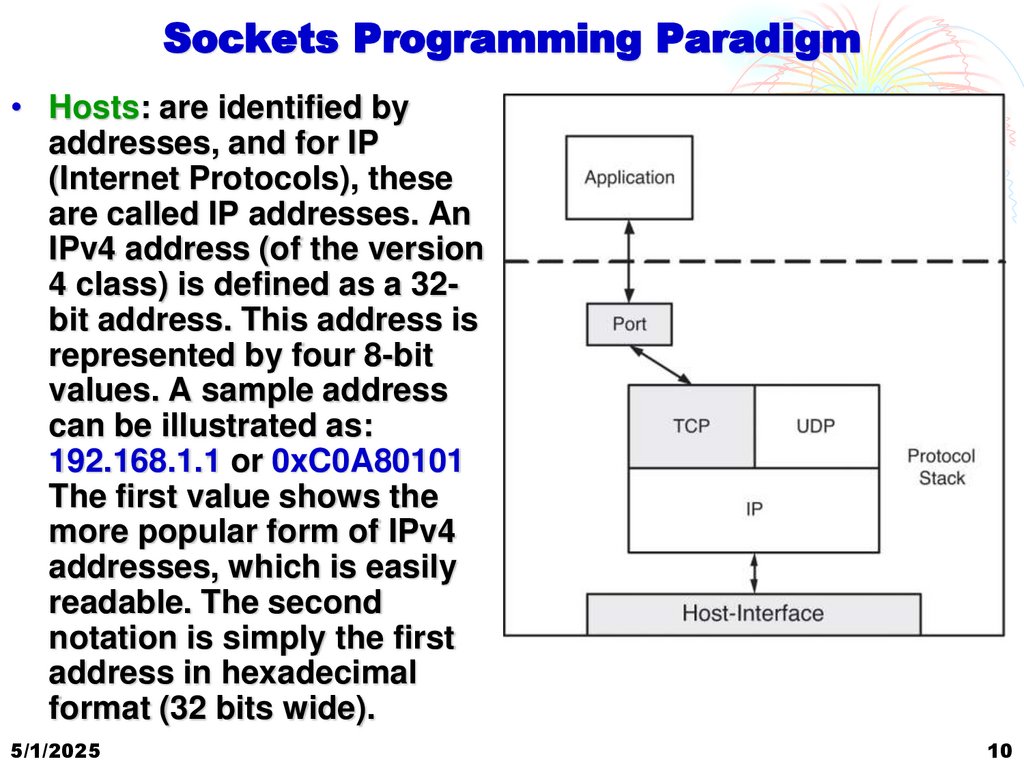
Sockets Programming Paradigm• Hosts: are identified by
addresses, and for IP
(Internet Protocols), these
are called IP addresses. An
IPv4 address (of the version
4 class) is defined as a 32bit address. This address is
represented by four 8-bit
values. A sample address
can be illustrated as:
192.168.1.1 or 0xC0A80101
The first value shows the
more popular form of IPv4
addresses, which is easily
readable. The second
notation is simply the first
address in hexadecimal
format (32 bits wide).
5/1/2025
10
11.
Sockets Programming Paradigm• Protocol: The protocol specifies the details of
communication over the socket. The two most common
protocols used are the Transmission Control Protocol
(TCP) and the User Datagram Protocol (UDP). TCP is a
stream-based reliable protocol, and UDP is a datagram
(message)-based protocol that can be unreliable.
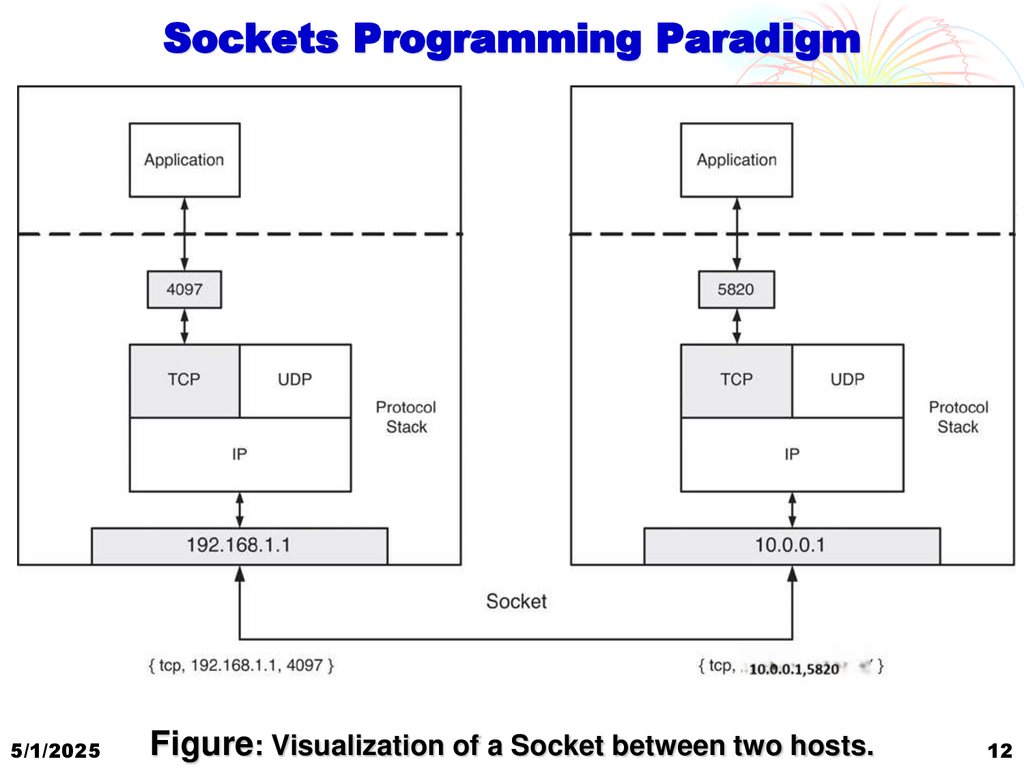
• Port: The port is the endpoint for a given process
(interface) for a protocol. This is the application’s interface
to the Socket interface. Ports are unique on a host for a
given protocol. Ports are commonly called “bound” when
they are attached to a given socket. Ports are numbers that
are split basically into two ranges. Port numbers below
1024 are reserved for well-known services (called wellknown addresses). Port numbers above 1024 are typically
used by applications.
5/1/2025
11
12.
Sockets Programming Paradigm5/1/2025
Figure: Visualization of a Socket between two hosts.
12
13.
Client / Server Model• In most Sockets applications, there exists
a server (responds to requests and provides
responses) and a client (makes requests
to the server).
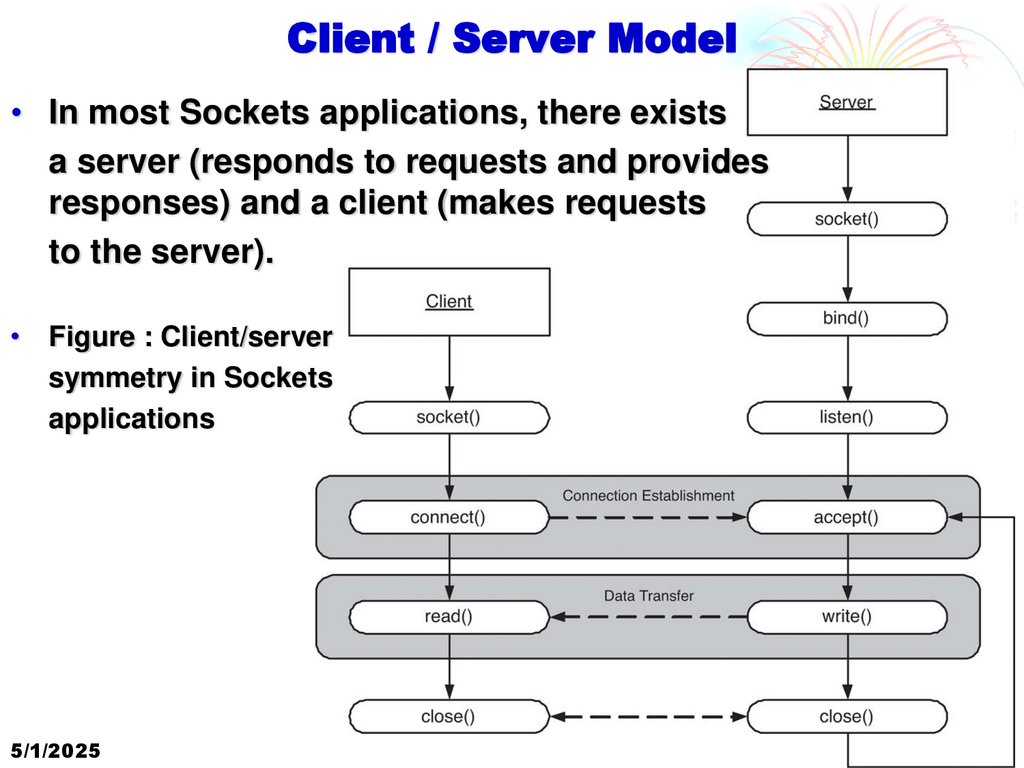
• Figure : Client/server
symmetry in Sockets
applications
5/1/2025
13
14.
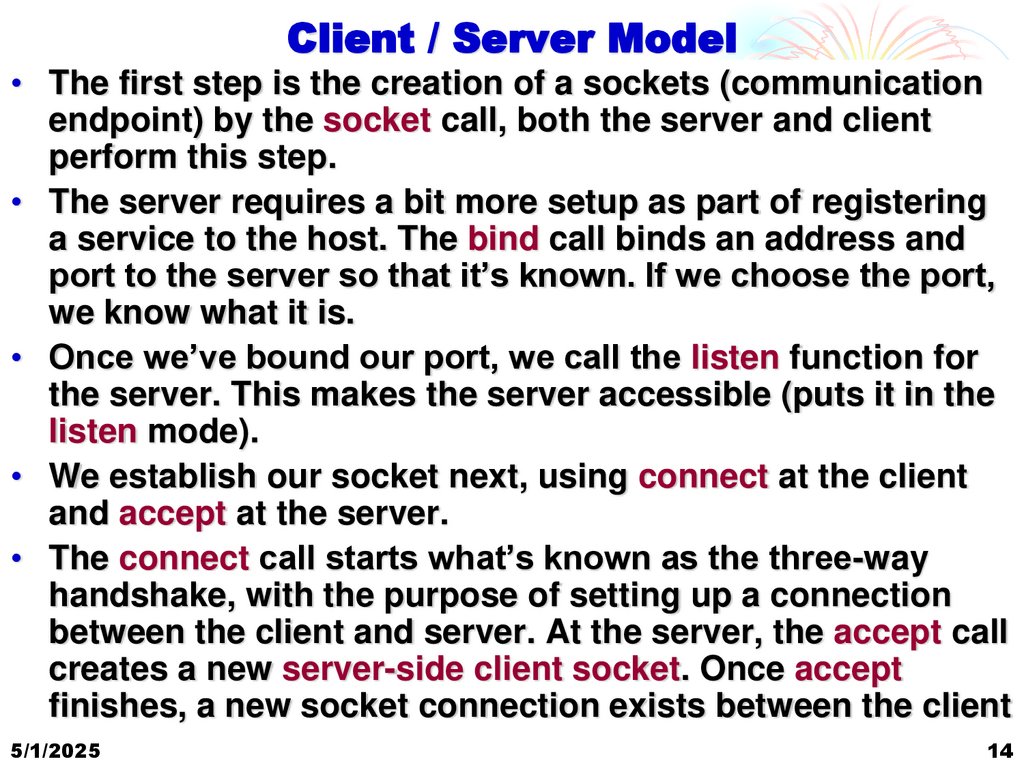
Client / Server Model• The first step is the creation of a sockets (communication
endpoint) by the socket call, both the server and client
perform this step.
• The server requires a bit more setup as part of registering
a service to the host. The bind call binds an address and
port to the server so that it’s known. If we choose the port,
we know what it is.
• Once we’ve bound our port, we call the listen function for
the server. This makes the server accessible (puts it in the
listen mode).
• We establish our socket next, using connect at the client
and accept at the server.
• The connect call starts what’s known as the three-way
handshake, with the purpose of setting up a connection
between the client and server. At the server, the accept call
creates a new server-side client socket. Once accept
finishes, a new socket connection exists between the client
5/1/2025
14
15.
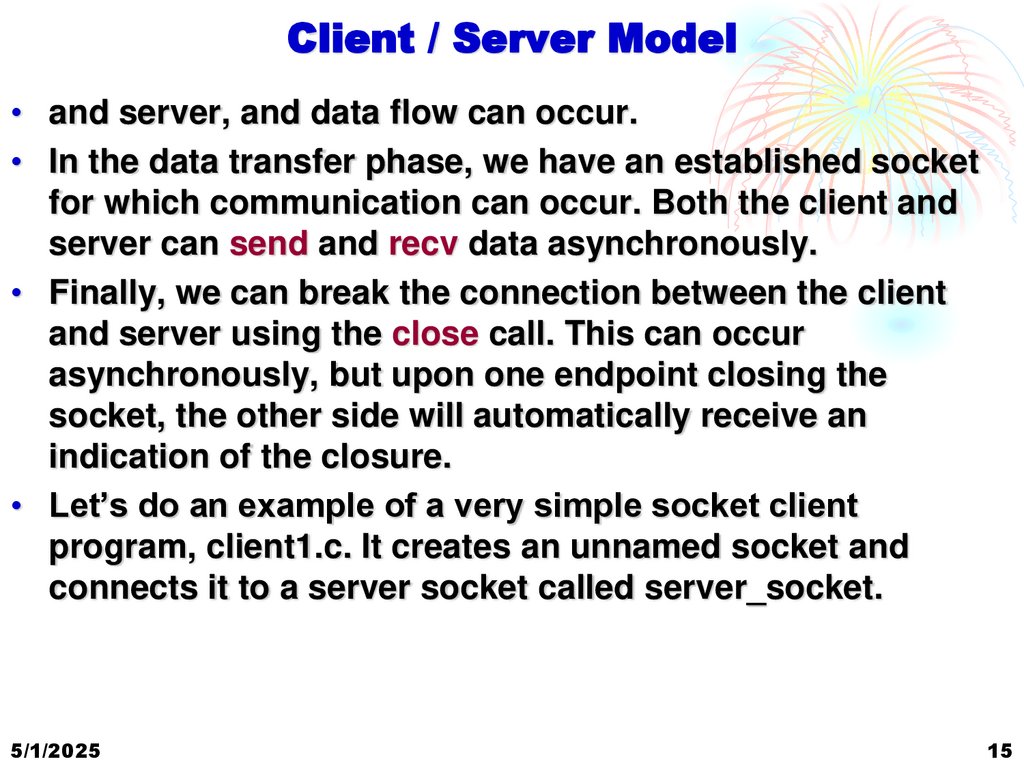
Client / Server Model• and server, and data flow can occur.
• In the data transfer phase, we have an established socket
for which communication can occur. Both the client and
server can send and recv data asynchronously.
• Finally, we can break the connection between the client
and server using the close call. This can occur
asynchronously, but upon one endpoint closing the
socket, the other side will automatically receive an
indication of the closure.
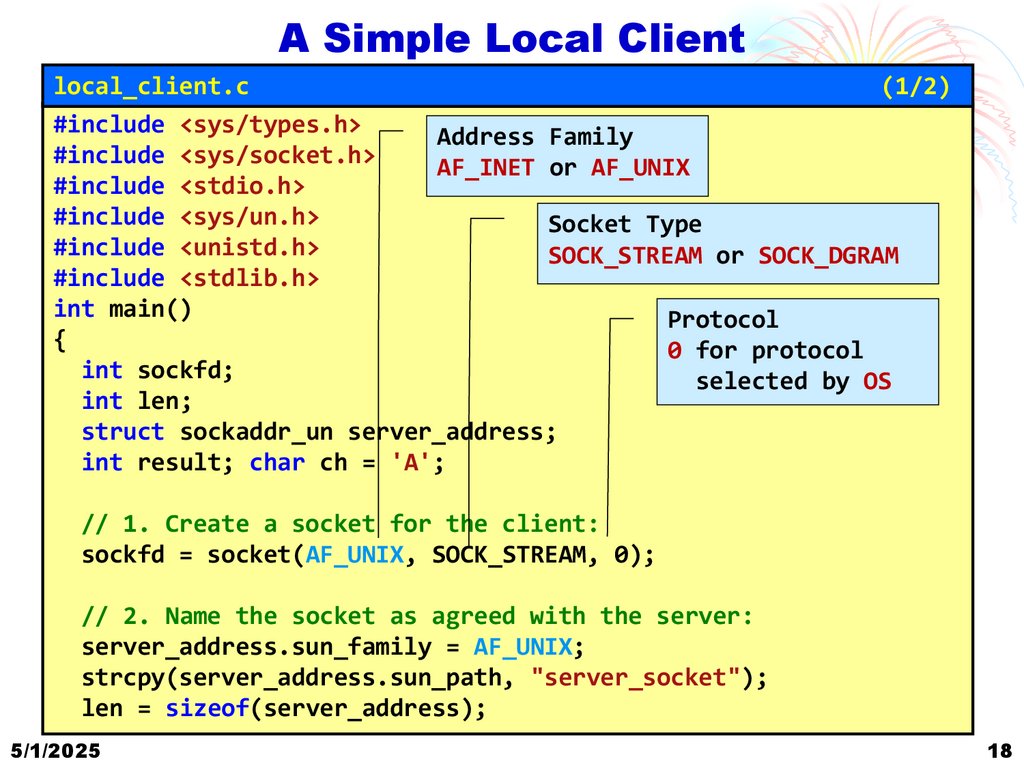
• Let’s do an example of a very simple socket client
program, client1.c. It creates an unnamed socket and
connects it to a server socket called server_socket.
5/1/2025
15
16.
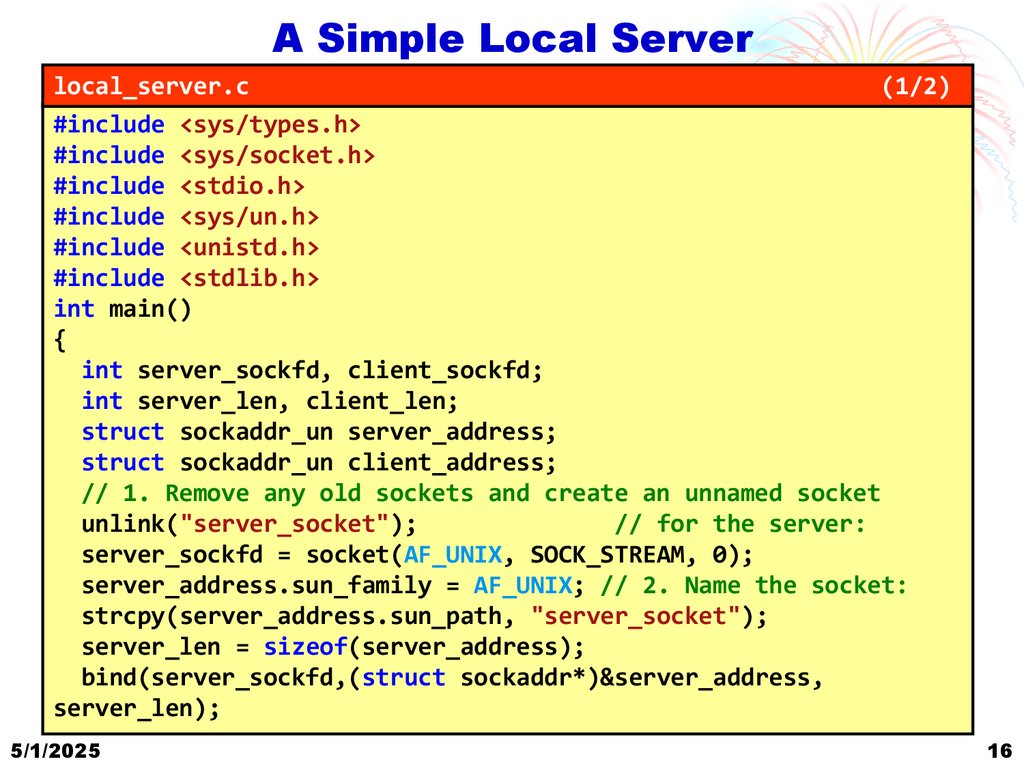
A Simple Local Serverlocal_server.c
(1/2)
#include <sys/types.h>
#include <sys/socket.h>
#include <stdio.h>
#include <sys/un.h>
#include <unistd.h>
#include <stdlib.h>
int main()
{
int server_sockfd, client_sockfd;
int server_len, client_len;
struct sockaddr_un server_address;
struct sockaddr_un client_address;
// 1. Remove any old sockets and create an unnamed socket
unlink("server_socket");
// for the server:
server_sockfd = socket(AF_UNIX, SOCK_STREAM, 0);
server_address.sun_family = AF_UNIX; // 2. Name the socket:
strcpy(server_address.sun_path, "server_socket");
server_len = sizeof(server_address);
bind(server_sockfd,(struct sockaddr*)&server_address,
server_len);
5/1/2025
16
17.
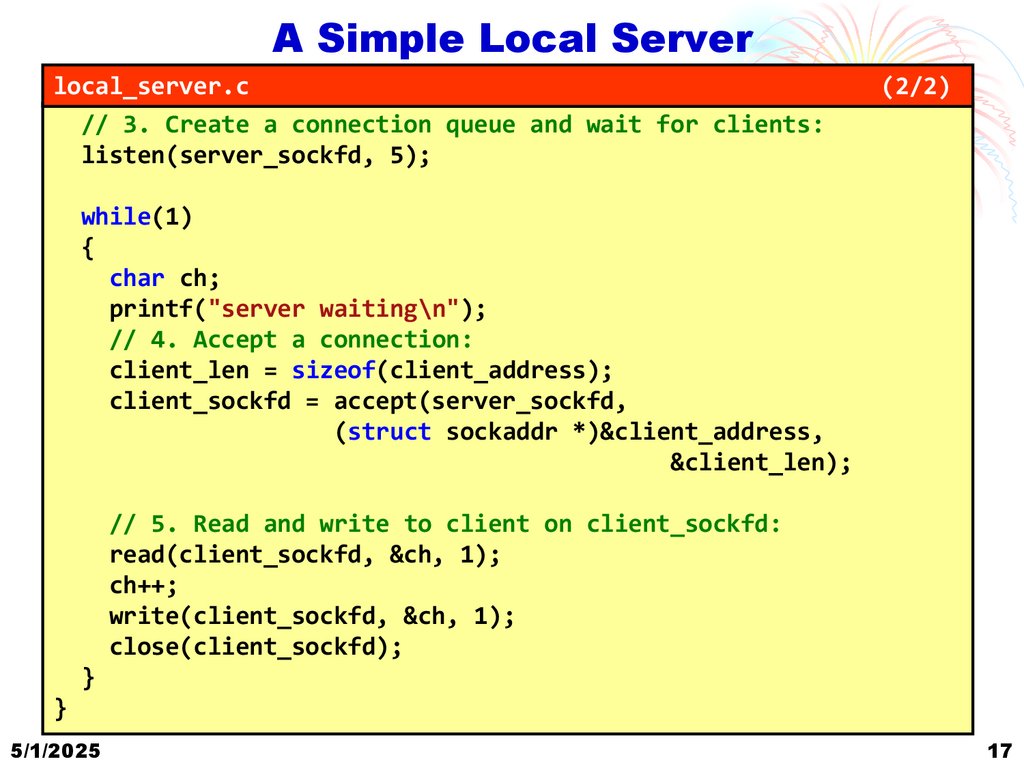
A Simple Local Serverlocal_server.c
// 3. Create a connection queue and wait for clients:
listen(server_sockfd, 5);
(2/2)
while(1)
{
char ch;
printf("server waiting\n");
// 4. Accept a connection:
client_len = sizeof(client_address);
client_sockfd = accept(server_sockfd,
(struct sockaddr *)&client_address,
&client_len);
// 5. Read and write to client on client_sockfd:
read(client_sockfd, &ch, 1);
ch++;
write(client_sockfd, &ch, 1);
close(client_sockfd);
}
}
5/1/2025
17
18.
A Simple Local Clientlocal_client.c
(1/2)
#include <sys/types.h>
Address Family
#include <sys/socket.h>
AF_INET or AF_UNIX
#include <stdio.h>
#include <sys/un.h>
Socket Type
#include <unistd.h>
SOCK_STREAM or SOCK_DGRAM
#include <stdlib.h>
int main()
Protocol
{
0 for protocol
int sockfd;
selected by OS
int len;
struct sockaddr_un server_address;
int result; char ch = 'A';
// 1. Create a socket for the client:
sockfd = socket(AF_UNIX, SOCK_STREAM, 0);
// 2. Name the socket as agreed with the server:
server_address.sun_family = AF_UNIX;
strcpy(server_address.sun_path, "server_socket");
len = sizeof(server_address);
5/1/2025
18
19.
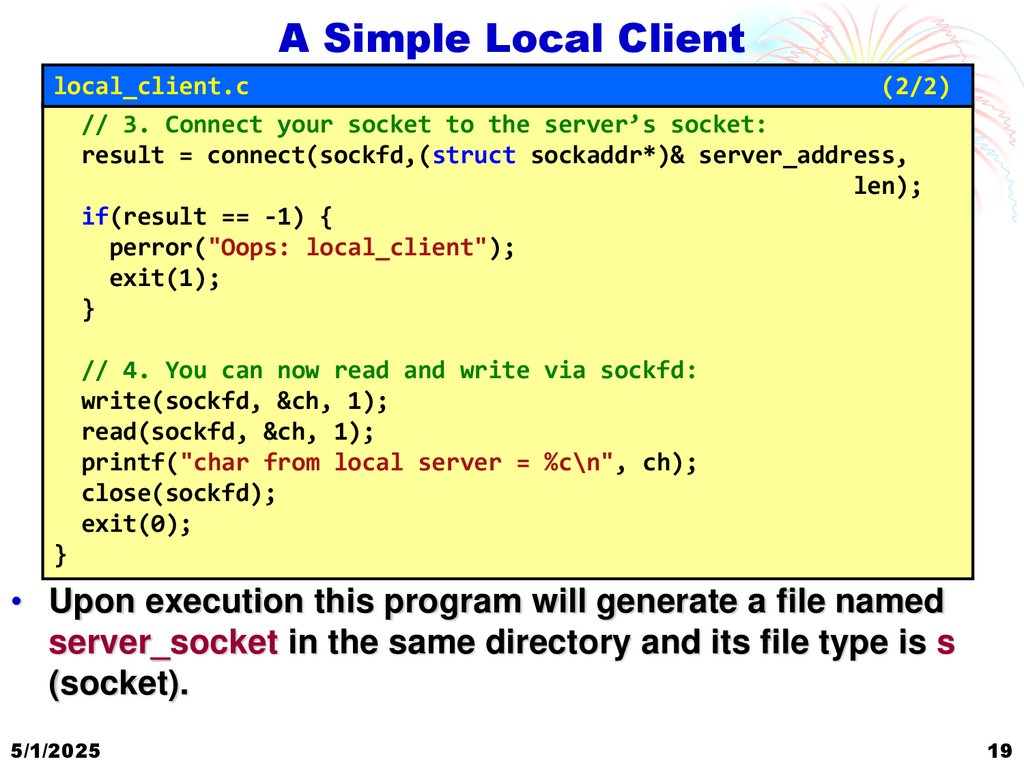
A Simple Local Clientlocal_client.c
(2/2)
// 3. Connect your socket to the server’s socket:
result = connect(sockfd,(struct sockaddr*)& server_address,
len);
if(result == -1) {
perror("Oops: local_client");
exit(1);
}
// 4. You can now read and write via sockfd:
write(sockfd, &ch, 1);
read(sockfd, &ch, 1);
printf("char from local server = %c\n", ch);
close(sockfd);
exit(0);
}
• Upon execution this program will generate a file named
server_socket in the same directory and its file type is s
(socket).
5/1/2025
19
20.
Unix Domain Server and Client5/1/2025
20
21.
Thank YouQuestions?