 Информатика
Похожие презентации:





SSL/TLS configuration in OpenEdge
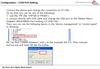
1. SSL/TLS configuration in OpenEdge
Sharath GabbetaKumar Navneet
Principal Software Engineer
Principal Software Engineer
PSC
PSC
2. Agenda
Challenges for Data in Transit followed by Lab 1SSL/TLS communication followed by Lab 2
Digital certificates followed by Lab 3
SSL/TLS configuration followed by Lab 4
Client Authentication followed by Lab 5
Trouble shooting tips followed by 6
2
3. Challenges for Data in transit
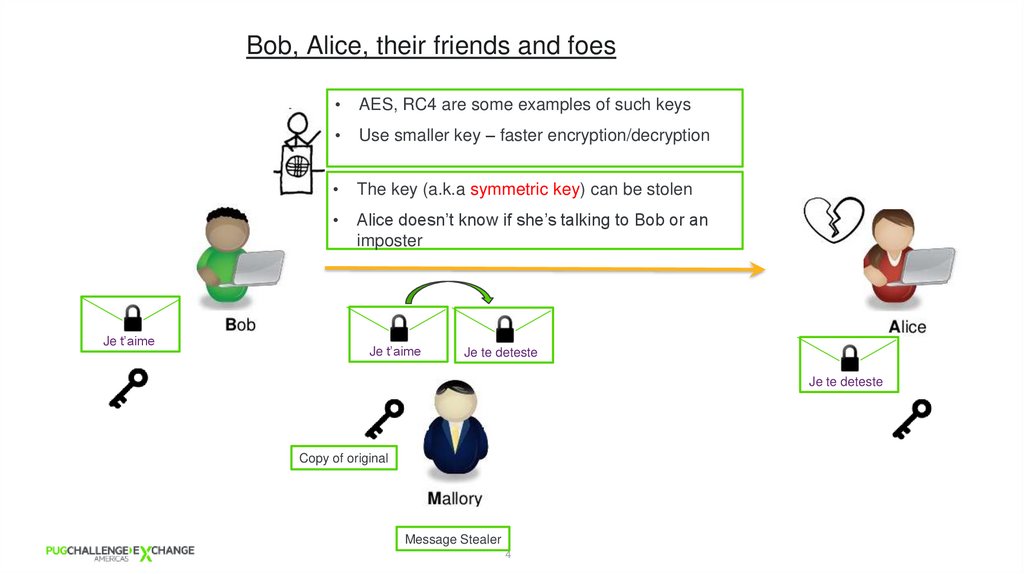
4. Bob, Alice, their friends and foes
Je t’aimeAES, RC4 are some examples of such keys
Use smaller key – faster encryption/decryption
The key (a.k.a symmetric key) can be stolen
Alice doesn’t know if she’s talking to Bob or an
imposter
Je t’aime
Je te deteste
Je te deteste
Copy of original
Message Stealer
4
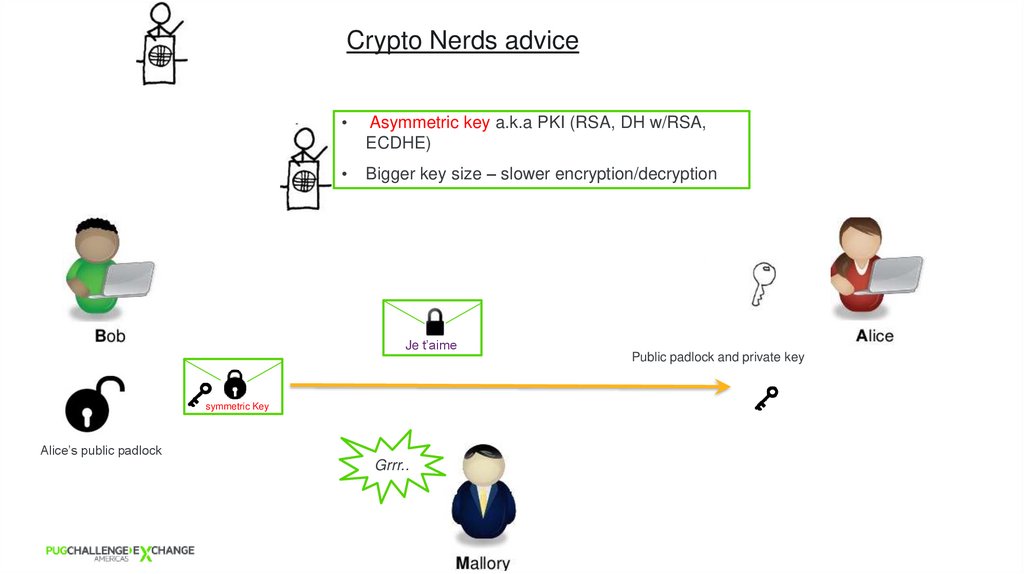
5. Crypto Nerds advice
Asymmetric key a.k.a PKI (RSA, DH w/RSA,
ECDHE)
Bigger key size – slower encryption/decryption
Je t’aime
Public padlock and private key
symmetric Key
Alice’s public padlock
Grrr..
5
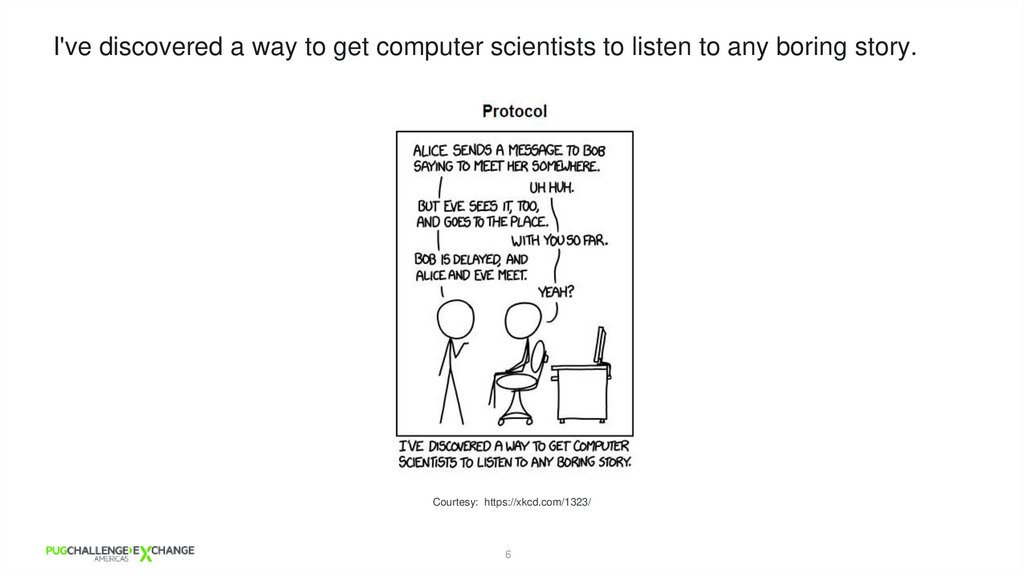
6. I've discovered a way to get computer scientists to listen to any boring story.
I've discovered a way to get computer scientists to listen to any boring story.Courtesy: https://xkcd.com/1323/
6
7.
LAB 1:Is your Private conversation
PRIVATE?
8. Jokes apart… Data in transit needs to be secured
SSL/TLS communication9. Encryption/Decryption and Hashing
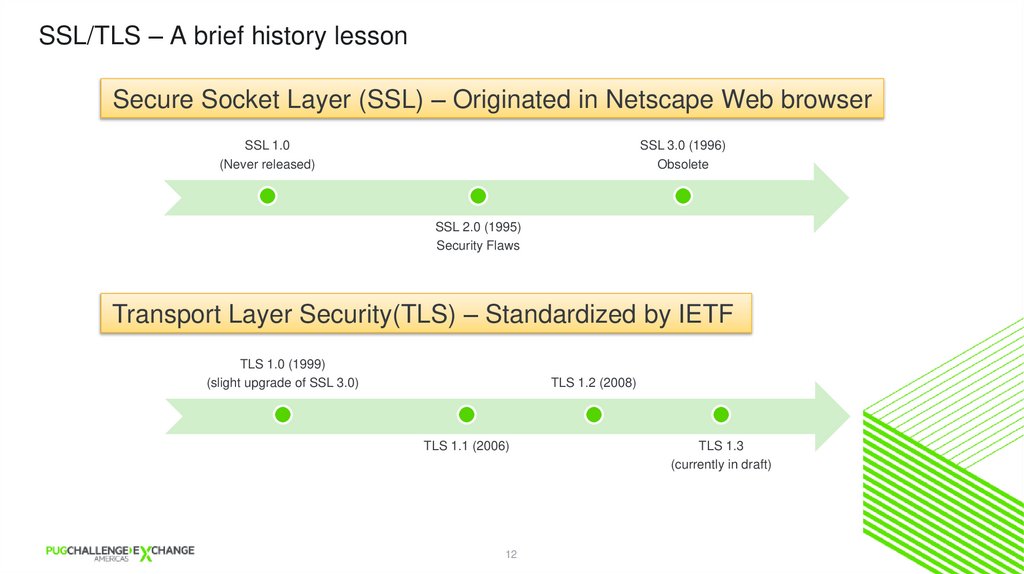
SSL/TLS – A brief history lessonSecure Socket Layer (SSL) – Originated in Netscape Web browser
SSL 1.0
(Never released)
SSL 3.0 (1996)
Obsolete
SSL 2.0 (1995)
Security Flaws
Transport Layer Security(TLS) – Standardized by IETF
TLS 1.0 (1999)
(slight upgrade of SSL 3.0)
TLS 1.2 (2008)
TLS 1.1 (2006)
12
TLS 1.3
(currently in draft)
10. LAB 1: Is your Private conversation PRIVATE?
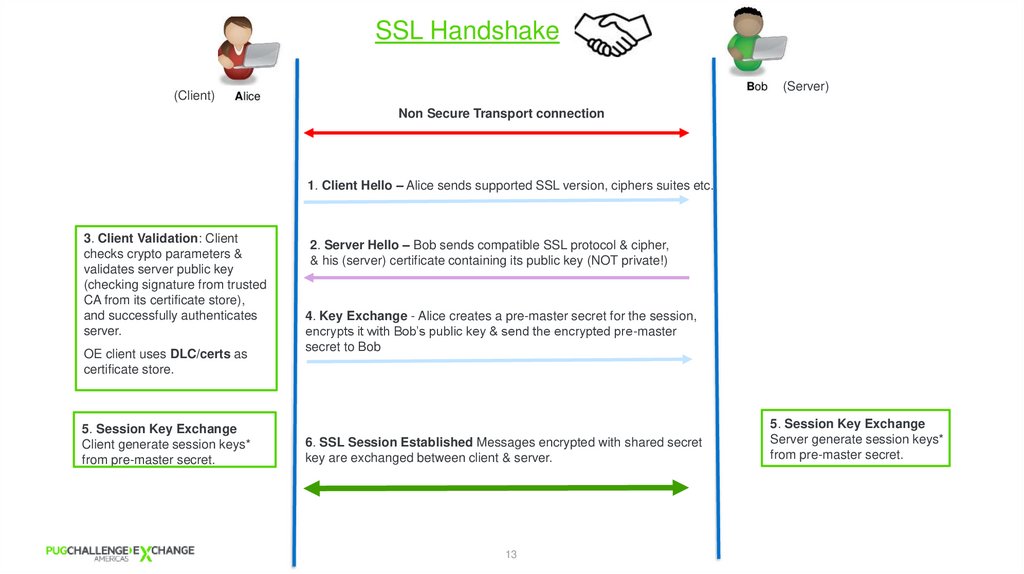
SSL Handshake(Server)
(Client)
Non Secure Transport connection
1. Client Hello – Alice sends supported SSL version, ciphers suites etc.
3. Client Validation: Client
checks crypto parameters &
validates server public key
(checking signature from trusted
CA from its certificate store),
and successfully authenticates
server.
OE client uses DLC/certs as
certificate store.
5. Session Key Exchange
Client generate session keys*
from pre-master secret.
2. Server Hello – Bob sends compatible SSL protocol & cipher,
& his (server) certificate containing its public key (NOT private!)
4. Key Exchange - Alice creates a pre-master secret for the session,
encrypts it with Bob’s public key & send the encrypted pre-master
secret to Bob
6. SSL Session Established Messages encrypted with shared secret
key are exchanged between client & server.
13
5. Session Key Exchange
Server generate session keys*
from pre-master secret.
11. SSL/TLS communication
LAB 2:Demonstrate SSL Handshake
12. SSL/TLS – A brief history lesson
Digital Certificates13.
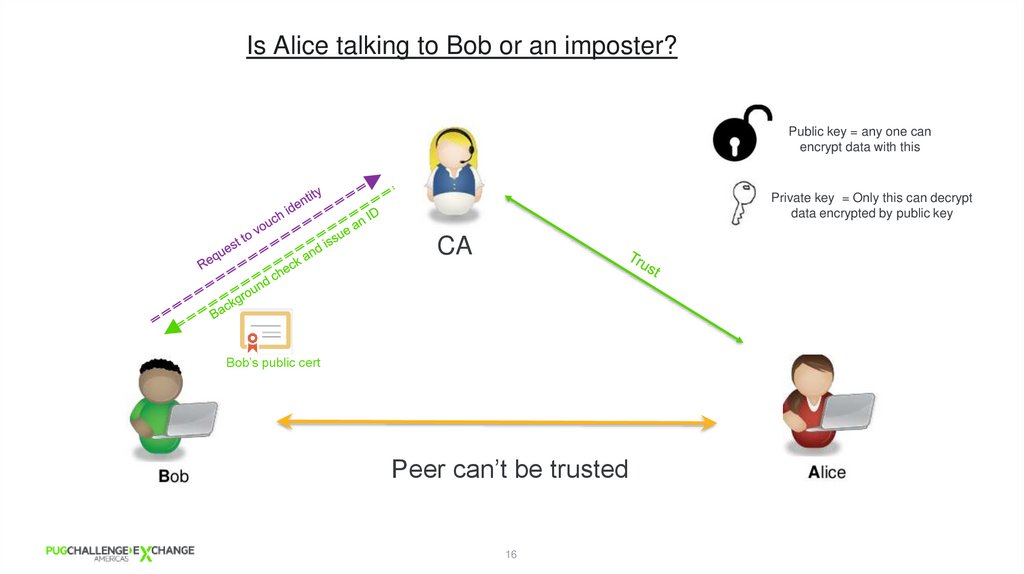
Is Alice talking to Bob or an imposter?Public key = any one can
encrypt data with this
Private key = Only this can decrypt
data encrypted by public key
CA
Bob’s public cert
Peer can’t be trusted
16
14. LAB 2: Demonstrate SSL Handshake
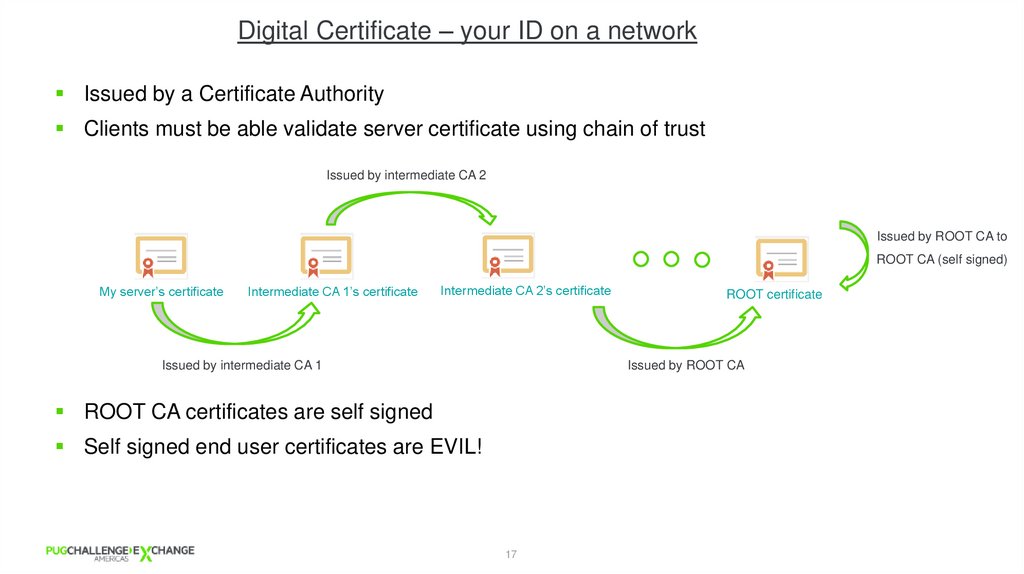
Digital Certificate – your ID on a networkIssued by a Certificate Authority
Clients must be able validate server certificate using chain of trust
Issued by intermediate CA 2
Issued by ROOT CA to
ROOT CA (self signed)
My server’s certificate
Intermediate CA 1’s certificate
Intermediate CA 2’s certificate
Issued by intermediate CA 1
ROOT certificate
Issued by ROOT CA
ROOT CA certificates are self signed
Self signed end user certificates are EVIL!
17
15. Digital Certificates
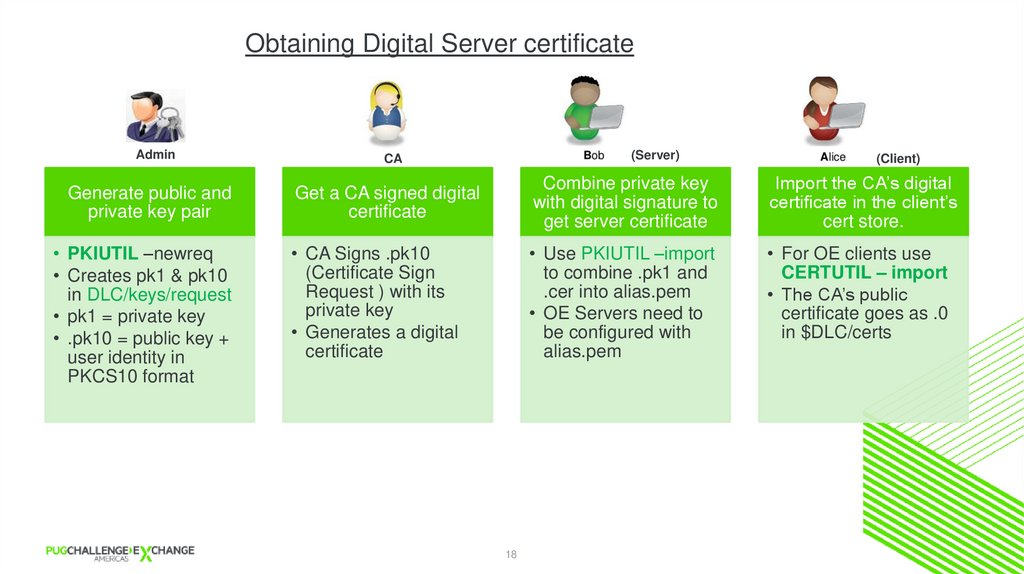
Obtaining Digital Server certificateAdmin
CA
Generate public and
private key pair
Get a CA signed digital
certificate
Combine private key
with digital signature to
get server certificate
Import the CA’s digital
certificate in the client’s
cert store.
• CA Signs .pk10
(Certificate Sign
Request ) with its
private key
• Generates a digital
certificate
• Use PKIUTIL –import
to combine .pk1 and
.cer into alias.pem
• OE Servers need to
be configured with
alias.pem
• For OE clients use
CERTUTIL – import
• The CA’s public
certificate goes as .0
in $DLC/certs
• PKIUTIL –newreq
• Creates pk1 & pk10
in DLC/keys/request
• pk1 = private key
• .pk10 = public key +
user identity in
PKCS10 format
(Server)
18
(Client)
16. Is Alice talking to Bob or an imposter?
LAB 3:Creating Digital Certificate
17.
SSL/TLS Configuration18. Obtaining Digital Server certificate
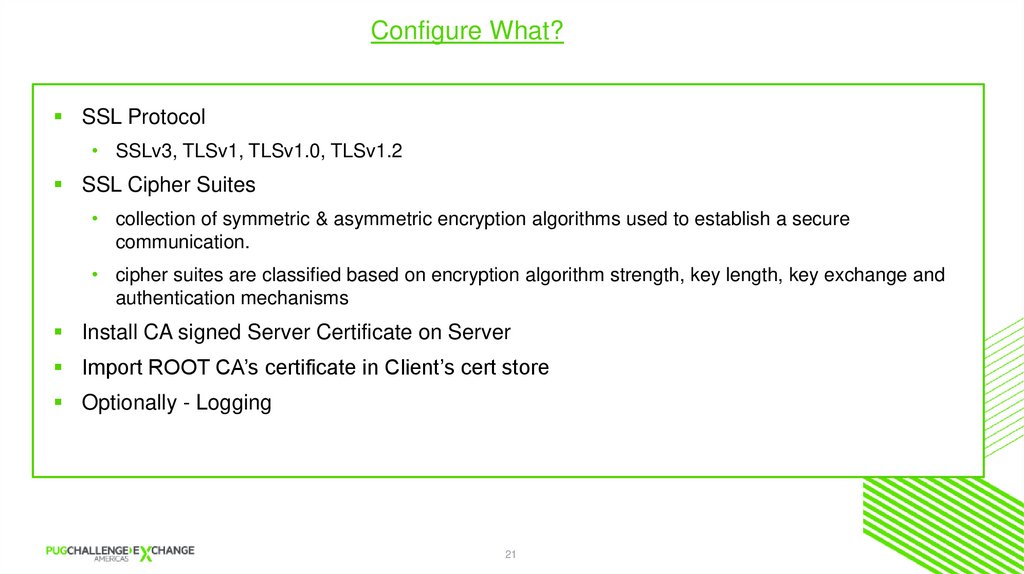
Configure What?SSL Protocol
• SSLv3, TLSv1, TLSv1.0, TLSv1.2
SSL Cipher Suites
• collection of symmetric & asymmetric encryption algorithms used to establish a secure
communication.
• cipher suites are classified based on encryption algorithm strength, key length, key exchange and
authentication mechanisms
Install CA signed Server Certificate on Server
Import ROOT CA’s certificate in Client’s cert store
Optionally - Logging
21
19. LAB 3: Creating Digital Certificate
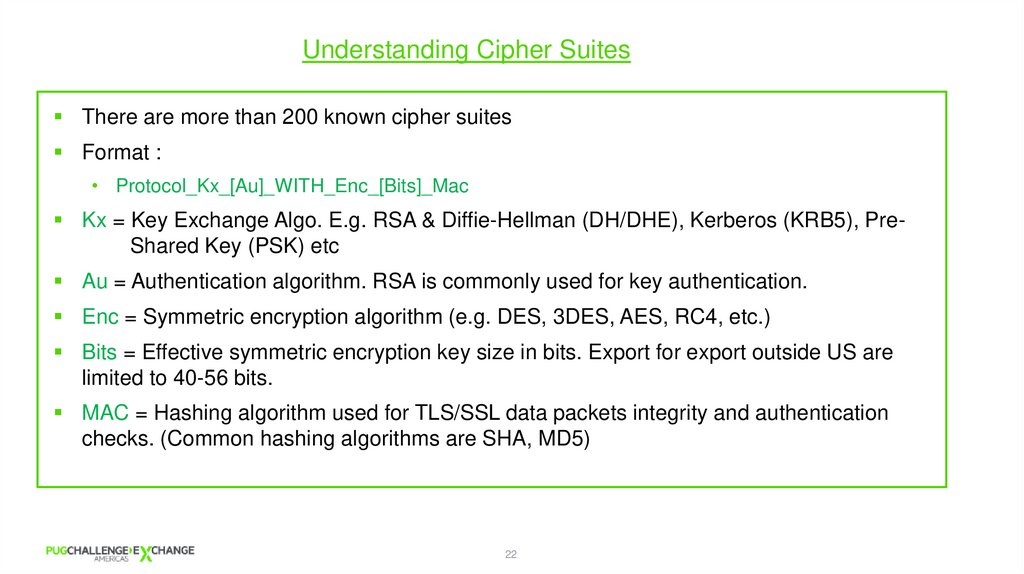
Understanding Cipher SuitesThere are more than 200 known cipher suites
Format :
• Protocol_Kx_[Au]_WITH_Enc_[Bits]_Mac
Kx = Key Exchange Algo. E.g. RSA & Diffie-Hellman (DH/DHE), Kerberos (KRB5), PreShared Key (PSK) etc
Au = Authentication algorithm. RSA is commonly used for key authentication.
Enc = Symmetric encryption algorithm (e.g. DES, 3DES, AES, RC4, etc.)
Bits = Effective symmetric encryption key size in bits. Export for export outside US are
limited to 40-56 bits.
MAC = Hashing algorithm used for TLS/SSL data packets integrity and authentication
checks. (Common hashing algorithms are SHA, MD5)
22
20. SSL/TLS Configuration
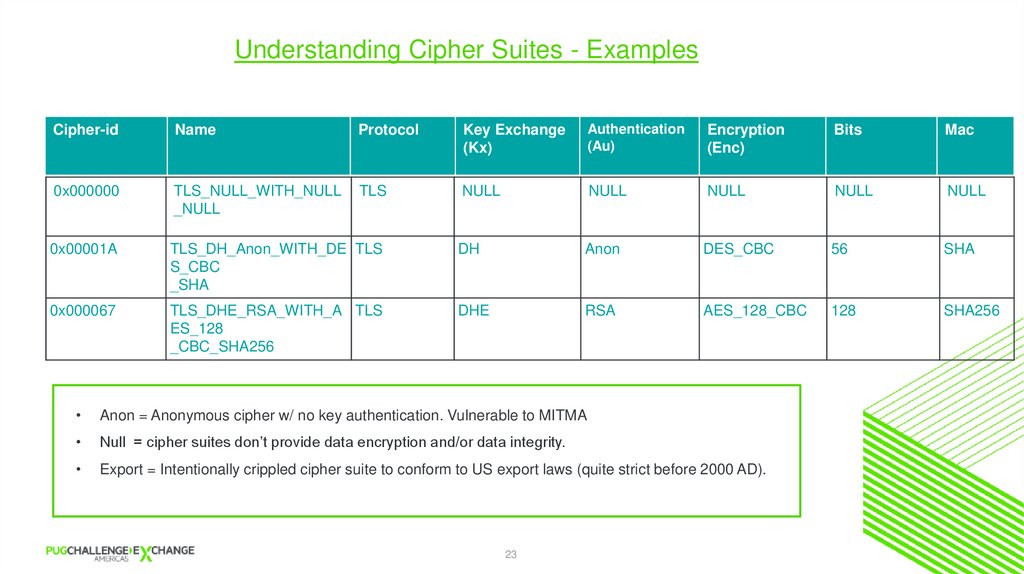
Understanding Cipher Suites - ExamplesCipher-id
Name
Protocol
Key Exchange
(Kx)
Authentication
(Au)
Encryption
(Enc)
Bits
Mac
0x000000
TLS_NULL_WITH_NULL
_NULL
TLS
NULL
NULL
NULL
NULL
NULL
0x00001A
TLS_DH_Anon_WITH_DE TLS
S_CBC
_SHA
DH
Anon
DES_CBC
56
SHA
0x000067
TLS_DHE_RSA_WITH_A TLS
ES_128
_CBC_SHA256
DHE
RSA
AES_128_CBC
128
SHA256
Anon = Anonymous cipher w/ no key authentication. Vulnerable to MITMA
Null = cipher suites don’t provide data encryption and/or data integrity.
Export = Intentionally crippled cipher suite to conform to US export laws (quite strict before 2000 AD).
23
21.
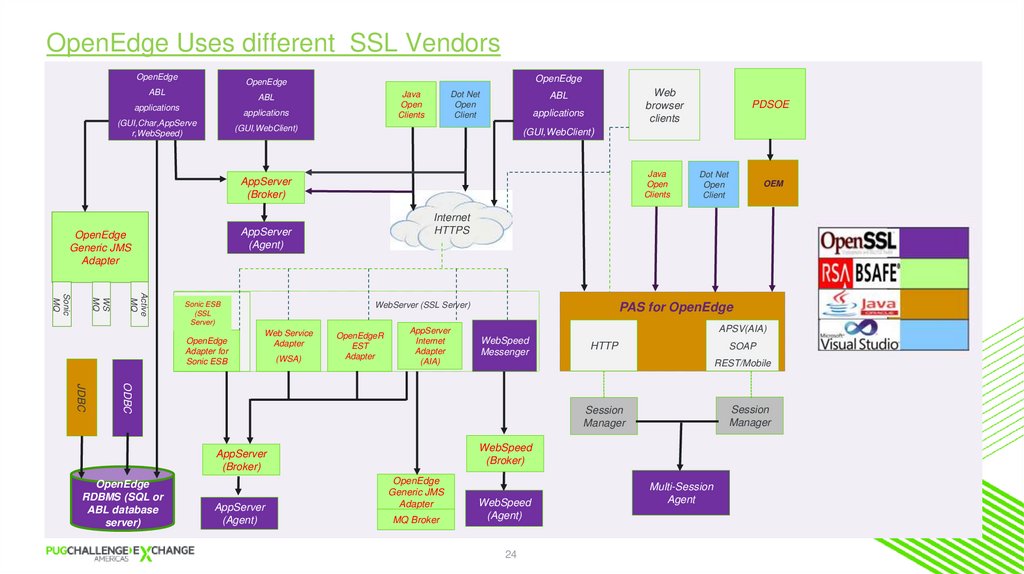
OpenEdge Uses different SSL VendorsOpenEdge
OpenEdge
OpenEdge
ABL
Java
Open
Clients
ABL
applications
applications
(GUI,Char,AppServe
r,WebSpeed)
Dot Net
Open
Client
Web
browser
clients
ABL
applications
(GUI,WebClient)
(GUI,WebClient)
Java
Open
Clients
AppServer
(Broker)
Active
MQ
WS
MQ
Sonic
MQ
WebServer (SSL Server)
Sonic ESB
(SSL
Server)
OpenEdge
Adapter for
Sonic ESB
Web Service
Adapter
(WSA)
OpenEdgeR
EST
Adapter
AppServer
Internet
Adapter
(AIA)
APSV(AIA)
WebSpeed
Messenger
HTTP
SOAP
REST/Mobile
ODBC
JDBC
AppServer
(Agent)
OEM
PAS for OpenEdge
Session
Manager
Session
Manager
WebSpeed
(Broker)
AppServer
(Broker)
OpenEdge
RDBMS (SQL or
ABL database
server)
Dot Net
Open
Client
Internet
HTTPS
AppServer
(Agent)
OpenEdge
Generic JMS
Adapter
PDSOE
OpenEdge
Generic JMS
Adapter
MQ Broker
WebSpeed
(Agent)
24
Multi-Session
Agent
22.
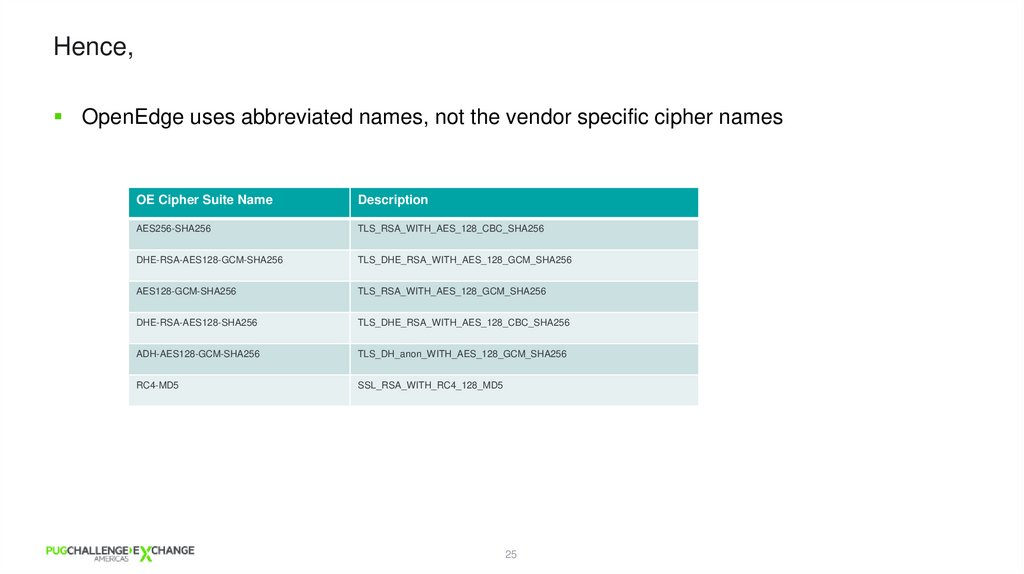
Hence,OpenEdge uses abbreviated names, not the vendor specific cipher names
OE Cipher Suite Name
Description
AES256-SHA256
TLS_RSA_WITH_AES_128_CBC_SHA256
DHE-RSA-AES128-GCM-SHA256
TLS_DHE_RSA_WITH_AES_128_GCM_SHA256
AES128-GCM-SHA256
TLS_RSA_WITH_AES_128_GCM_SHA256
DHE-RSA-AES128-SHA256
TLS_DHE_RSA_WITH_AES_128_CBC_SHA256
ADH-AES128-GCM-SHA256
TLS_DH_anon_WITH_AES_128_GCM_SHA256
RC4-MD5
SSL_RSA_WITH_RC4_128_MD5
25
23.
Reference slides on default SSLprotocol and ciphers
*Refer OpenEdge documentation for complete list
24. OpenEdge Uses different SSL Vendors
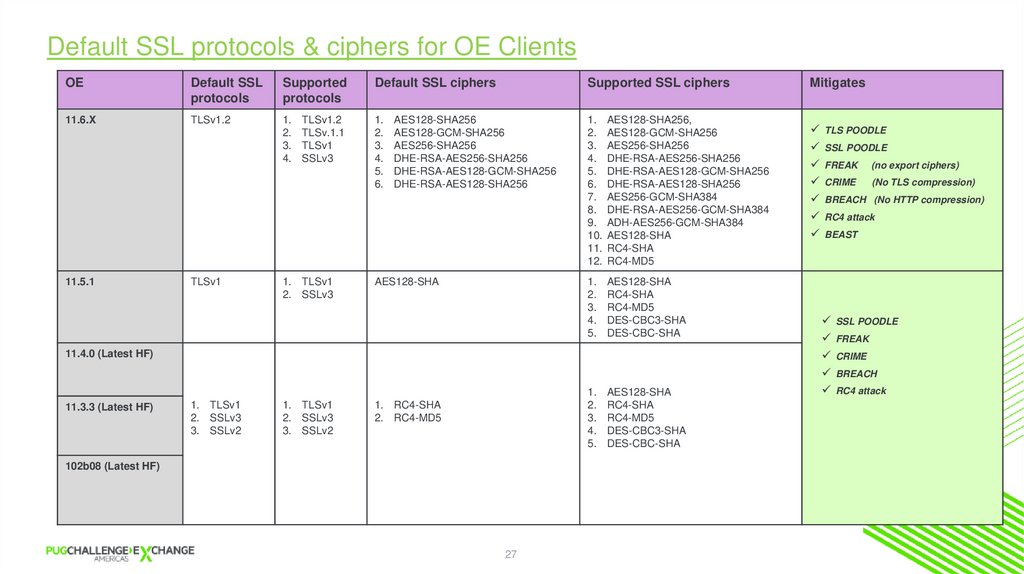
Default SSL protocols & ciphers for OE ClientsOE
Default SSL
protocols
Supported
protocols
Default SSL ciphers
Supported SSL ciphers
11.6.X
TLSv1.2
1.
2.
3.
4.
1.
2.
3.
4.
5.
6.
1. AES128-SHA256,
2. AES128-GCM-SHA256
3. AES256-SHA256
4. DHE-RSA-AES256-SHA256
5. DHE-RSA-AES128-GCM-SHA256
6. DHE-RSA-AES128-SHA256
7. AES256-GCM-SHA384
8. DHE-RSA-AES256-GCM-SHA384
9. ADH-AES256-GCM-SHA384
10. AES128-SHA
11. RC4-SHA
12. RC4-MD5
11.5.1
TLSv1
1. TLSv1
2. SSLv3
TLSv1.2
TLSv.1.1
TLSv1
SSLv3
AES128-SHA256
AES128-GCM-SHA256
AES256-SHA256
DHE-RSA-AES256-SHA256
DHE-RSA-AES128-GCM-SHA256
DHE-RSA-AES128-SHA256
AES128-SHA
1.
2.
3.
4.
5.
AES128-SHA
RC4-SHA
RC4-MD5
DES-CBC3-SHA
DES-CBC-SHA
1.
2.
3.
4.
5.
AES128-SHA
RC4-SHA
RC4-MD5
DES-CBC3-SHA
DES-CBC-SHA
11.4.0 (Latest HF)
11.3.3 (Latest HF)
1. TLSv1
2. SSLv3
3. SSLv2
1. TLSv1
2. SSLv3
3. SSLv2
1. RC4-SHA
2. RC4-MD5
102b08 (Latest HF)
27
Mitigates
TLS POODLE
SSL POODLE
FREAK (no export ciphers)
CRIME (No TLS compression)
BREACH (No HTTP compression)
RC4 attack
BEAST
SSL POODLE
FREAK
CRIME
BREACH
RC4 attack
25. Hence,
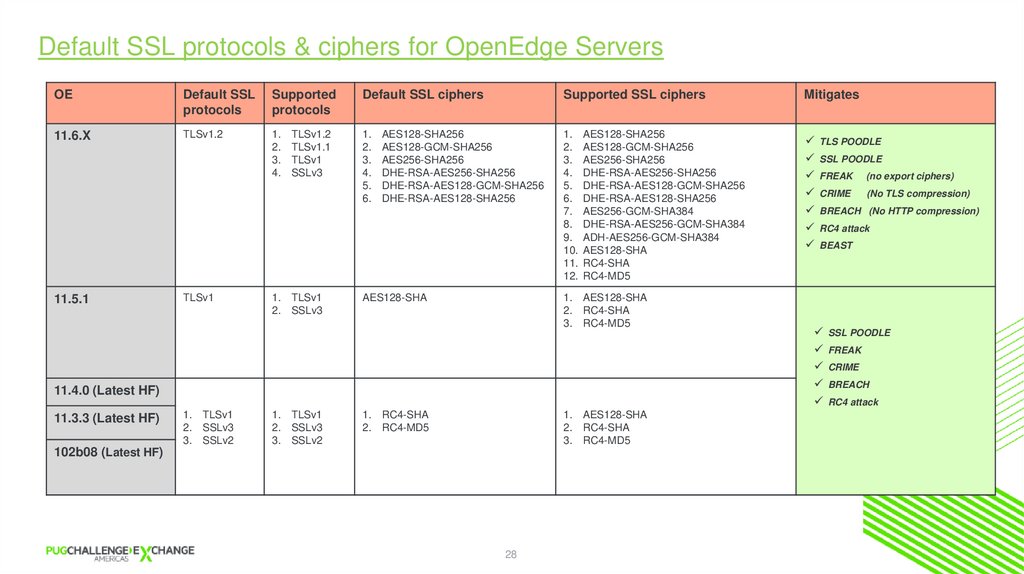
Default SSL protocols & ciphers for OpenEdge ServersOE
Default SSL
protocols
Supported
protocols
Default SSL ciphers
Supported SSL ciphers
Mitigates
11.6.X
TLSv1.2
1.
2.
3.
4.
1.
2.
3.
4.
5.
6.
1. AES128-SHA256
2. AES128-GCM-SHA256
3. AES256-SHA256
4. DHE-RSA-AES256-SHA256
5. DHE-RSA-AES128-GCM-SHA256
6. DHE-RSA-AES128-SHA256
7. AES256-GCM-SHA384
8. DHE-RSA-AES256-GCM-SHA384
9. ADH-AES256-GCM-SHA384
10. AES128-SHA
11. RC4-SHA
12. RC4-MD5
TLS POODLE
SSL POODLE
FREAK (no export ciphers)
CRIME (No TLS compression)
BREACH (No HTTP compression)
RC4 attack
BEAST
11.5.1
TLSv1
1. TLSv1
2. SSLv3
TLSv1.2
TLSv1.1
TLSv1
SSLv3
AES128-SHA256
AES128-GCM-SHA256
AES256-SHA256
DHE-RSA-AES256-SHA256
DHE-RSA-AES128-GCM-SHA256
DHE-RSA-AES128-SHA256
AES128-SHA
1. AES128-SHA
2. RC4-SHA
3. RC4-MD5
11.4.0 (Latest HF)
11.3.3 (Latest HF)
1. TLSv1
2. SSLv3
3. SSLv2
1. TLSv1
2. SSLv3
3. SSLv2
1. RC4-SHA
2. RC4-MD5
1. AES128-SHA
2. RC4-SHA
3. RC4-MD5
102b08 (Latest HF)
28
SSL POODLE
FREAK
CRIME
BREACH
RC4 attack
26.
LAB 4:Enabling & Configuring SSL
27. Default SSL protocols & ciphers for OE Clients
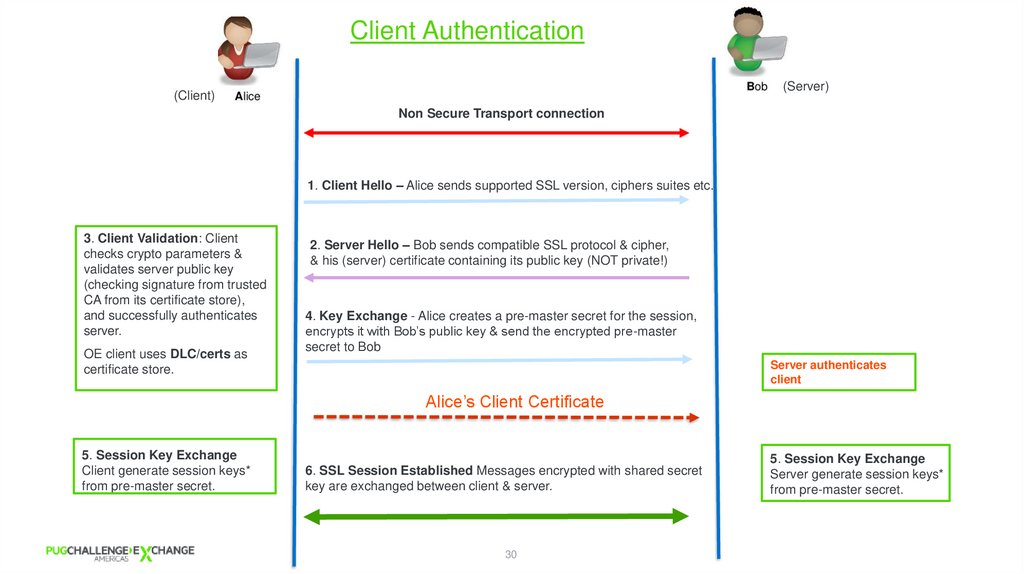
Client Authentication(Server)
(Client)
Non Secure Transport connection
1. Client Hello – Alice sends supported SSL version, ciphers suites etc.
3. Client Validation: Client
checks crypto parameters &
validates server public key
(checking signature from trusted
CA from its certificate store),
and successfully authenticates
server.
OE client uses DLC/certs as
certificate store.
2. Server Hello – Bob sends compatible SSL protocol & cipher,
& his (server) certificate containing its public key (NOT private!)
4. Key Exchange - Alice creates a pre-master secret for the session,
encrypts it with Bob’s public key & send the encrypted pre-master
secret to Bob
Server authenticates
client
Alice’s Client Certificate
5. Session Key Exchange
Client generate session keys*
from pre-master secret.
6. SSL Session Established Messages encrypted with shared secret
key are exchanged between client & server.
30
5. Session Key Exchange
Server generate session keys*
from pre-master secret.
28. Default SSL protocols & ciphers for OpenEdge Servers
LAB 5:PASOE Round trip with Client
Authentication
29. LAB 4: Enabling & Configuring SSL
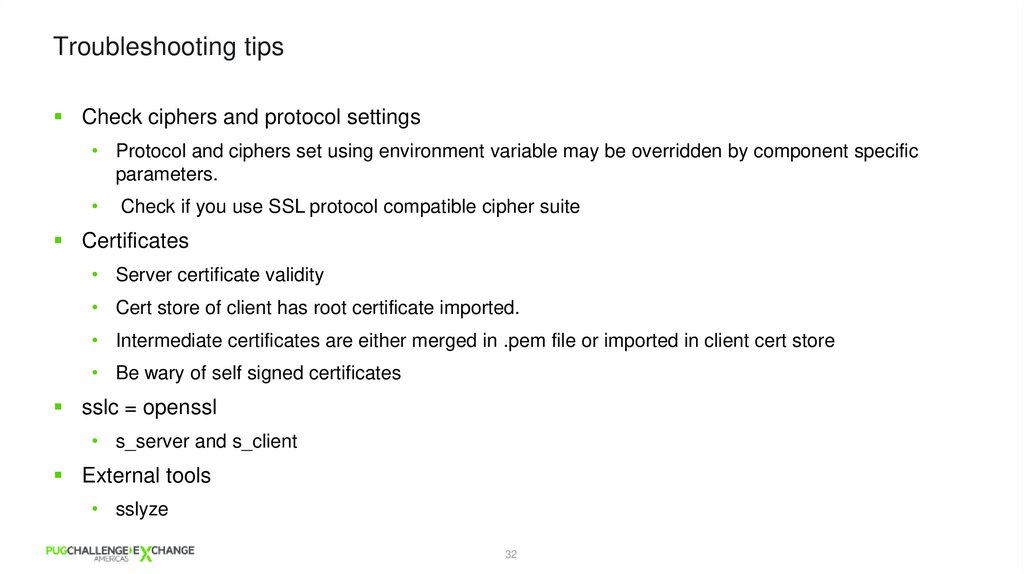
Troubleshooting tipsCheck ciphers and protocol settings
• Protocol and ciphers set using environment variable may be overridden by component specific
parameters.
Check if you use SSL protocol compatible cipher suite
Certificates
• Server certificate validity
• Cert store of client has root certificate imported.
• Intermediate certificates are either merged in .pem file or imported in client cert store
• Be wary of self signed certificates
sslc = openssl
• s_server and s_client
External tools
• sslyze
32
30.
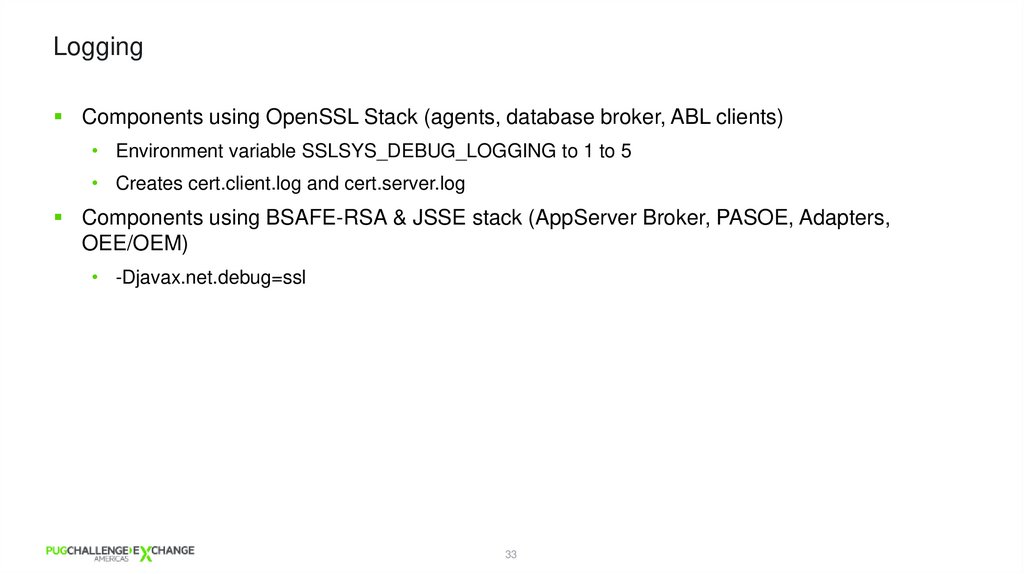
LoggingComponents using OpenSSL Stack (agents, database broker, ABL clients)
• Environment variable SSLSYS_DEBUG_LOGGING to 1 to 5
• Creates cert.client.log and cert.server.log
Components using BSAFE-RSA & JSSE stack (AppServer Broker, PASOE, Adapters,
OEE/OEM)
• -Djavax.net.debug=ssl
33
31. LAB 5: PASOE Round trip with Client Authentication
LAB 6: Troubleshoot32. Troubleshooting tips
Craving for more? You might want to attend…Integrating & Troubleshooting SSL/TLS Connections with Various OpenEdge Clients
and Servers - Arun Kumar Mohapatra, Mike Jacobs, Progress
When: Tuesday, June 28th at 3:30 PM
Where: Salon A
35