






 Программирование
Похожие презентации:






![C++ [ OOP ]](https://cf.ppt-online.org/files/thumb/b/bzXZmEKFkj9SVoJayThUqwL2Og3crYdivPB8eM.jpg "C++ [ OOP ]")

Stream Input and Output
1. LECTURE 9
Stream Input and OutputLECTURE 9
1
2. Contents
C++ I/O streams.Reading and writing sequential files.
Member Functions of Stream Classes
File Pointers
Function for manipulation of file pointer
read() and write() function
3.
What is a file?File
A file is a collection of information, usually
stored on a computer’s disk. Information can be
saved to files and then later reused.
File Names
All files are assigned a name that is used for
identification purposes by the operating system
and the user.
4. Why do we need Files?
1.2.
3.
If there is a large amount of data generated as output by
a program, storing that output in file will help in easy
handling /analysis of the output as user can see the
whole output at any time even after complete execution
of the program.
If we need lot of data to be inputted, user cannot keep on
typing that again and again for repeated execution of
program. In that case, all input data can be once written
in a file and then that file can be easily used as the input
file.
The transfer of input – data or output – data from one
computer to another can be easily done by using files.
5. The Process of Using a File
Using a file in a program is a simple three-step process1.
The file must be opened. If the file does not yet exists,
opening it means creating it.
2.
Information is then saved to the file, read from the file, or
both.
3.
When the program is finished using the file, the file must be
closed.
6. Stream Classes
Ifstream: provides input operations.Contains open() with default input mode.
Inherits the functions
get(), getline(), read(), seekg() and tellg() function from istream.
Ofstream: provides output operations.
Contains open() with default output mode.
Inherits
put(), seekp(), teelp() and write() function from ostream.
Fstream : provides support for simultaneous input and output operations.
Contains open() with default input mode.
Inherits all the function from isteram and ostream classes through iostream
7.
8. Reading/writing text streams
All programs we’ve written so far have readinput from standard input, and written
output to standard output.
cin, cout, and cerr are C++ streams.
We will now extend this concept to disk
files.
9.
Reading strings from streams (code fragment):#include <iostream>
...
ifstream input_data;
input_data.open(“myfile”);
string s;
input_data >> s; // read word
getline(input_data,s);
...
10.
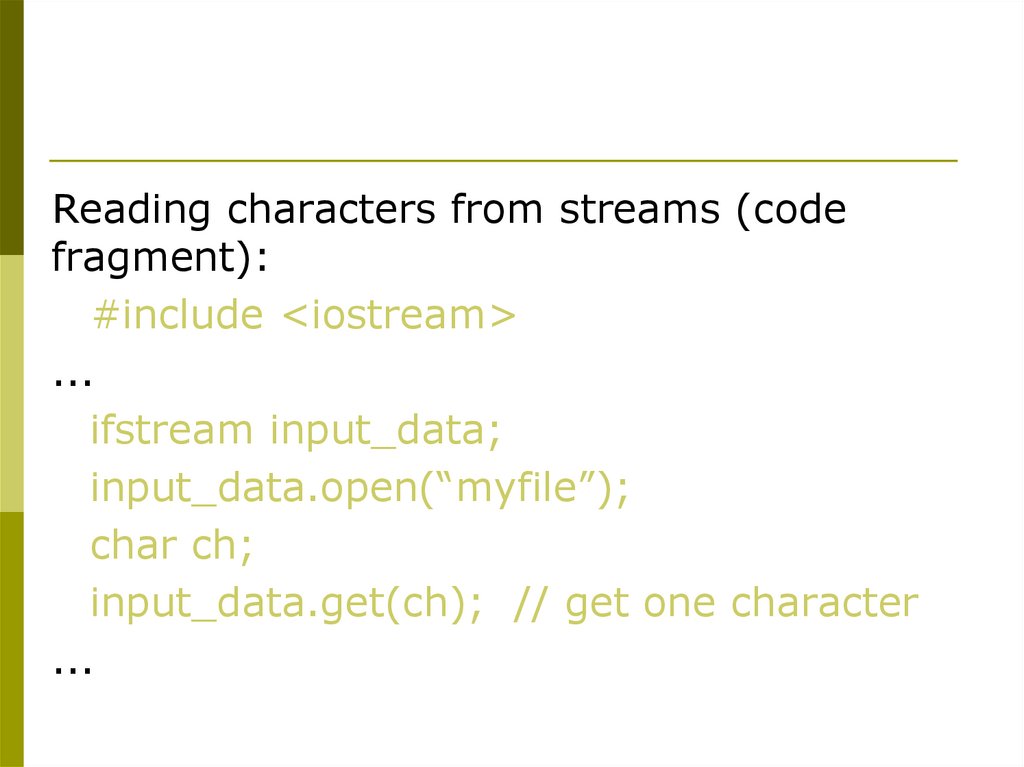
Reading characters from streams (codefragment):
#include <iostream>
...
ifstream input_data;
input_data.open(“myfile”);
char ch;
input_data.get(ch); // get one character
...
11. Object and Member Functions
Streamhandle
Name
Member Function
Name
input_stream.open("numbers.txt“)
Calling
Object
Dot
Operator
File Name
Dir:\\folder\fileName.extention
Extention ( .dat, .out, .txt)
12. Open and Close a file
eg:ofstream outfile;// create stream
outfile . open (“DATA1”); // connect stream to DATA1
……………………………..
……………………………..
outfile . Close();
//disconnect stream from DATA1
outfile . Open(“DATA2”); //connect stream to DATA2
……………………………..
……………………………..
outfile . close();
13.
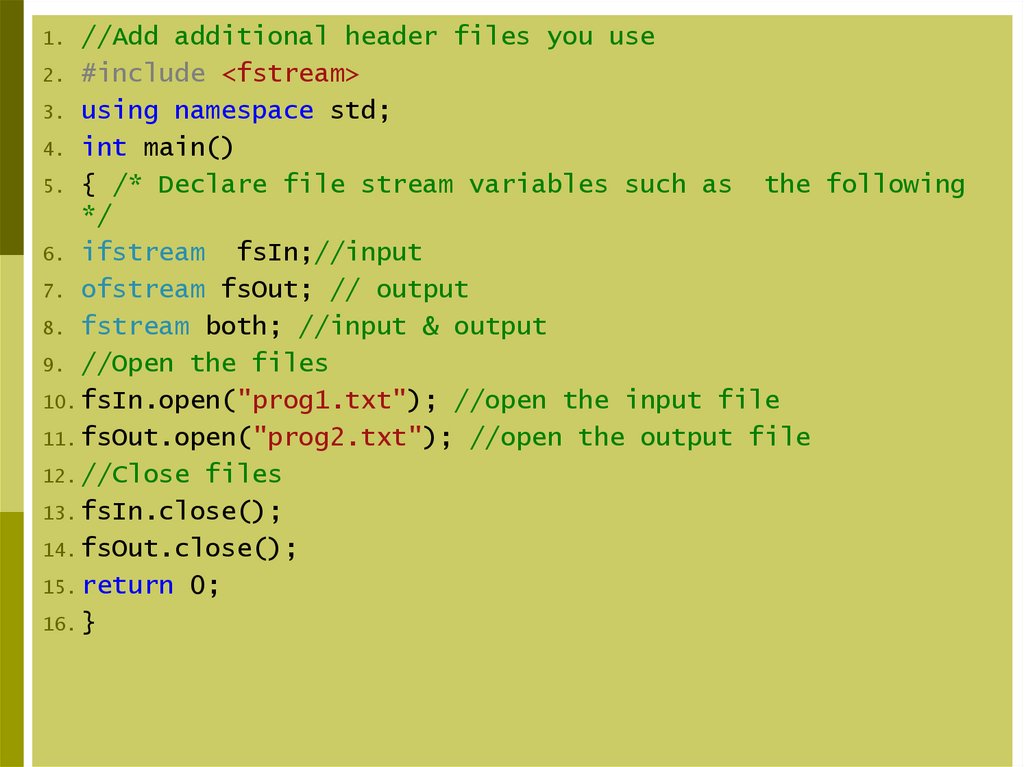
//Add additional header files you use2. #include <fstream>
3. using namespace std;
4. int main()
5. { /* Declare file stream variables such as
the following
*/
6. ifstream
fsIn;//input
7. ofstream fsOut; // output
8. fstream both; //input & output
9. //Open the files
10. fsIn.open("prog1.txt"); //open the input file
11. fsOut.open("prog2.txt"); //open the output file
12. //Close files
13. fsIn.close();
14. fsOut.close();
15. return 0;
16. }
1.
14. File Open Modes
1.ios:: app - (append) write all output to the end of file
2.
ios:: ate - data can be written anywhere in the file
3.
ios:: binary - read/write data in binary format
4.
ios:: in - (input) open a file for input
5.
ios::out - (output) open a file for output
6.
ios: trunc -(truncate) discard the files’ contents if it exists
7.
ios:nocreate - if the file does NOT exists, the open operation fails.
8.
ios:noreplace - if the file exists, the open operation fails
15. Opening a File
The mode can combine two or more parametersusing the bitwise OR operator (symbol |)
eg :fstream file;
file . Open(“ data . txt”, ios :: out | ios :: in);
16. Opening a File
For opening a file, we must first create a file stream andthen link it to the filename.
A file can be opened in two ways:
1.
Using the constructor function of the class.
2.
Using the member function open() of the class.
17. Opening File using Constructor
A constructor is used to initialize an object while it is beingcreated.
In the same manner, a file name is used to initialize the file
stream object.
This involves the following steps:
1. Create a file stream object to manage the stream using the
appropriate class, i.e. the class ofstream is used to create
the output stream and the class ifstream is used to create
the input stream.
2. Initialized the file object with the desired filename.
18. Opening File using Constructor
e.g:Ofstream outfile(“results”); //output only
This statement opens the file results and attaches it to
the output stream outfile.
Ifstream infile(“data”); //input only
Similarly, above statement declares infile as an ifstream
object and attaches it to the file data for reading (input)
19. Opening Files Using open()
1.2.
The function open() can be used to open multiple
files that use the same stream object.
If we want to open file sequentially, we may create a
single stream object and use it to open each file in
turn.
file-stream-class stream-object;
stream-object.open(“filename”);
20.
//First Method (use the constructor)2. #include <fstream>
3. using namespace std;
4. int main()
5. {// declare output file variable
6. ofstream outFile("fout.txt”);
7. //behave just like cout, put the word into
8. outFile << "Hello World!";
9. outFile.close();
10.return 0;}
1.
the file
//Second Method ( use Open function)
2. #include <fstream>
3. using namespace std;
4. int main()
5. {// declare output file variable
6.
ofstream outFile;
7.
// open an exist file fout.txt
8.
outFile.open("fout.txt");
9.
//behave just like cout, put the word into
10.
outFile << "Hello World!";
11.
outFile.close();
12.
return 0;
13. }
1.
the file
21.
1.2.
3.
4.
5.
6.
7.
8.
9.
10.
11.
12.
13.
1.
2.
3.
4.
5.
6.
7.
8.
9.
10.
11.
12.
13.
14.
15.
//First Method (use the constructor)
#include <fstream>
#include <iostream>
using namespace std;
int main()
{
//declare and automatically open the file
ofstream outFile("fout.txt");
// Open validation
if (!outFile) {
cout << "Cannot open file.\n ";
return 1;}
return 0;}
//Second Method ( use Open function)
#include <fstream>
#include <iostream>
using namespace std;
int main()
{
//declare output file variable
ofstream outFile;
// open an exist file fout.txt
outFile.open("fout.txt");
// Open validation
if (!outFile.is_open()) {
cout << "Cannot open file.\n ";
return 1;}
return 0;}
22.
#include<iostream>2. #include<fstream>
3. #include<string>
4. using namespace std;
5. int main()
6. {
7. ofstream outfile("OOP.txt");
8. cout << "enter Name";
9. string name;
10. cin >> name;
11. outfile << name;
12. outfile.close();
13. ifstream infile("OOP.txt");
14. infile >> name;
15. cout << "\nname=
" << name << endl;
16. return 0;
17. }
1.
23.
1.//Working with Multiple Files
#include<iostream>
3. #include<fstream>
4. #include<string>
5. using namespace std;
6. int main()
7. {
8. ofstream outfile;
9. outfile.open("Next.txt");
10. outfile << "Tashkent " << endl;
11. outfile << "Samarkhand" << endl;
12. outfile << "Bukhara" << endl;
13. outfile.close();
14. outfile.open("First.txt");
15. outfile << "Tashkent- Frist" << endl;
16. outfile << "Samarkhand- first" << endl;
17. outfile << "Bukhara- first" << endl;
18. outfile.close();
2.
24.
19. stringline;
20. ifstream infile;
21. infile.open("First.txt");
22. while (infile)
23. {
24. getline(infile, line);
25. cout << line << endl;
26. }
27. infile.close();
28. infile.open("next.txt");
29. while (infile)
30. {
31. getline(infile, line);
32. cout << line << endl;
33. }
34. infile.close();
35. return 0;
36. }
25. Member Functions of Stream Classes
good() returns true if the stream is in a valid state forinput/output operations.
bad() returns true if a non-recoverable error has occurred
on the stream.
eof() returns true if the end-of-file has been reached on
the input stream.
fail() returns true if a recoverable error has occurred on
the stream.
26.
#include <iostream>2. using namespace std;
3. int main() {
4.
int age;
5.
while (true) {
6.
cout << "Enter your age: ";
7.
cin >> age;
8.
if (cin.fail()) {
9.
cout << "Invalid input. Enter an integer only.\n";
10.
cin.clear(); //After input failure, the stream remains in the failed
state. To use the stream again, we must remove the error state.
11.
cin.ignore(1000, '\n'); //Ignore up to 1000 characters or until
newline is found.This helps remove bad input completely.
12.
}
13.
else {
14.
break;
15.
}
16.
}
17.
cout << "Accepted age: " << age << endl;
18.
return 0;
19. }
1.
27.
//Reading from Two Files Simultaneously2. #include <iostream>
3. #include <fstream>
4. #include <string>
5. using namespace std;
6. int main()
7. {
8.
ofstream outfile1("country");
9.
ofstream outfile2("capital");
10.
string name;
11.
cout << "Enter names of 5 countries:" << endl;
12.
for (int i = 0; i < 5; i++)
13.
{
14.
getline(cin, name);
15.
outfile1 << name << endl;
16.
}
17.
cout << "Enter names of 5 capitals:" << endl;
18.
for (int i = 0; i < 5; i++)
19.
{
20.
getline(cin, name);
21.
outfile2 << name << endl;
22.
}
23.
outfile1.close();
24.
outfile2.close();
1.
28.
ifstream fin1("country");26.
ifstream fin2("capital");
27.
for (int i = 0; i < 5; i++)
28.
{
29.
getline(fin1, name);
30.
cout << "Capital of " << name << " is ";
31.
getline(fin2, name);
32.
cout << name << endl;
33.
}
34.
fin1.close();
35.
fin2.close();
36.
return 0;
37. }
25.
29.
#include <iostream>2. #include <fstream>
3. #include <string>
4. using namespace std;
5. int main()
6. {
7. ofstream outfile;
8. outfile.open("odd.txt");
9. for (int i = 0; i < 10; i++)
10. {
11. if (i % 2 != 0)
12. outfile << i << endl;
13. }
14. outfile.close();
15. outfile.open("even.txt");
16. for (int i = 0; i < 10; i++)
17. {
18. if (i % 2 == 0)
19. outfile << i << endl;
20. }
21. outfile.close();
22. int num;
23. ifstream infile;
24. infile.open("odd.txt");
25. cout << "\n ODD NUMBERS ARE :- \n";
1.
30.
while (infile.eof() == 0)27. {
28. infile >> num;
29. cout << num << endl;
30. }
31. infile.close();
32. infile.open("even.txt");
33. cout << "\n EVEN NUMBERS ARE :- \n";
34. while ((infile.eof()) == 0)
35. {
36. infile >> num;
37. cout << num << endl;
38. }
39. infile.close();
40. return 0;
41. }
26.
31. File Pointers
Each file have two associated pointers known asthe file pointers.
1.
2. One of them is called the input pointer (or get pointer) and the
other is called the output pointer (or put pointer).
3. The input pointer is used for reading the contents of a given file
location
4. The output pointer is used for writing to a given file location.
32. Default Actions
1.2.
3.
To open a file in read-only mode, the input pointer is
automatically set at the beginning so that we can read the file
from the start.
Similarly, when we open a file in write-only mode, the
existing contents are deleted and output pointer is set at the
beginning.This enables us to write to the file from the start .
If we want to open an existing file to add more data, the file is
opened in ‘append’ mode.
33. Action on File Pointers while Opening a File
34. Function for manipulation of file pointer
When we want to move file pointer to desired position then use these function formanage the file pointers.
seekg () = moves get pointer (input) to a specified location
seekp () = moves put pointer (output) to a specified location
tellg ()
= gives the current position of the get pointer
tellp ()
= gives the current position of the put pointer
35.
Example,Infile.seekg(10) ;
This statement moves the file pointer to the byte number 10.
The bytes in the a file are numbered beginning from zero. Therefore, the pointer
will be pointing to the 11th byte in the file.
Consider the following statements:
ofstream fileout;
Fileout.open(“hello”,ios::app);
Int p=fileout.tellp();
On execution of these statement, The pointer is moved to the end of the file “hello”
and the value of p Will represent number of bytes in the file.
36.
‘Seek’ functionsseekg() and seekp() can also be used with two arguments as follows:
Seekg(offset,refposition);
, seekp(offset,refposition)
Offset represents the number of bytes the file pointer is to be moved from the
location specified by the parameter ref position.
Reference position takes one of the following three constants defined in the ios class
ios::beg
start of the file
ios:: cur
current position of the pointer
ios::end
end of the file
37.
//Example of using seekg() and tellg() functions2. #include <fstream>
3. using namespace std;
4. int main() {
5.
ofstream outFile("example.txt");
6.
outFile << "This is a test sentence." << endl;
7.
outFile.close();
8.
ifstream inFile("example.txt");
9.
char ch;
10.
inFile.seekg(5); // Set the get pointer to the 6th character
11.
inFile.get(ch);
12.
cout << "Character at position 5: " << ch << endl;
13.
inFile.seekg(0, ios::end); // Set the get pointer to the end of the
file
14.
cout << "File size: " << inFile.tellg() << " bytes" << endl;
15.
inFile.close();
16.
return 0;
17. }
1.
38.
//Example of using tellg() function2. #include <iostream>
3. #include <fstream>
4. using namespace std;
5. int main() {
6.
ofstream outFile("example.txt");
7.
outFile << "This is a test sentence." << endl;
8.
outFile.close();
9.
ifstream inFile("example.txt");
10.
cout << "Current position of get pointer: " << inFile.tellg() <<
endl;
11.
inFile.seekg(10); // Move the get pointer to position 10
12.
cout << "Current position of get pointer after seekg(): " <<
inFile.tellg() << endl;
13.
inFile.close();
14.
return 0;
15. }
1.
39.
fout . seekg(0, ios :: beg) -fout . seekg(0, ios :: cur) -fout . seekg(0, ios :: end) -fout . seekg(m, ios :: beg) -fout . seekg(m, ios :: cur) -fout . seekg(-m, ios :: cur) --fout . seekg(-m, ios :: end) --
go to start
stay at current
position
go to the end of
file
move to m+1
byte in the file
go forward by m
bytes from the
current position
go backward by
m bytes
from the current
position
go backward by m
bytes
from the end
40. read() and write() function
1. The functions read() and write () , unlike the functionsput() and get() , handle the data in binary form.
2. Values are stored in the disk file in the same format in
which they are stored in the internal memory.
3. An int take two bytes to store its value in the binary form
irrespective of its size. But a 4 digit int will take 4 bytes to
store it in the character form.
4. The binary format is more accurate for storing the
numbers as they are stored in the exact internal
representation.
5. There are no conversions while saving the data and
therefore saving is much faster.
41. read() and write() function
file.read ((char *)&V , sizeof (V));file.write ((char *)&V , sizeof (V));
These function take two arguments. The first is the address of the
variable V , and the second is the length of that variable in bytes.
The address of variable must be cast to type char * (i.e pointer to
character type) .
To output objects of other types, we must convert the pointers to
those objects to type const char*.