





 Электроника
Похожие презентации:

Washing machine service manual
1.
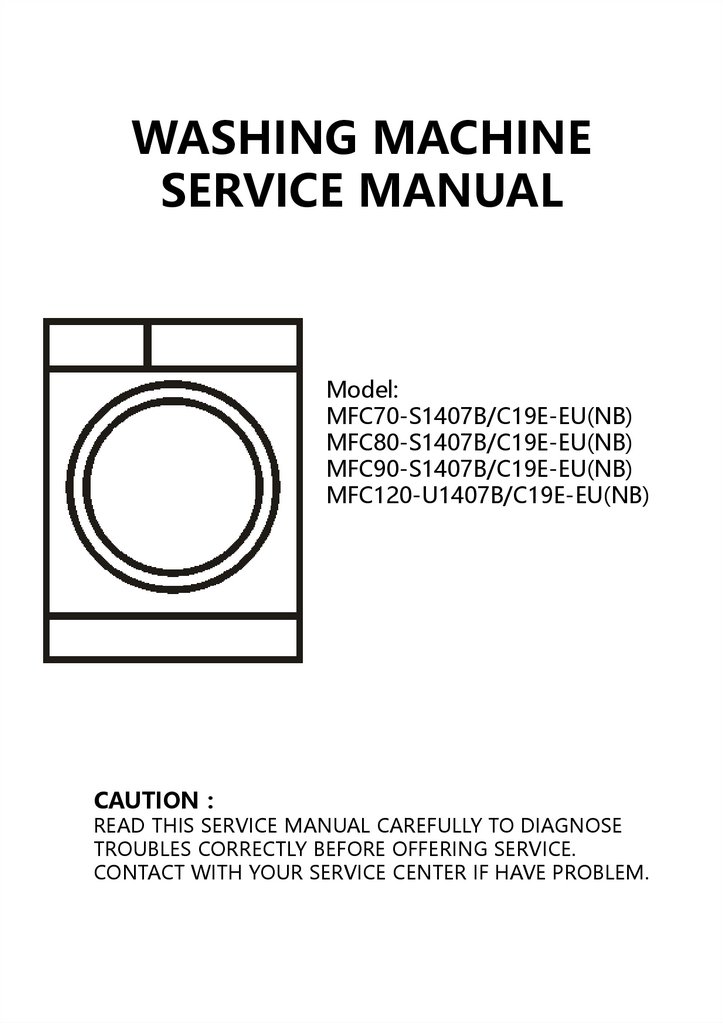
WASHING MACHINESERVICE MANUAL
Model:
MFC70-S1407B/C19E-EU(NB)
MFC80-S1407B/C19E-EU(NB)
MFC90-S1407B/C19E-EU(NB)
MFC120-U1407B/C19E-EU(NB)
CAUTION
READ THIS SERVICE MANUAL CAREFULLY TO DIAGNOSE
TROUBLES CORRECTLY BEFORE OFFERING SERVICE.
CONTACT WITH YOUR SERVICE CENTER IF HAVE PROBLEM.
2.
Contents1 PRECAUTION………………….………………..…………………………………………………. 3
1.1 Safety Precautions
1.2 Servicing Precaution
1.3 Cautions For Safety
2 FACTORY PATTERN DETECTION …………….…………….………………………………. 7
3 UNPACKING WAYS OF MAIN PARTS……………………………………………………… 10
4 MALFUNCTIONS CODES AND EXPLANATIONS ……………………………………… 18
5 TROUBLESHOOTING …………………………………………………………………………… 20
6 CHECK POINT OF CIRCUIT …………………………………………………………………… 30
7 SERVICE TOOLS……..………………............................................................................... 31
2
3.
1 PrecautionWhen performing troubleshooting and part replacement during service take notice
following safety precautions:
1.1 Safety Precautions
1.1.1 Use Genuine Parts
The components of the washing machine have safety features such as non-combustibility
and voltage with standing. Therefore, always use the same part as suggested by the maker.
In particular be sure to use only designated parts in case of major safety parts identified
by the marker.
1.1.2 Grounding
Connect the grounding wire to the shell plate ,and bury it under at least 25cm of earth:
alternatively, connect the ground wire to the appropriate pin on a properly grounded
power receptacle. Never connect the wire to a telephone line, lightning rod, or gas pipe.
1.2 Servicing Precautions
1.2.1Observe Warnings
Make sure to follow special warnings and precautions described on labels and user
manual.
1.2.2 Parts Assembly and Wiring
Make sure use insulation material(such as tube and tape) and restore all parts and wires to
their original position. Take special care to avoid contact with sharp edges.
1.2.3 Perform Safety Checks after Servicing
After servicing, check and ensure screws, parts and wiring are restored to their original
position. Do check the insulation between the external metals and the socket plug. In
additional, place the washing machine in flat ground (less than 1 degree)to prevent
vibration and noise during operations.
1.2.4 Insulation Check
Pull off the power plug from the socket, pour water into the spin tub.
Check the resistance insulation value between terminals of plug and external exposed
metal of machine should bigger than 1MΩ .
Note : If it is unable to check insulation with a 500V insulation resistance tester,
please use other testers for checking.
3
4.
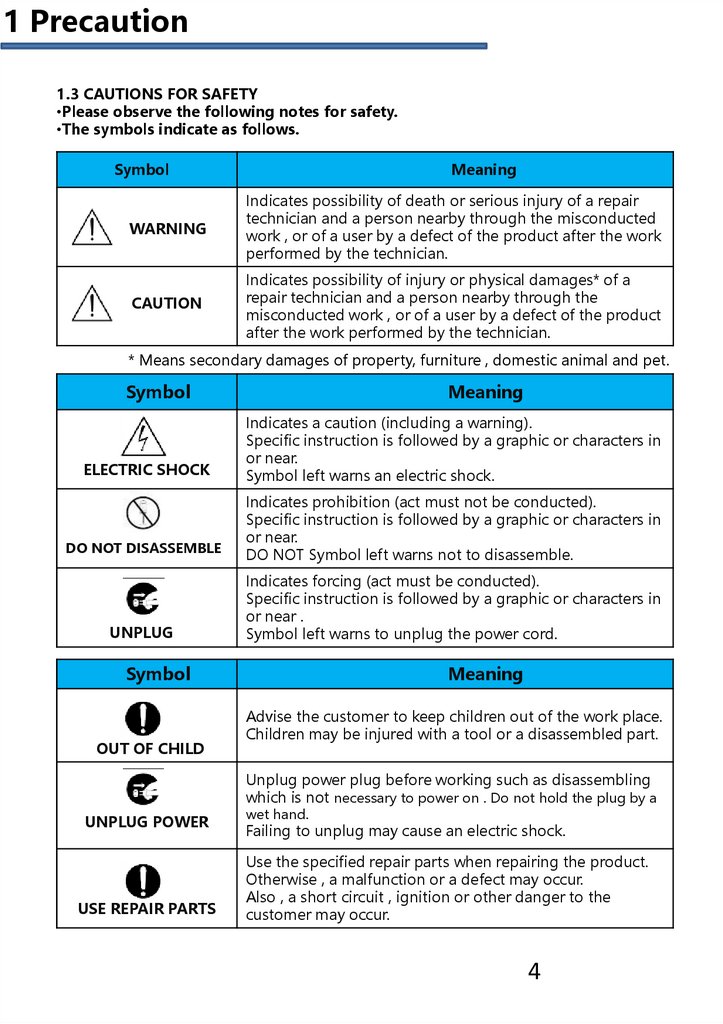
1 Precaution1.3 CAUTIONS FOR SAFETY
•Please observe the following notes for safety.
•The symbols indicate as follows.
Symbol
Meaning
WARNING
Indicates possibility of death or serious injury of a repair
technician and a person nearby through the misconducted
work , or of a user by a defect of the product after the work
performed by the technician.
CAUTION
Indicates possibility of injury or physical damages* of a
repair technician and a person nearby through the
misconducted work , or of a user by a defect of the product
after the work performed by the technician.
* Means secondary damages of property, furniture , domestic animal and pet.
Symbol
ELECTRIC SHOCK
DO NOT DISASSEMBLE
UNPLUG
Meaning
Indicates a caution (including a warning).
Specific instruction is followed by a graphic or characters in
or near.
Symbol left warns an electric shock.
Indicates prohibition (act must not be conducted).
Specific instruction is followed by a graphic or characters in
or near.
DO NOT Symbol left warns not to disassemble.
Indicates forcing (act must be conducted).
Specific instruction is followed by a graphic or characters in
or near .
Symbol left warns to unplug the power cord.
Symbol
OUT OF CHILD
Meaning
Advise the customer to keep children out of the work place.
Children may be injured with a tool or a disassembled part.
Unplug power plug before working such as disassembling
which is not necessary to power on . Do not hold the plug by a
UNPLUG POWER
USE REPAIR PARTS
wet hand.
Failing to unplug may cause an electric shock.
Use the specified repair parts when repairing the product.
Otherwise , a malfunction or a defect may occur.
Also , a short circuit , ignition or other danger to the
customer may occur.
4
5.
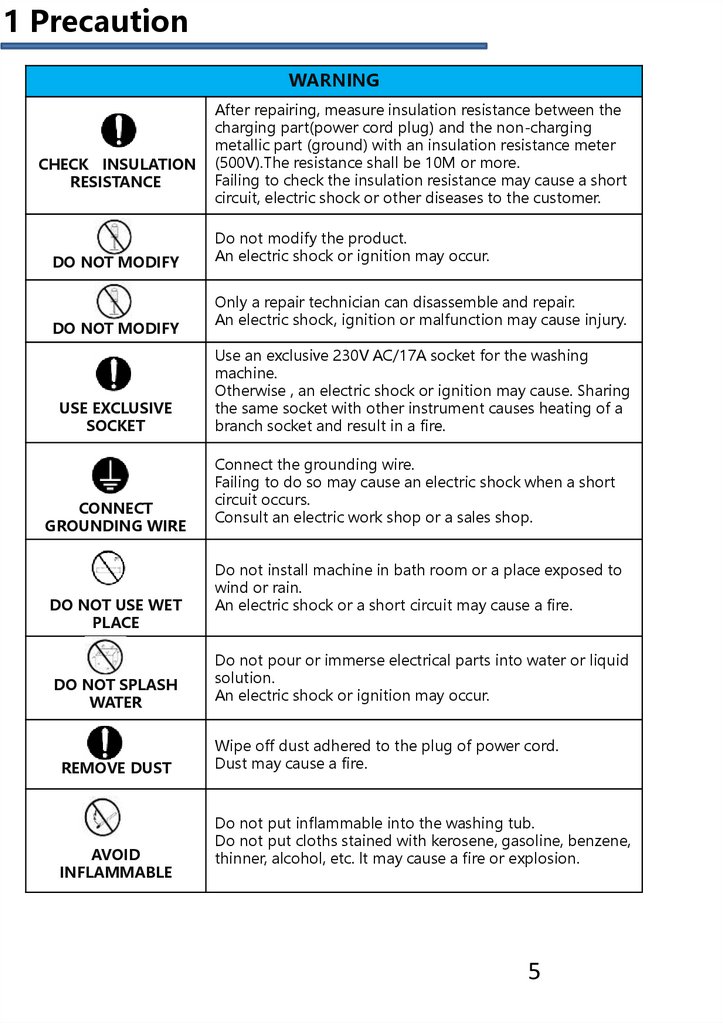
1 PrecautionWARNING
CHECK INSULATION
RESISTANCE
DO NOT MODIFY
DO NOT MODIFY
USE EXCLUSIVE
SOCKET
CONNECT
GROUNDING WIRE
DO NOT USE WET
PLACE
After repairing, measure insulation resistance between the
charging part(power cord plug) and the non-charging
metallic part (ground) with an insulation resistance meter
(500V).The resistance shall be 10M or more.
Failing to check the insulation resistance may cause a short
circuit, electric shock or other diseases to the customer.
Do not modify the product.
An electric shock or ignition may occur.
Only a repair technician can disassemble and repair.
An electric shock, ignition or malfunction may cause injury.
Use an exclusive 230V AC/17A socket for the washing
machine.
Otherwise , an electric shock or ignition may cause. Sharing
the same socket with other instrument causes heating of a
branch socket and result in a fire.
Connect the grounding wire.
Failing to do so may cause an electric shock when a short
circuit occurs.
Consult an electric work shop or a sales shop.
Do not install machine in bath room or a place exposed to
wind or rain.
An electric shock or a short circuit may cause a fire.
DO NOT SPLASH
WATER
Do not pour or immerse electrical parts into water or liquid
solution.
An electric shock or ignition may occur.
REMOVE DUST
Wipe off dust adhered to the plug of power cord.
Dust may cause a fire.
AVOID
INFLAMMABLE
Do not put inflammable into the washing tub.
Do not put cloths stained with kerosene, gasoline, benzene,
thinner, alcohol, etc. lt may cause a fire or explosion.
5
6.
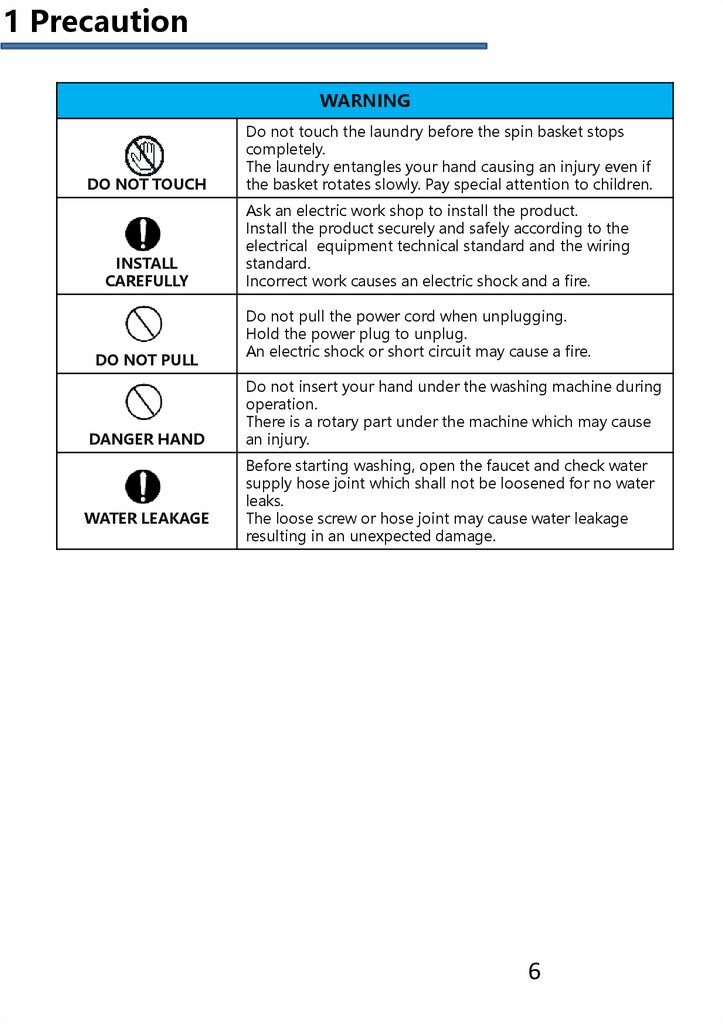
1 PrecautionWARNING
DO NOT TOUCH
INSTALL
CAREFULLY
DO NOT PULL
DANGER HAND
WATER LEAKAGE
Do not touch the laundry before the spin basket stops
completely.
The laundry entangles your hand causing an injury even if
the basket rotates slowly. Pay special attention to children.
Ask an electric work shop to install the product.
Install the product securely and safely according to the
electrical equipment technical standard and the wiring
standard.
Incorrect work causes an electric shock and a fire.
Do not pull the power cord when unplugging.
Hold the power plug to unplug.
An electric shock or short circuit may cause a fire.
Do not insert your hand under the washing machine during
operation.
There is a rotary part under the machine which may cause
an injury.
Before starting washing, open the faucet and check water
supply hose joint which shall not be loosened for no water
leaks.
The loose screw or hose joint may cause water leakage
resulting in an unexpected damage.
6
7.
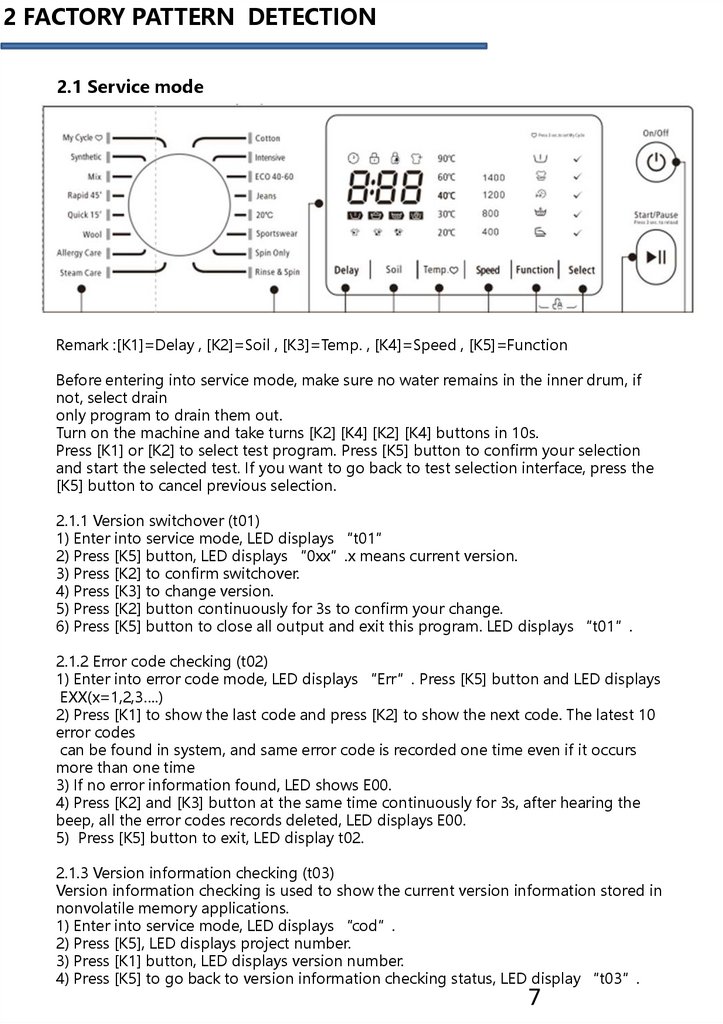
2 FACTORY PATTERN DETECTION2.1 Service mode
Remark :[K1]=Delay , [K2]=Soil , [K3]=Temp. , [K4]=Speed , [K5]=Function
Before entering into service mode, make sure no water remains in the inner drum, if
not, select drain
only program to drain them out.
Turn on the machine and take turns [K2] [K4] [K2] [K4] buttons in 10s.
Press [K1] or [K2] to select test program. Press [K5] button to confirm your selection
and start the selected test. If you want to go back to test selection interface, press the
[K5] button to cancel previous selection.
2.1.1 Version switchover (t01)
1) Enter into service mode, LED displays “t01”
2) Press [K5] button, LED displays “0xx”.x means current version.
3) Press [K2] to confirm switchover.
4) Press [K3] to change version.
5) Press [K2] button continuously for 3s to confirm your change.
6) Press [K5] button to close all output and exit this program. LED displays “t01”.
2.1.2 Error code checking (t02)
1) Enter into error code mode, LED displays “Err”. Press [K5] button and LED displays
EXX(x=1,2,3….)
2) Press [K1] to show the last code and press [K2] to show the next code. The latest 10
error codes
can be found in system, and same error code is recorded one time even if it occurs
more than one time
3) If no error information found, LED shows E00.
4) Press [K2] and [K3] button at the same time continuously for 3s, after hearing the
beep, all the error codes records deleted, LED displays E00.
5) Press [K5] button to exit, LED display t02.
2.1.3 Version information checking (t03)
Version information checking is used to show the current version information stored in
nonvolatile memory applications.
1) Enter into service mode, LED displays “cod”.
2) Press [K5], LED displays project number.
3) Press [K1] button, LED displays version number.
4) Press [K5] to go back to version information checking status, LED display “t03”.
7
8.
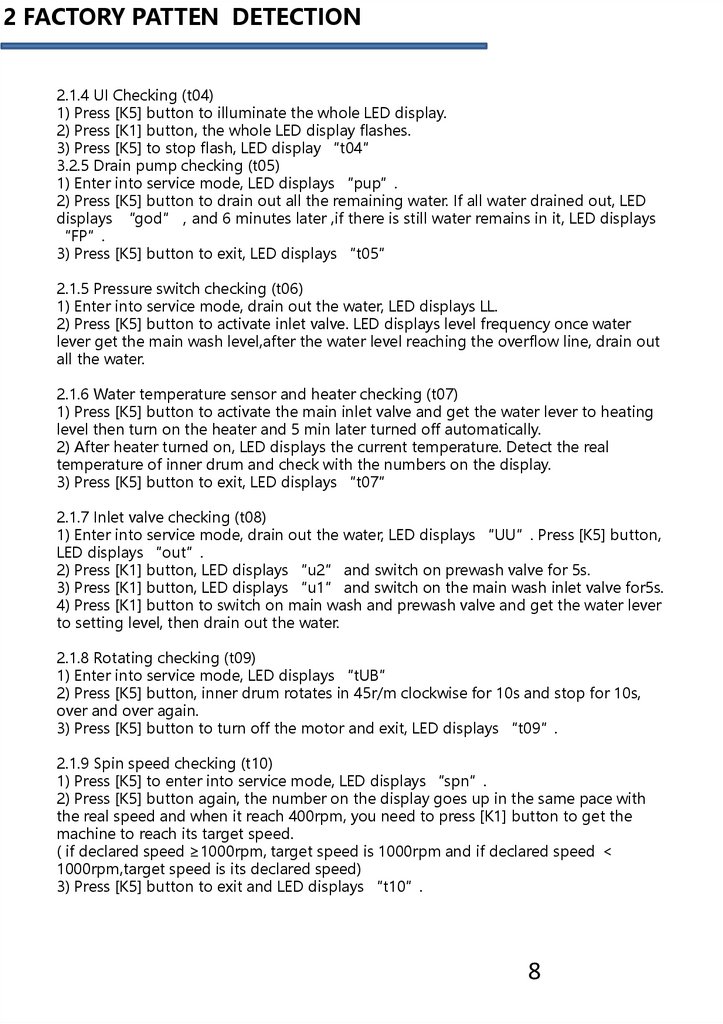
2 FACTORY PATTEN DETECTION2.1.4 UI Checking (t04)
1) Press [K5] button to illuminate the whole LED display.
2) Press [K1] button, the whole LED display flashes.
3) Press [K5] to stop flash, LED display “t04”
3.2.5 Drain pump checking (t05)
1) Enter into service mode, LED displays “pup”.
2) Press [K5] button to drain out all the remaining water. If all water drained out, LED
displays “god” and 6 minutes later ,if there is still water remains in it, LED displays
“FP”.
3) Press [K5] button to exit, LED displays “t05”
2.1.5 Pressure switch checking (t06)
1) Enter into service mode, drain out the water, LED displays LL.
2) Press [K5] button to activate inlet valve. LED displays level frequency once water
lever get the main wash level,after the water level reaching the overflow line, drain out
all the water.
2.1.6 Water temperature sensor and heater checking (t07)
1) Press [K5] button to activate the main inlet valve and get the water lever to heating
level then turn on the heater and 5 min later turned off automatically.
2) After heater turned on, LED displays the current temperature. Detect the real
temperature of inner drum and check with the numbers on the display.
3) Press [K5] button to exit, LED displays “t07”
2.1.7 Inlet valve checking (t08)
1) Enter into service mode, drain out the water, LED displays “UU”. Press [K5] button,
LED displays “out”.
2) Press [K1] button, LED displays “u2” and switch on prewash valve for 5s.
3) Press [K1] button, LED displays “u1” and switch on the main wash inlet valve for5s.
4) Press [K1] button to switch on main wash and prewash valve and get the water lever
to setting level, then drain out the water.
2.1.8 Rotating checking (t09)
1) Enter into service mode, LED displays “tUB”
2) Press [K5] button, inner drum rotates in 45r/m clockwise for 10s and stop for 10s,
over and over again.
3) Press [K5] button to turn off the motor and exit, LED displays “t09”.
2.1.9 Spin speed checking (t10)
1) Press [K5] to enter into service mode, LED displays “spn”.
2) Press [K5] button again, the number on the display goes up in the same pace with
the real speed and when it reach 400rpm, you need to press [K1] button to get the
machine to reach its target speed.
( if declared speed ≥1000rpm, target speed is 1000rpm and if declared speed
1000rpm,target speed is its declared speed)
3) Press [K5] button to exit and LED displays “t10”.
8
9.
3 UNPACKING WAYS OF MAIN PARTS3. UNPACKING WAYS OF MAIN PARTS
1. Undo the back cover
2. Undo top cover
3. Undo the control panel
4. Undo the lower panel
5. Undo the door lock
6. Undo the front plate
7. Undo the facade counterweight
8. Undo the gasket
9. Undo the PCB panel
10. Undo the detergent box
11. Undo the inlet valve
12. Undo the pressure
13. Undo the pulley
14. Undo the absorber pin
15. Undo the filter
16. Undo the drain pump
17. Undo the heater
18. Undo the NTC
19. Undo the door glass
20. Undo the panel support
21. Undo the drum tub assembly
22. Undo the absorber
23. Undo the motor
9
10.
3 UNPACKING WAYS OF MAIN PARTSOperation
Picture
1. Undo the back cover
Undo four screws fit
between back plate and
cabinet, and then pull out.
2. Undo the top cover
I. Undo 2 screws fit back
Cabinet.
II. Push back the top cover
15mm until it leaves away
from the control panel, and
then take it down.
3. Undo the control panel
I. Departing the top cover
II. Draw out the detergent
drawer.
III. Loosen two screws fit
on the control panel .
IV. Loosen two screws fit
on the control panel.
V. Take out the control
Panel inclined from the
panel .
10
11.
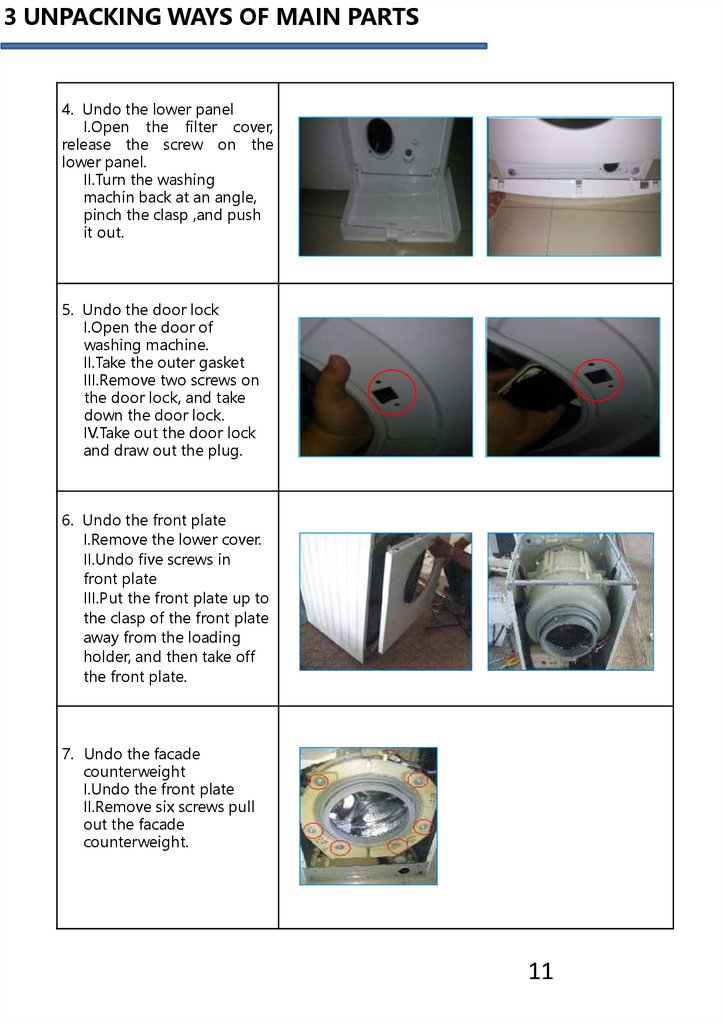
3 UNPACKING WAYS OF MAIN PARTS4. Undo the lower panel
I.Open the filter cover,
release the screw on the
lower panel.
II.Turn the washing
machin back at an angle,
pinch the clasp ,and push
it out.
5. Undo the door lock
I.Open the door of
washing machine.
II.Take the outer gasket
III.Remove two screws on
the door lock, and take
down the door lock.
IV.Take out the door lock
and draw out the plug.
6. Undo the front plate
I.Remove the lower cover.
II.Undo five screws in
front plate
III.Put the front plate up to
the clasp of the front plate
away from the loading
holder, and then take off
the front plate.
7. Undo the facade
counterweight
I.Undo the front plate
II.Remove six screws pull
out the facade
counterweight.
11
12.
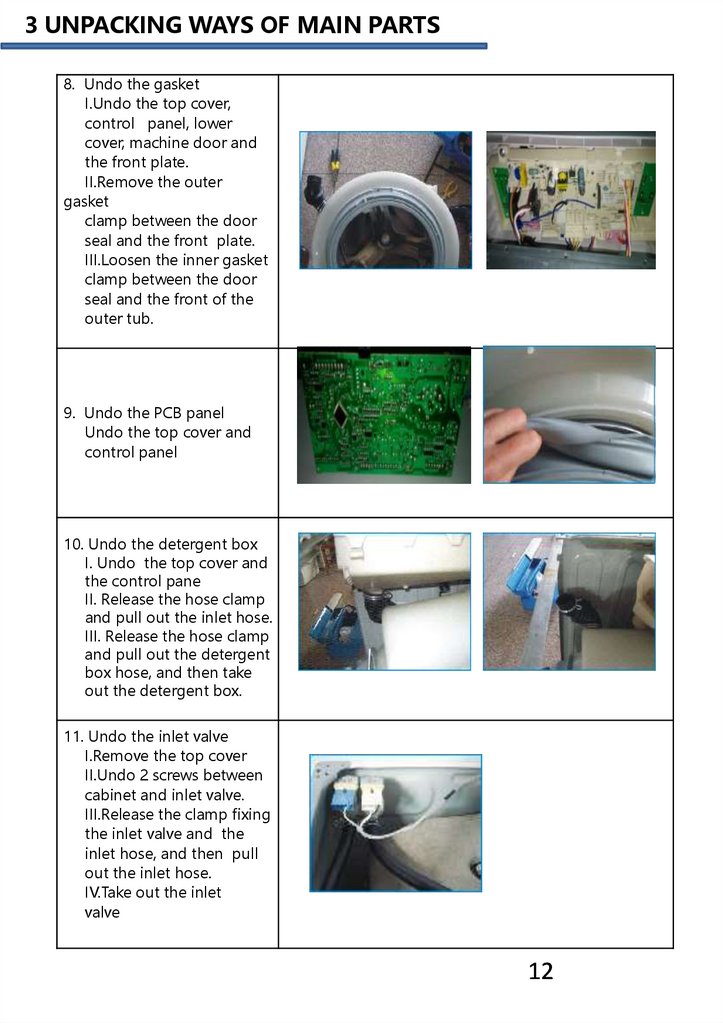
3 UNPACKING WAYS OF MAIN PARTS8. Undo the gasket
I.Undo the top cover,
control panel, lower
cover, machine door and
the front plate.
II.Remove the outer
gasket
clamp between the door
seal and the front plate.
III.Loosen the inner gasket
clamp between the door
seal and the front of the
outer tub.
9. Undo the PCB panel
Undo the top cover and
control panel
10. Undo the detergent box
I. Undo the top cover and
the control pane
II. Release the hose clamp
and pull out the inlet hose.
III. Release the hose clamp
and pull out the detergent
box hose, and then take
out the detergent box.
11. Undo the inlet valve
I.Remove the top cover
II.Undo 2 screws between
cabinet and inlet valve.
III.Release the clamp fixing
the inlet valve and the
inlet hose, and then pull
out the inlet hose.
IV.Take out the inlet
valve
12
13.
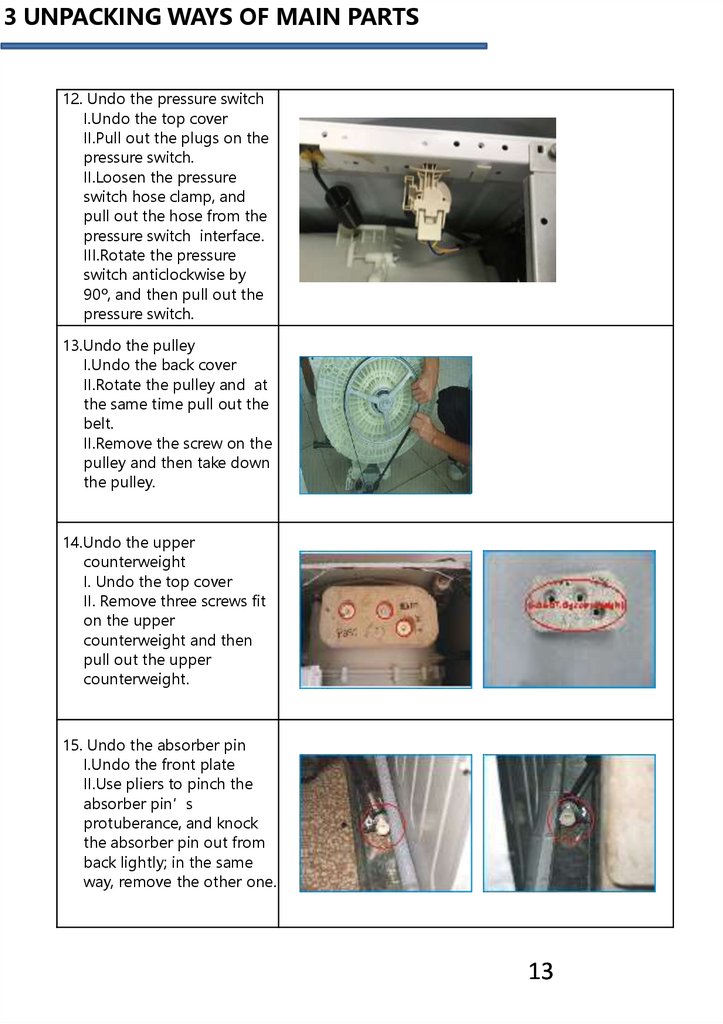
3 UNPACKING WAYS OF MAIN PARTS12. Undo the pressure switch
I.Undo the top cover
II.Pull out the plugs on the
pressure switch.
II.Loosen the pressure
switch hose clamp, and
pull out the hose from the
pressure switch interface.
III.Rotate the pressure
switch anticlockwise by
90º, and then pull out the
pressure switch.
13.Undo the pulley
I.Undo the back cover
II.Rotate the pulley and at
the same time pull out the
belt.
II.Remove the screw on the
pulley and then take down
the pulley.
14.Undo the upper
counterweight
I. Undo the top cover
II. Remove three screws fit
on the upper
counterweight and then
pull out the upper
counterweight.
15. Undo the absorber pin
I.Undo the front plate
II.Use pliers to pinch the
absorber pin’s
protuberance, and knock
the absorber pin out from
back lightly; in the same
way, remove the other one.
13
14.
3 UNPACKING WAYS OF MAIN PARTS16.Undo the filter
Open the filter cover.
Rotate the filter knob
anticlockwise, and then
pull out the filter.
17. Undo the drain pump
I.Undo the top cover,
control panel, lower cover
and front plate.
II.Nip out clamp between
drain hose and the drain
pump, and then pullout
the drain hose.
III.Loosen the screws fitted
on the drain pump, and
then pull out the drain
pump.
18.Undo the heater
I.Under the top cover,
II.control panel lower
cover and front plate.
III.Pull out the heater plug.
14
15.
3 UNPACKING WAYS OF MAIN PARTS19. Undo the NTC
I.Undo the top cover,
control panel, lower cover
and front plate.
II.Undo the NTC with
special
tools.
20.Undo the door glass
I. Open the door, remove
two screws fixing the
hinge and front plate, and
then remove the door.
II. Remove twelve screws
on
the inner door.
III. Remove the outer door
and the inner door with
special tool.
21.Undo the panel support
I. Undo the top cover
II.Undo the control panel.
III.Remove two screws
fixing the panel support,
and then remove it.
22.Undo the drum tub
assembly
I.Remove the motor in
II.Pull out the heater.
III.Remove the belt.
VI.Remove the screws
fixing the pulley, and then
take out the pulley.
V.Remove the screws fixing
the front and rear tub,
and then remove the tub.
VI.Remove the inner drum
kit.
15
16.
3 UNPACKING WAYS OF MAIN PARTS23.Undo the absorber
I.Lift out the outer tub kit.
II.Undo the absorber pin
between absorber and
rear tub, remove the
absorber.
24.Undo the motor
I.First let the machine lie
down on the back and
then pullout the motor
wire and grounding wire.
II.Use spanner to remove
the motor screw, and lift
up the motor with the
other hand in case of
falling to the drain pump
III.After two screws are
removed, change the
motor. First support it to
clasp the correct position,
then install the screws.
16
17.
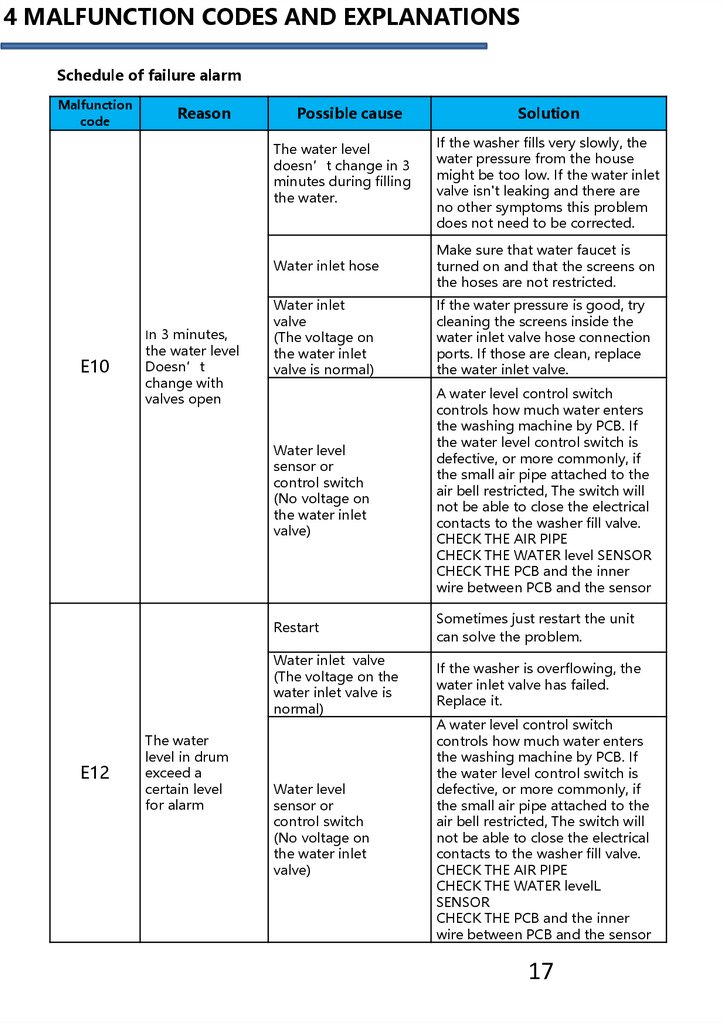
4 MALFUNCTION CODES AND EXPLANATIONSSchedule of failure alarm
Malfunction
code
Reason
Possible cause
The water level
doesn’t change in 3
minutes during filling
the water.
E10
E12
In 3 minutes,
the water level
Doesn’t
change with
valves open
The water
level in drum
exceed a
certain level
for alarm
Solution
If the washer fills very slowly, the
water pressure from the house
might be too low. If the water inlet
valve isn't leaking and there are
no other symptoms this problem
does not need to be corrected.
Water inlet hose
Make sure that water faucet is
turned on and that the screens on
the hoses are not restricted.
Water inlet
valve
(The voltage on
the water inlet
valve is normal)
If the water pressure is good, try
cleaning the screens inside the
water inlet valve hose connection
ports. If those are clean, replace
the water inlet valve.
Water level
sensor or
control switch
(No voltage on
the water inlet
valve)
A water level control switch
controls how much water enters
the washing machine by PCB. If
the water level control switch is
defective, or more commonly, if
the small air pipe attached to the
air bell restricted, The switch will
not be able to close the electrical
contacts to the washer fill valve.
CHECK THE AIR PIPE
CHECK THE WATER level SENSOR
CHECK THE PCB and the inner
wire between PCB and the sensor
Restart
Sometimes just restart the unit
can solve the problem.
Water inlet valve
(The voltage on the
water inlet valve is
normal)
If the washer is overflowing, the
water inlet valve has failed.
Replace it.
Water level
sensor or
control switch
(No voltage on
the water inlet
valve)
A water level control switch
controls how much water enters
the washing machine by PCB. If
the water level control switch is
defective, or more commonly, if
the small air pipe attached to the
air bell restricted, The switch will
not be able to close the electrical
contacts to the washer fill valve.
CHECK THE AIR PIPE
CHECK THE WATER levelL
SENSOR
CHECK THE PCB and the inner
wire between PCB and the sensor
17
18.
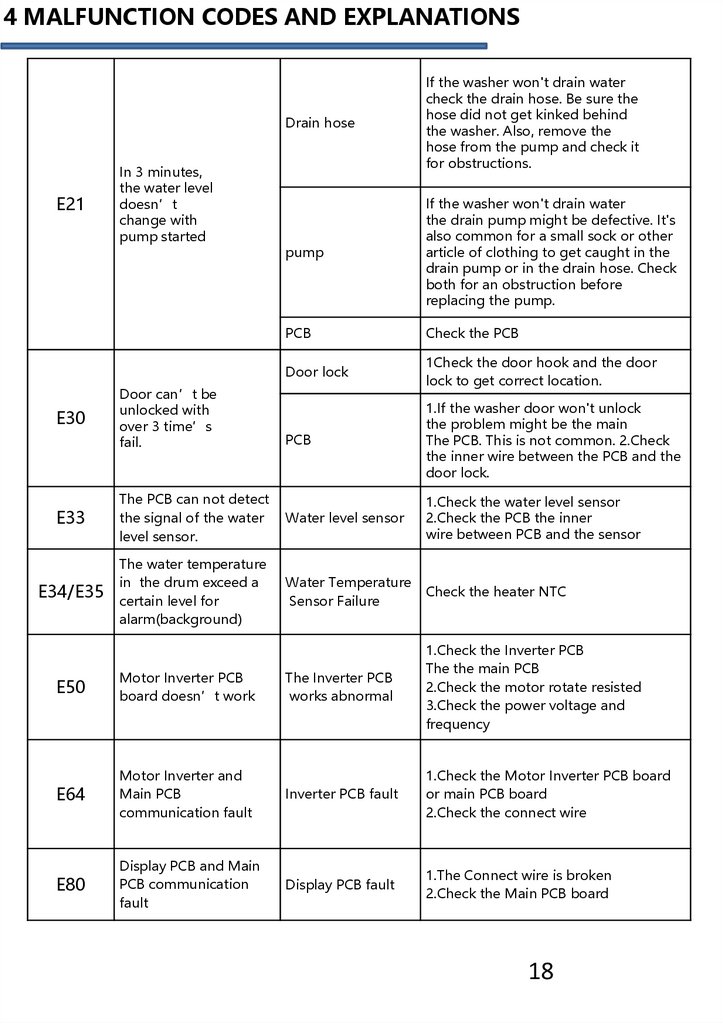
4 MALFUNCTION CODES AND EXPLANATIONSDrain hose
If the washer won't drain water
check the drain hose. Be sure the
hose did not get kinked behind
the washer. Also, remove the
hose from the pump and check it
for obstructions.
pump
If the washer won't drain water
the drain pump might be defective. It's
also common for a small sock or other
article of clothing to get caught in the
drain pump or in the drain hose. Check
both for an obstruction before
replacing the pump.
PCB
Check the PCB
Door lock
1Check the door hook and the door
lock to get correct location.
PCB
1.If the washer door won't unlock
the problem might be the main
The PCB. This is not common. 2.Check
the inner wire between the PCB and the
door lock.
E33
The PCB can not detect
the signal of the water
level sensor.
Water level sensor
1.Check the water level sensor
2.Check the PCB the inner
wire between PCB and the sensor
E34/E35
The water temperature
in the drum exceed a
certain level for
alarm(background)
Water Temperature
Sensor Failure
Check the heater NTC
E21
E30
In 3 minutes,
the water level
doesn’t
change with
pump started
Door can’t be
unlocked with
over 3 time’s
fail.
E50
Motor Inverter PCB
board doesn’t work
The Inverter PCB
works abnormal
1.Check the Inverter PCB
The the main PCB
2.Check the motor rotate resisted
3.Check the power voltage and
frequency
E64
Motor Inverter and
Main PCB
communication fault
Inverter PCB fault
1.Check the Motor Inverter PCB board
or main PCB board
2.Check the connect wire
E80
Display PCB and Main
PCB communication
fault
Display PCB fault
1.The Connect wire is broken
2.Check the Main PCB board
18
19.
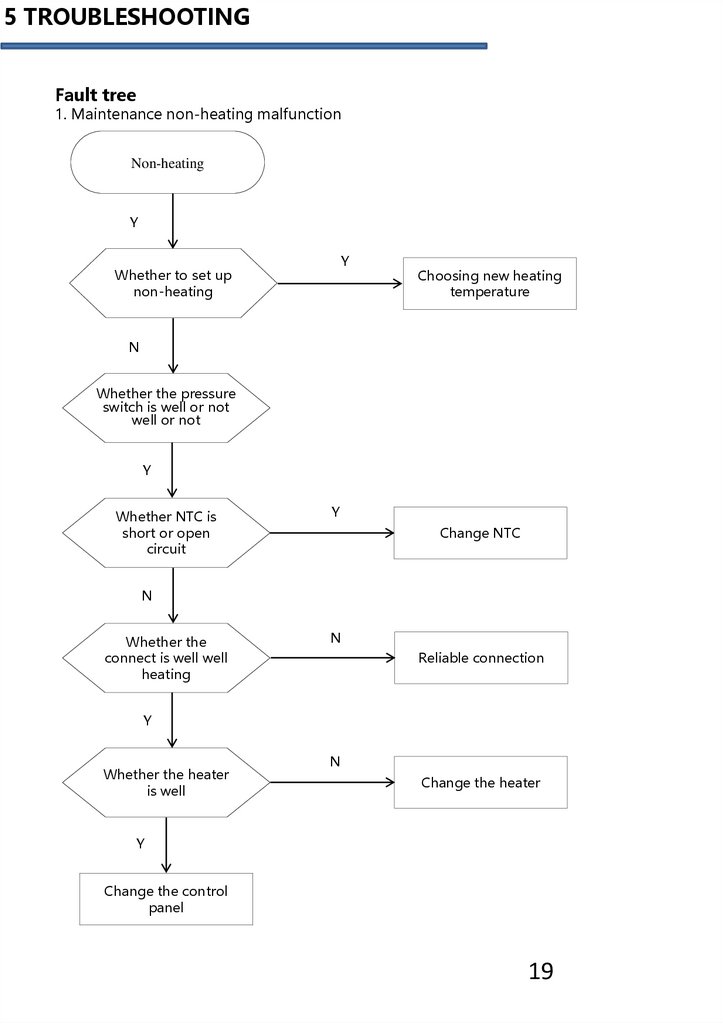
5 TROUBLESHOOTINGFault tree
1. Maintenance non-heating malfunction
Non-heating
Y
Y
Whether to set up
non-heating
Choosing new heating
temperature
N
Whether the pressure
switch is well or not
well or not
Y
Whether NTC is
short or open
circuit
Y
Change NTC
N
Whether the
connect is well well
heating
N
Reliable connection
Y
Whether the heater
is well
N
Change the heater
Y
Change the control
panel
19
20.
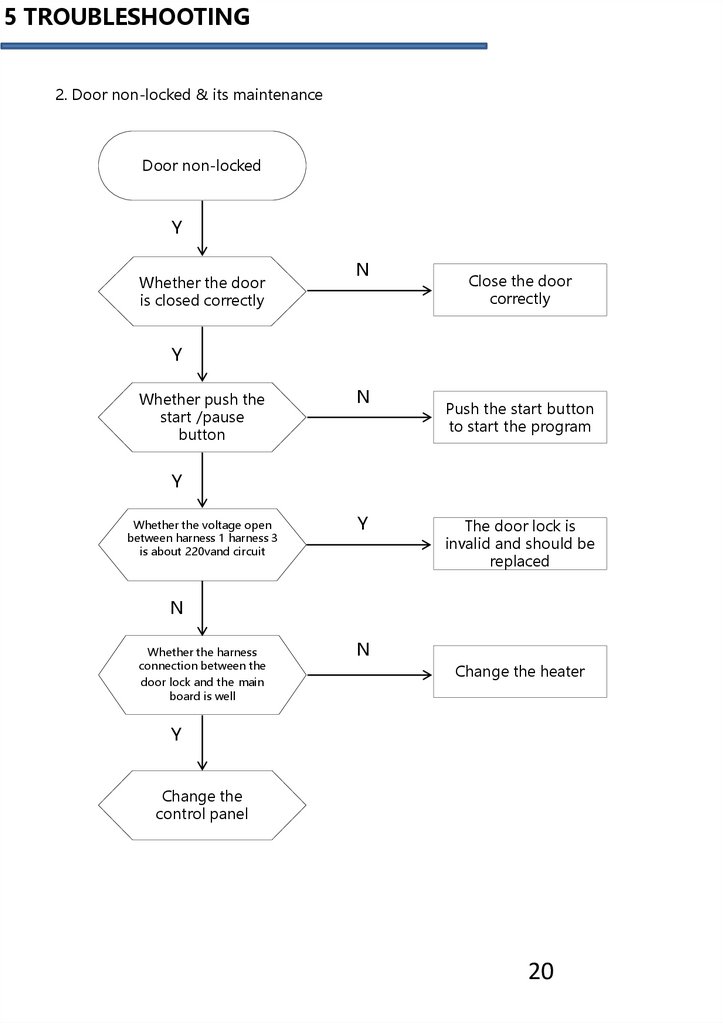
5 TROUBLESHOOTING2. Door non-locked & its maintenance
Door non-locked
Y
Whether the door
is closed correctly
N
Close the door
correctly
Y
Whether push the
start /pause
button
N
Push the start button
to start the program
Y
Whether the voltage open
between harness 1 harness 3
is about 220vand circuit
Y
The door lock is
invalid and should be
replaced
N
Whether the harness
connection between the
door lock and the main
board is well
N
Change the heater
Y
Change the
control panel
20
21.
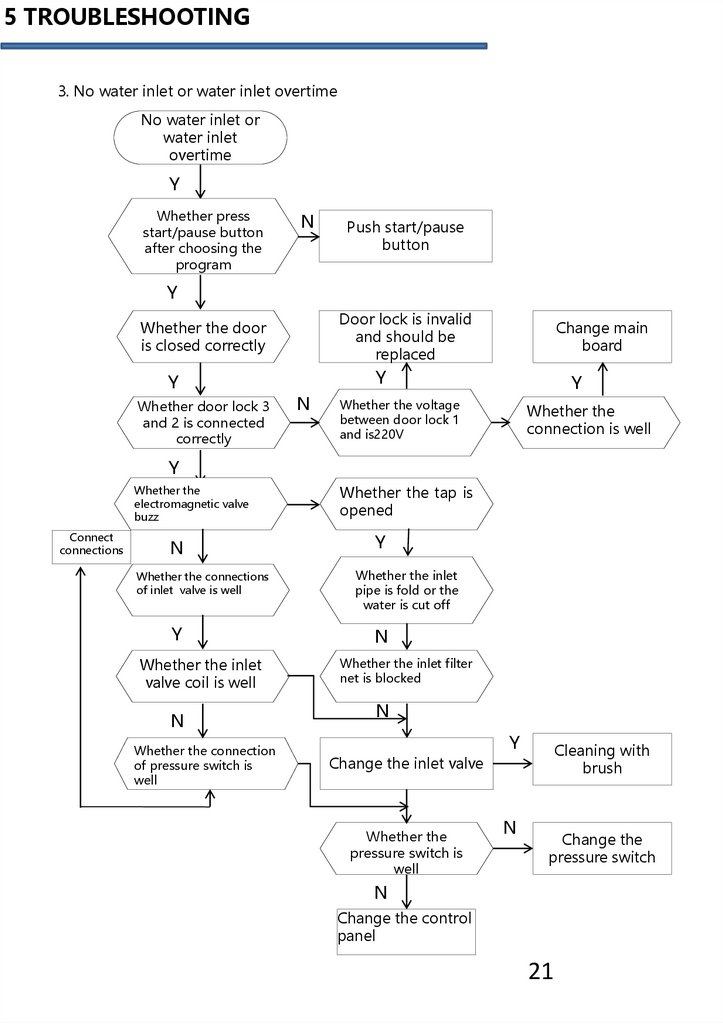
5 TROUBLESHOOTING3. No water inlet or water inlet overtime
No water inlet or
water inlet
overtime
Y
Whether press
start/pause button
after choosing the
program
N
Push start/pause
button
Y
Door lock is invalid
and should be
replaced
Whether the door
is closed correctly
Y
Whether door lock 3
and 2 is connected
correctly
Change main
board
Y
N
Y
Whether the voltage
between door lock 1
and is220V
Whether the
connection is well
Y
Whether the
electromagnetic valve
buzz
Connect
connections
N
Whether the connections
of inlet valve is well
Y
Whether the inlet
valve coil is well
N
Whether the connection
of pressure switch is
well
Whether the tap is
opened
Y
Whether the inlet
pipe is fold or the
water is cut off
N
Whether the inlet filter
net is blocked
N
Y
Cleaning with
brush
Change the inlet valve
Whether the
pressure switch is
well
N
Change the
pressure switch
N
Change the control
panel
21
22.
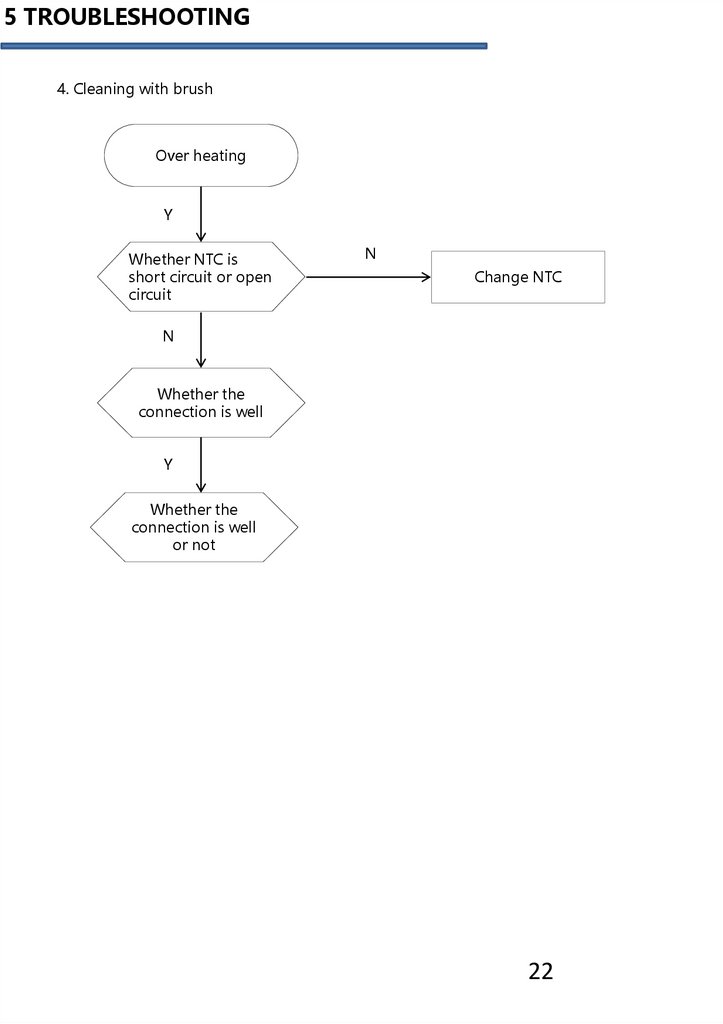
5 TROUBLESHOOTING4. Cleaning with brush
Over heating
Y
circuit open
Whether
NTC is
circuit
short circuit or open
circuit
N
Change NTC
N
Whether the
connection is well
Y
Whether the
connection is well
or not
22
23.
5 TROUBLESHOOTING5. Maintenance of non-drain or drain exceed the setting time
Non-drain or
overtime drain
Y
Whether it is in
the state of pause
Y
Push start/pause
button
N
Close
the
door
N
Whether the
door is closed
The means of detecting
door switch refers to the
paragraph of "no water
inlet".
Y
Whether the door
lock is well
Y
Whether the
pump is
vibrating
N
Y
Cleaning
the filter
button
Y
Whether the
connection
between the
pump and the
board is
loosened
N
N
Y
Reliable
connection
Whether the filter
is blocked
Change the
control panel
N
Whether the drain
pipe is too high
Y
Whether the
pump is blocked
or burned out
between the
door lock and
the main board
is well
Return to the normal
station
N
Change the drain
pump
23
24.
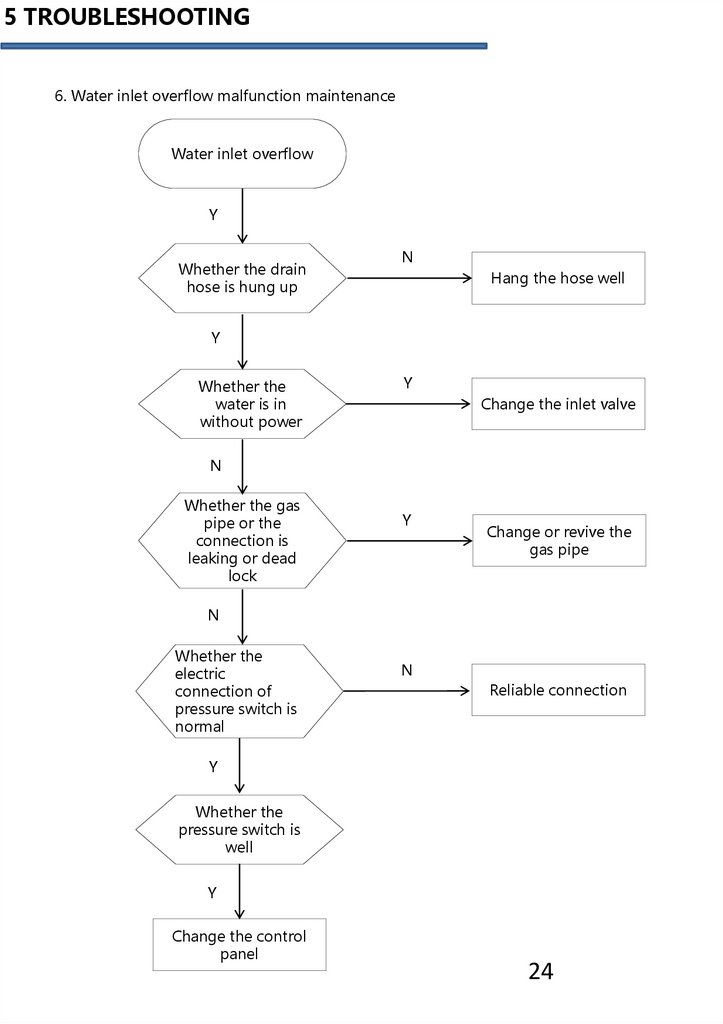
5 TROUBLESHOOTING6. Water inlet overflow malfunction maintenance
Water inlet overflow
Y
Whether the drain
hose is hung up
N
Hang the hose well
Y
Whether the
water is in
without power
Y
Change the inlet valve
N
Whether the gas
pipe or the
connection is
leaking or dead
lock
Y
Change or revive the
gas pipe
N
Whether the
electric
connection of
pressure switch is
normal
N
Reliable connection
Y
Whether the
pressure switch is
well
Y
Change the control
panel
24
25.
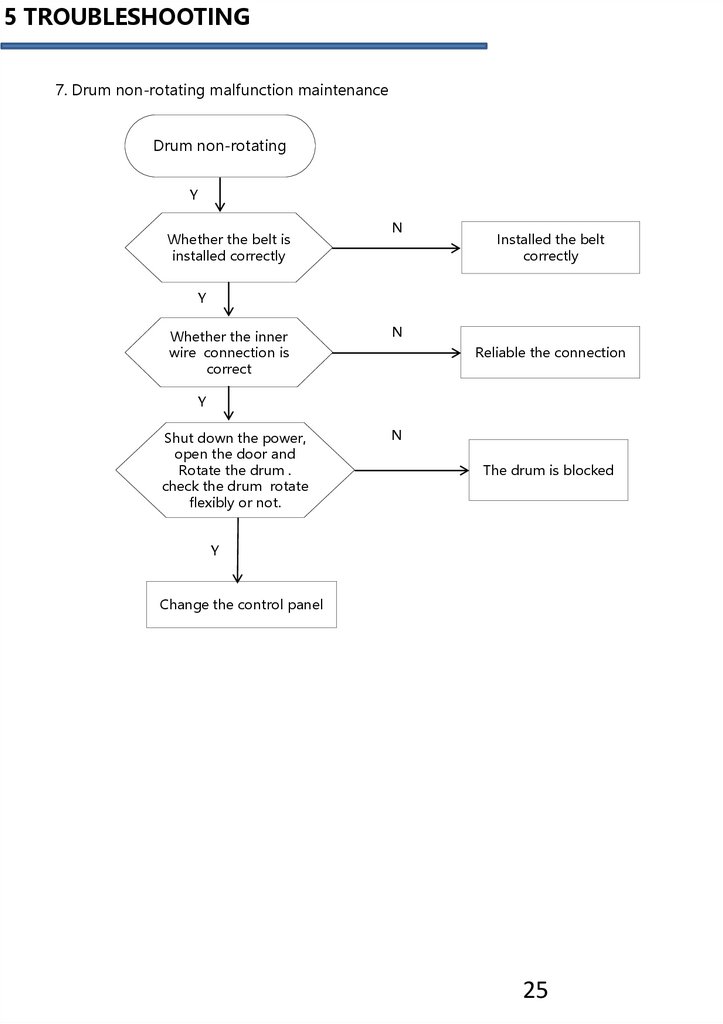
5 TROUBLESHOOTING7. Drum non-rotating malfunction maintenance
Drum non-rotating
Y
Whether the belt is
installed correctly
N
Installed the belt
correctly
Y
Whether the inner
wire connection is
correct
N
Reliable the connection
Y
Shut down the power,
open the door and
Rotate the drum .
check the drum rotate
flexibly or not.
N
The drum is blocked
Y
Change the control panel
25
26.
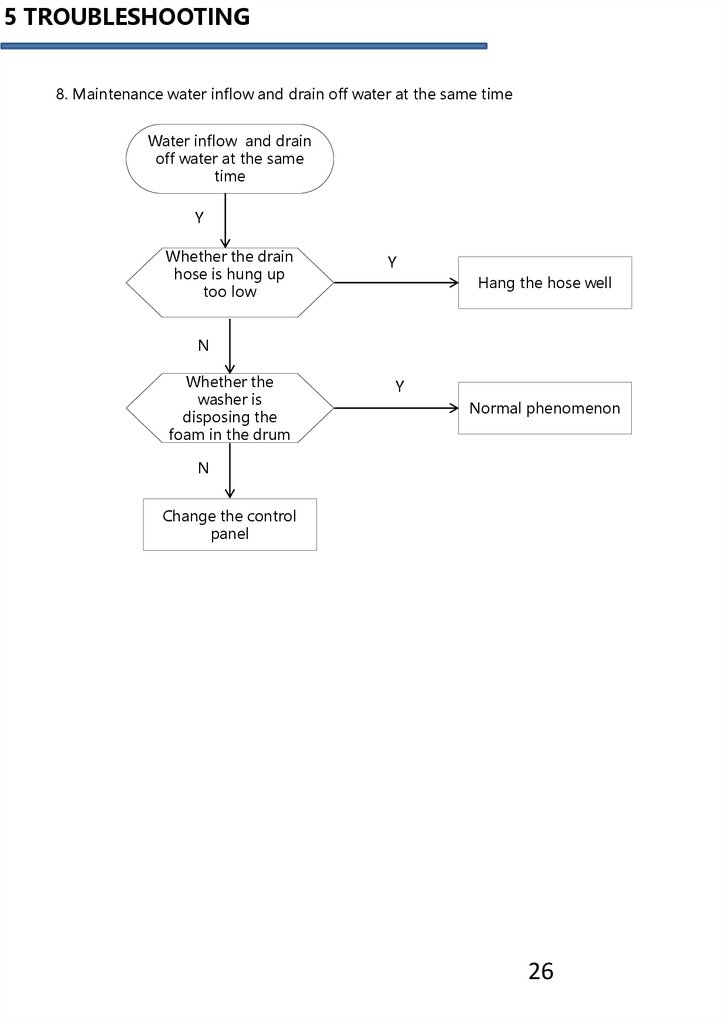
5 TROUBLESHOOTING8. Maintenance water inflow and drain off water at the same time
Water inflow and drain
off water at the same
time
Y
Whether the drain
hose is hung up
too low
Y
Hang the hose well
N
Whether the
washer is
disposing the
foam in the drum
Y
Normal phenomenon
N
Change the control
panel
26
27.
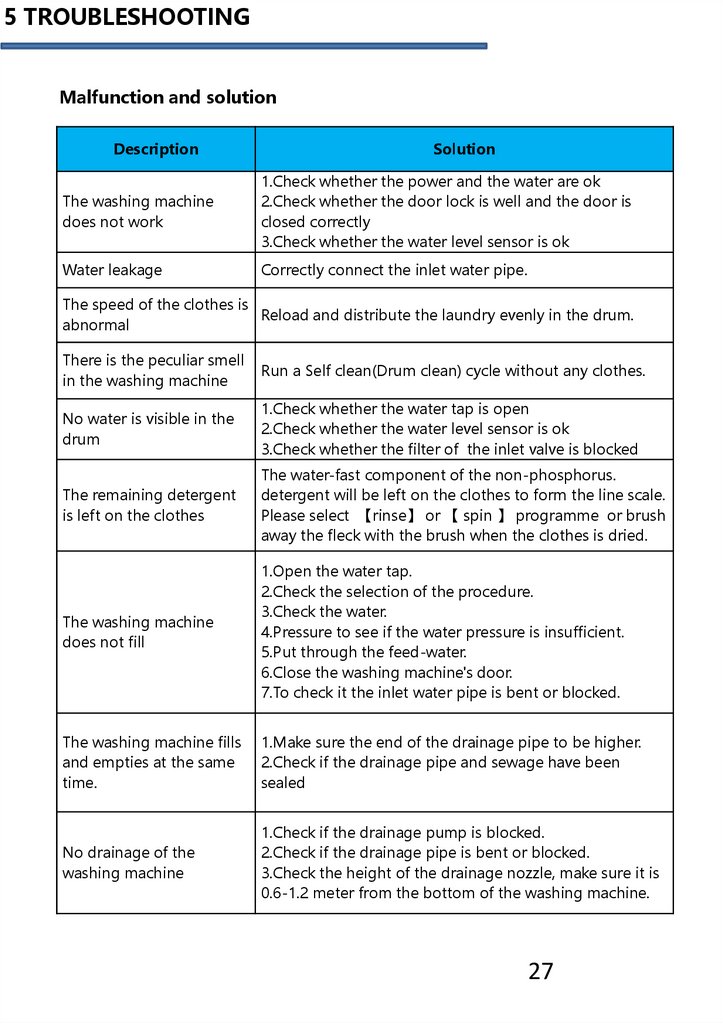
5 TROUBLESHOOTINGMalfunction and solution
Description
Solution
The washing machine
does not work
1.Check whether the power and the water are ok
2.Check whether the door lock is well and the door is
closed correctly
3.Check whether the water level sensor is ok
Water leakage
Correctly connect the inlet water pipe.
The speed of the clothes is
Reload and distribute the laundry evenly in the drum.
abnormal
There is the peculiar smell
in the washing machine
Run a Self clean(Drum clean) cycle without any clothes.
No water is visible in the
drum
1.Check whether the water tap is open
2.Check whether the water level sensor is ok
3.Check whether the filter of the inlet valve is blocked
The remaining detergent
is left on the clothes
The water-fast component of the non-phosphorus.
detergent will be left on the clothes to form the line scale.
Please select 【rinse】 or 【 spin 】 programme or brush
away the fleck with the brush when the clothes is dried.
The washing machine
does not fill
1.Open the water tap.
2.Check the selection of the procedure.
3.Check the water.
4.Pressure to see if the water pressure is insufficient.
5.Put through the feed-water.
6.Close the washing machine's door.
7.To check it the inlet water pipe is bent or blocked.
The washing machine fills
and empties at the same
time.
1.Make sure the end of the drainage pipe to be higher.
2.Check if the drainage pipe and sewage have been
sealed
No drainage of the
washing machine
1.Check if the drainage pump is blocked.
2.Check if the drainage pipe is bent or blocked.
3.Check the height of the drainage nozzle, make sure it is
0.6-1.2 meter from the bottom of the washing machine.
27
28.
5 TROUBLESHOOTINGVibration of the washing
machine
1.Level the washing machine.
2.Fasten the adjustable foot
3.To check if the internal packing for the transportation
have all been removed.
The bubble spills from
the detergent
1.Check if the detergent is excessive, if it is the specialized
detergent for the cylinder washing machine.
2.Dip one scoop of the softener mixed with 1/2 liter of
water to the detergent box II.
3.Reduce the usage amount of the detergent in the next
time's wash.
The machine stops when
the procedure has not
been finished
1.Check whether the power is ok
2.Check whether the water is ok
The inner barrel water of the washing machine has been
The drainage pump has
drained but there is still a small amount of water in the
noise during the
drainage pump and pipe. The drainage pump
operation when the water
continuously operates and takes in the air, and at this time
has just been drained
there is the noise, which is normal situation.
To stop for some time
during the wash
procedure
The washing machine adds water automatically.
Because there is too much bubble in the tube, the
washing machine is cleaning the bubble.
If you cannot solve the above abnormal situations, would you please:
1. To turn the procedure knob to 【OFF】, pull out the attachment plug;
2. To close the water tap, and contact the nearest service center.
28
29.
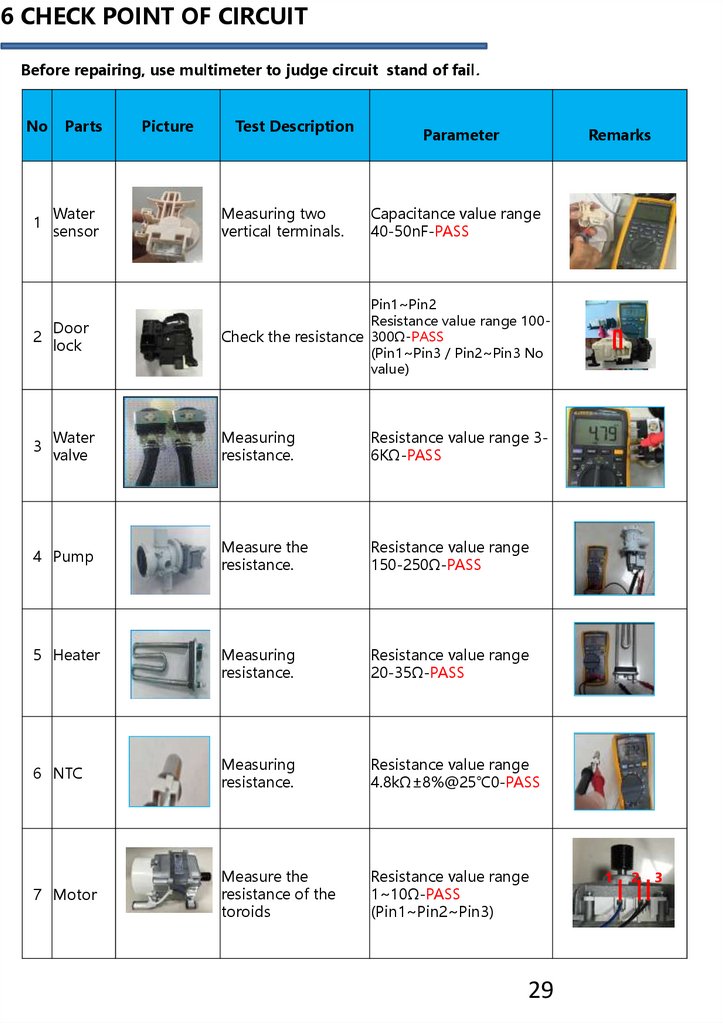
6 CHECK POINT OF CIRCUITBefore repairing, use multimeter to judge circuit stand of fail.
No
Parts
1
Water
sensor
Measuring two
vertical terminals.
2
Door
lock
Pin1~Pin2
Resistance value range 100Check the resistance 300Ω-PASS
(Pin1~Pin3 / Pin2~Pin3 No
value)
3
Water
valve
Measuring
resistance.
Resistance value range 36KΩ-PASS
Measure the
resistance.
Resistance value range
150-250Ω-PASS
Measuring
resistance.
Resistance value range
20-35Ω-PASS
6 NTC
Measuring
resistance.
Resistance value range
4.8kΩ±8%@25℃0-PASS
7 Motor
Measure the
resistance of the
toroids
Resistance value range
1~10Ω-PASS
(Pin1~Pin2~Pin3)
4 Pump
5 Heater
Picture
Test Description
Parameter
Remarks
Capacitance value range
40-50nF-PASS
29
1
2
3
30.
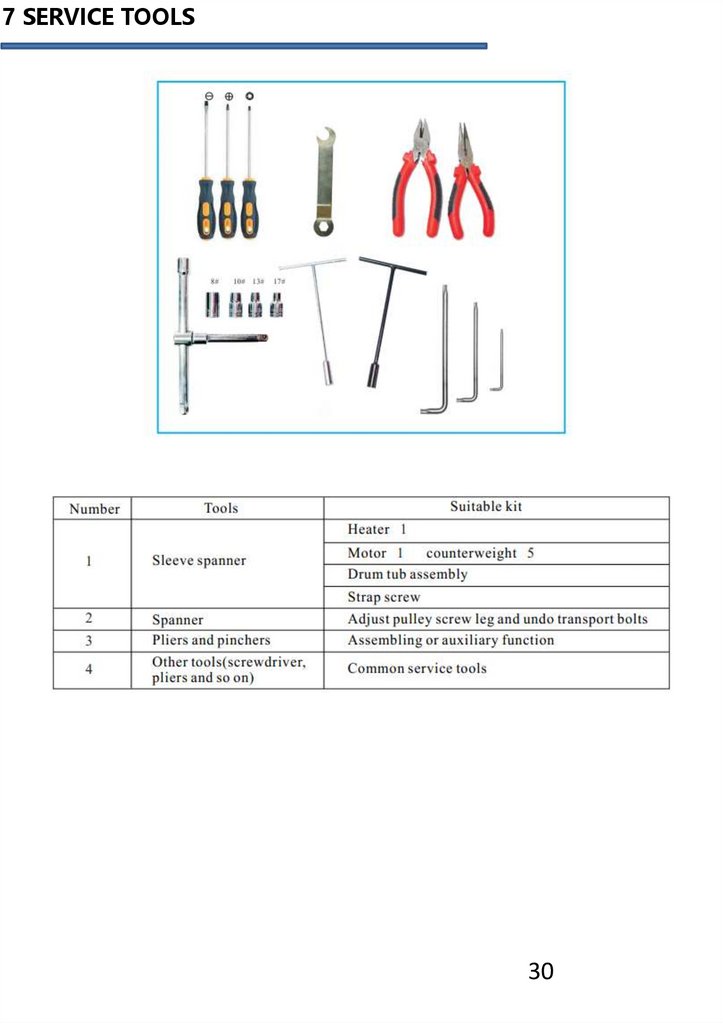
7 SERVICE TOOLS30
31.
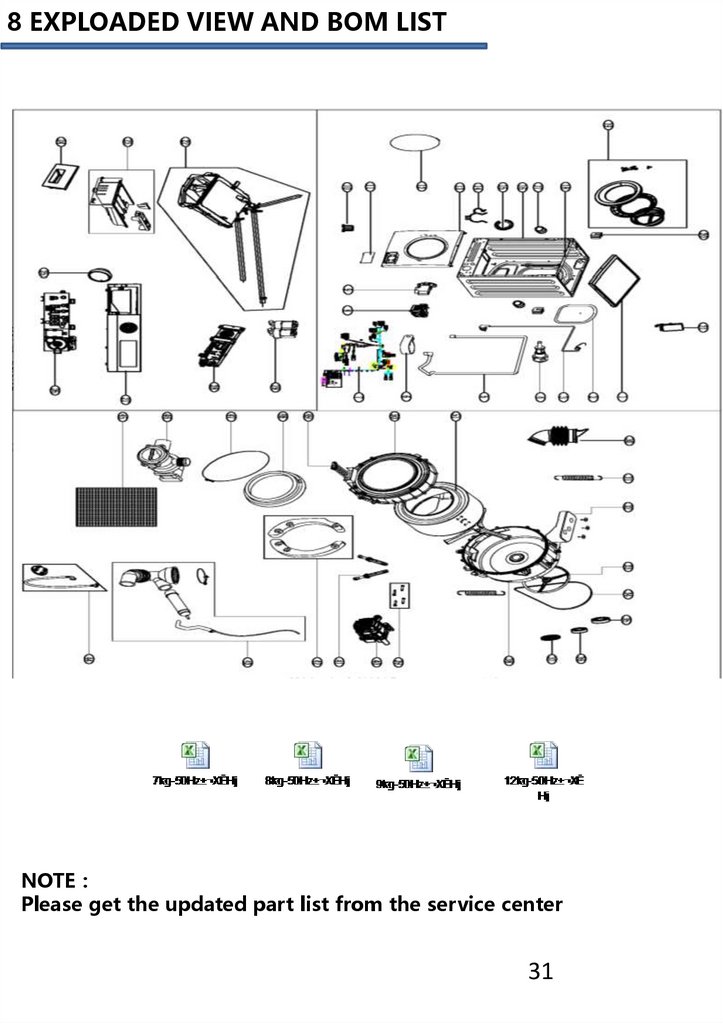
8 EXPLOADED VIEW AND BOM LISTNOTE
Please get the updated part list from the service center
31