 Интернет
Похожие презентации:



Network & Internet
1. Network & Internet
NETWORK & INTERNETCREATED BY:MUHAMMEDOVA.A
2. Introduction
INTRODUCTION• The need to share information and resources among
different computers has led to linked computer systems,
called network
• Network: computers are connected together so that the
data can be transferred from machine to machine.
• Share resources(printer), exchange messages, save
time, save money.
INTRODUCTION TO COMPUTER AND INTERNET
3. Network Fundamentals
NETWORK FUNDAMENTALS• Network Classifications
• Scope
• Local area network (LAN)
• Metropolitan area (MAN)
• Wide area network (WAN)
• Ownership
• Closed
• open
• Topology (configuration)
• Bus (Ethernet)
• Star (Wireless networks with central Access Point)
INTRODUCTION TO COMPUTER AND INTERNET
4. Network Classifications
NETWORK CLASSIFICATIONS• LAN: Normally consists of a collection of computers in a
single building.
• Example: computers in university.
• MAN: network of intermediate size
• WAN: links computers over a greater distance-perhaps
in neighboring cities.
INTRODUCTION TO COMPUTER AND INTERNET
5. Network Classifications
NETWORK CLASSIFICATIONS• Open network: open network design for a public domain
are freely circulated and often grow in popularity.
• the internet is an open system.
• Communication thought the internet is governed by an
open collection of standards known as TCP/IP protocol.
• Closed network: innovations owned and controlled by a
particular entity.
INTRODUCTION TO COMPUTER AND INTERNET
6. Network Topologies
NETWORK TOPOLOGIES• Network topology refer to the pattern in which the
machines are connected.
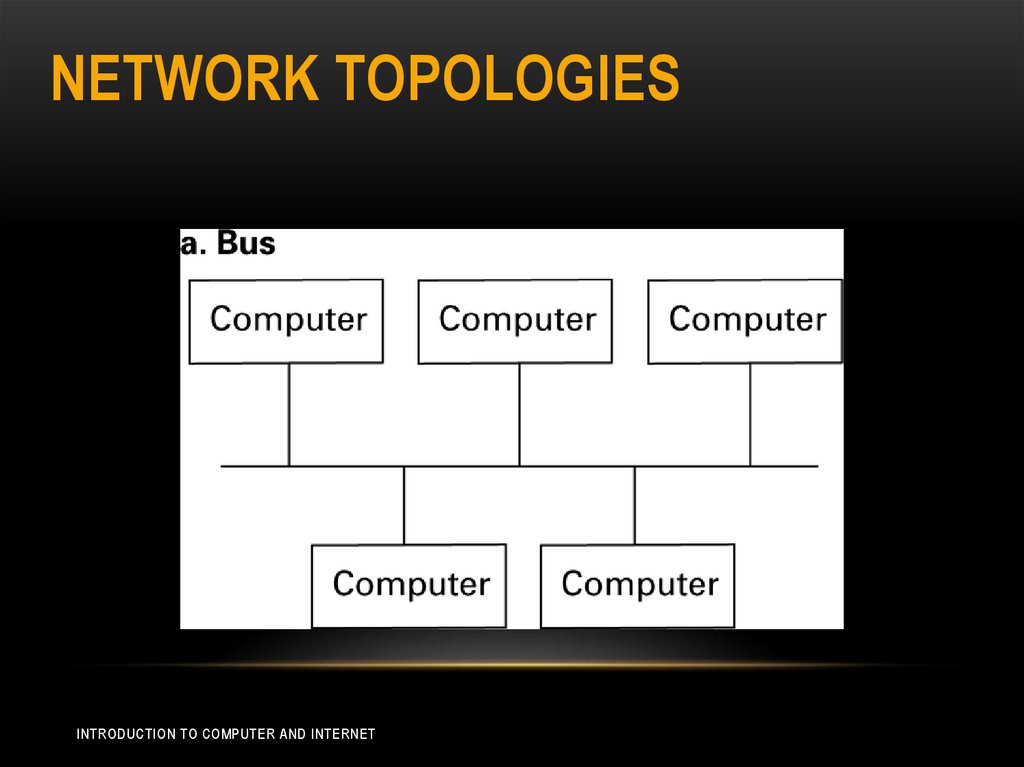
• Bus: all the machines are connected to a common
communication line called a bus.
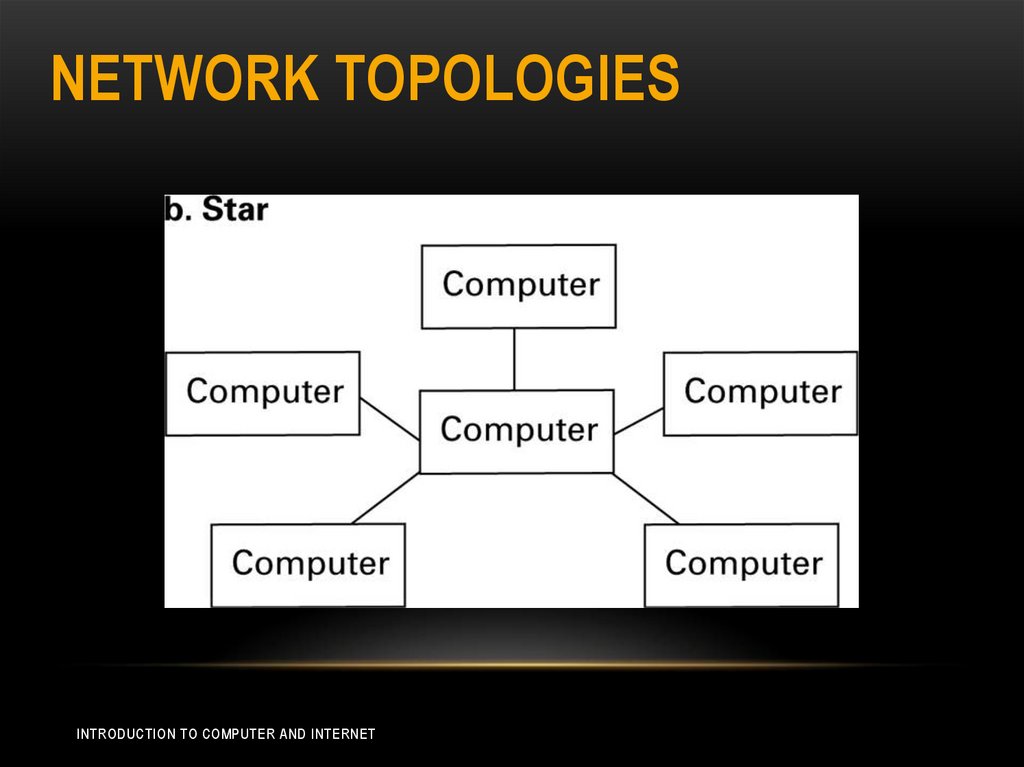
• Star: one machine serve as a central focal point to which
all the others are connected.
INTRODUCTION TO COMPUTER AND INTERNET
7. Network Topologies
NETWORK TOPOLOGIESINTRODUCTION TO COMPUTER AND INTERNET
8. Network Topologies
NETWORK TOPOLOGIESINTRODUCTION TO COMPUTER AND INTERNET
9. Network Classifications
NETWORK CLASSIFICATIONS• Bus topology was popularized in the 1990s under set of
standards known as Ethernet.
• The star was popularized in the 1970s.
• Today, the star configuration is popular in wireless
networks where communication is conducted by means
of radio broadcast and the central machine called the
access point (AP).
• The different between the bus and star not always by the
physical arrangement of equipment, it also about the
machines them selves as communicating directly (bus)
or indirectly through an intermediary central machine.
INTRODUCTION TO COMPUTER AND INTERNET
10. Network Classifications
NETWORK CLASSIFICATIONS• Sometimes a bus network is created by running links
from each computer to a central location where they are
connected to a device called a hub.
• Hub is little more than a very short bus, all it does is
really any signal it receives back out to all the machines
connected to it.
INTRODUCTION TO COMPUTER AND INTERNET
11. Protocols
PROTOCOLS• For network to function reliably, it is important to
establish rules by which activities are conducted, such
rules called protocols
• Let us consider the problem of coordinating the
transmission of messages among computers in a
network.
• Without rules, all the computers might insist on
transmitting messages at the same time or fails to assist
other machines when that assistance is required.
INTRODUCTION TO COMPUTER AND INTERNET
12. Protocols
PROTOCOLS• In a bus network, transmitting messages is controlled by
the protocol known as Carrier Sense, Multiple Access
with Collision Detection (CSMA/CD).
• This protocol dictates “decide” that each message be
broadcast to all the machines on the bus.
• To transmit a message, a machine waits until the bus is
silent , and at this time it begins transmitting while
continuing to monitor the bus.
INTRODUCTION TO COMPUTER AND INTERNET
13. Protocols
PROTOCOLS• If another machine also begins transmitting, both
machines detect the clash and pause for a brief, before
trying to transmit again.
• CSMA/CD is not compatible with wireless star networks
which communicate through a central AP. This is
because a machine may be unable to detect that its
transmission are colliding with those of another. (hidden
terminal problem) “none of the end system can hear
each other”
INTRODUCTION TO COMPUTER AND INTERNET
14. Protocols
PROTOCOLS• Wireless networks adopts policy that trying to avoid
collisions rather than trying to detect it (CSMA/CA) ,
Carrier Sense, Multiple Access with Collision avoidance,
within a protocol called as WiFi
INTRODUCTION TO COMPUTER AND INTERNET
15. Protocols
PROTOCOLS• This protocol (CSMA/CA) to a void collision, when a
collision occur, messages must be retransmitted.
• This protocol give advantages to machine that have
already been waiting an opportunity to transmit.
• The basic different between the CA and the CD, is that
when a machine need to transmit a message and find
communication channel silent, it doesn't start
transmitting immediately, it waits for a short period of
time and then starts transmitting only if the channel has
remained silent throughout that period.
INTRODUCTION TO COMPUTER AND INTERNET
16. Protocols
PROTOCOLS• Each individual station must be able to hear all the
others, to solve this problem, some WiFi networks
require that each machine send a short message
“request” message to the AP and wait until the AP
acknowledge that request before transmitting an entire
message.
INTRODUCTION TO COMPUTER AND INTERNET
17. Combining Networks
COMBINING NETWORKS• Sometimes it is necessary to connect existing networks
to make an extended communication system.
• This is done by connecting the networks to larger
version networks.
• This is done by using different devices such as:
• Repeaters, bridges, and switches
INTRODUCTION TO COMPUTER AND INTERNET
18. Combining Networks
COMBINING NETWORKS• Repeater: device that simply passes signals back and
forth between the two originals buses (the simplest
device).
• Bridge: more complex than a repeater, it is connects two
buses, but it doesn’t necessarily pass all messages a
cross the connection.
• It looks at the destination address and forwards a
message a cross the connection only when that
message destined for a computer on the other side.
INTRODUCTION TO COMPUTER AND INTERNET
19. Combining Networks
COMBINING NETWORKS• A switch : is a bridge with multiple connections, allowing
it to connect several buses rather than just two.
• A switch considers the destination of all messages and
forwards only those messages destined for other
spokes.
• Sometimes, the network that is connected have
incompatible characteristics.
• Example: the characteristics for WiFi or not readily compatible with an Ethernet network.
INTRODUCTION TO COMPUTER AND INTERNET
20. Combining Networks
COMBINING NETWORKS• In this case, the networks must be connected in manner
that build a network of networks known as internet
• Note: internet is different than Internet
• Example of internet is Internet
• In the network of networks, each original network
maintain their individually functions, and continue to
work as autonomous networks.
INTRODUCTION TO COMPUTER AND INTERNET
21. Combining Networks
COMBINING NETWORKS• The connection between these networks is handled by
router, which is a special purpose computer used for
forwarding messages.
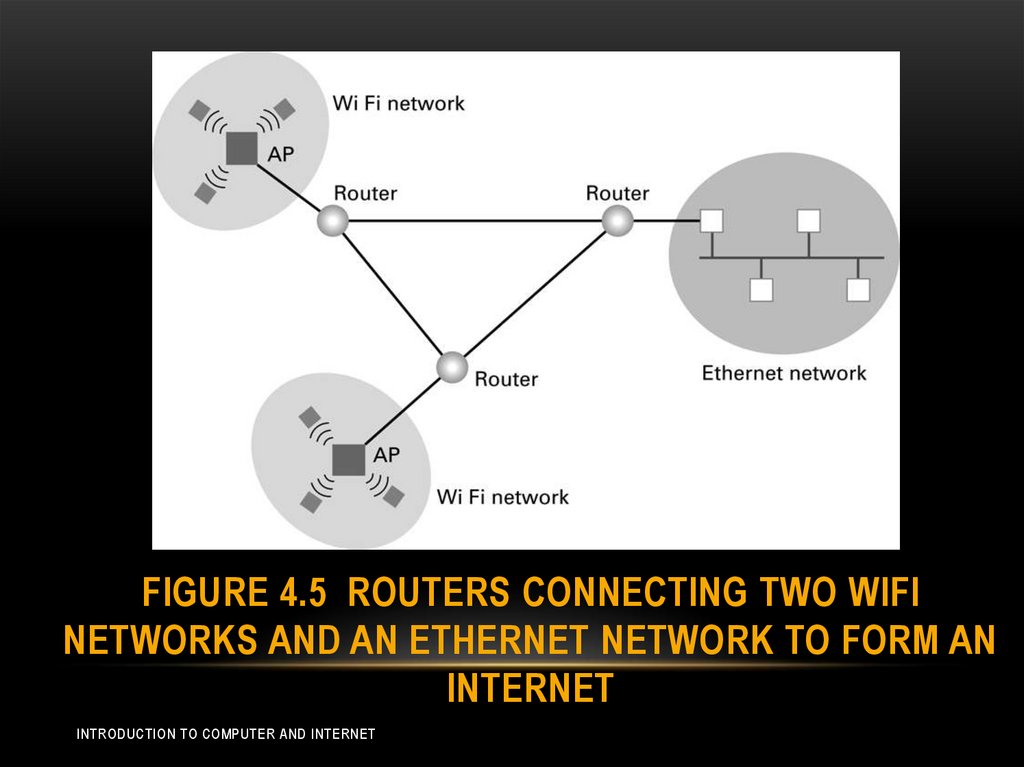
• Note that the task of router is different than others in that
routers provides links between networks while allowing
each network to maintains its unique internal
characteristics (Figure 4.5)
INTRODUCTION TO COMPUTER AND INTERNET
22. Figure 4.5 Routers connecting two WiFi networks and an Ethernet network to form an internet
FIGURE 4.5 ROUTERS CONNECTING TWO WIFINETWORKS AND AN ETHERNET NETWORK TO FORM AN
INTERNET
INTRODUCTION TO COMPUTER AND INTERNET
23. Methods of Process Communication
METHODS OF PROCESSCOMMUNICATION
• Client: the process “machine” which make request of other
processes
• Server: which satisfies “response” to the requests made by
clients.
• Example: if we attach a printer to network, all the machines
on the network use to, so in this case it plays the role of
server (print server).
• Example: file server, this is used to reduce the cost of
magnetic disk, and removing the duplicates copies of files.
• One machine on the network was equipped with a high –capacity mass storage that
contains all of the organization’s record, and others machines request access to
these records.
INTRODUCTION TO COMPUTER AND INTERNET
24. Methods of Process Communication
METHODS OF PROCESSCOMMUNICATION
• Another model of process communication is the peer-topeer (p2p),Figure 4.6 (machine can be client and server
at the same time).
• Example of usage:
• Instant messaging: when people carry on a written conversation over
the internet.
• Distribution a file such as music and motion pictures via the internet..
• In this case one peer may receive a file from another and then provides
file to other peers.
• The collection of peers participating in such a distribution is sometimes
called swarm.
INTRODUCTION TO COMPUTER AND INTERNET
25. The Internet
THE INTERNET• As we mentioned before the Internet is an example of
internet.
• The Internet was originated from research projects going
back to the early of 1960s.
• Today the Internet links a worldwide combination of
LANs, MANs, and WANs involving millions of computers.
INTRODUCTION TO COMPUTER AND INTERNET
26. Internet Architecture
INTERNET ARCHITECTURE• The fastest growing end systems are wireless
connections based WiFi technology.
• The strategy is to connect the AP to an access ISP and
thus provide Internet access through that ISP to end
systems within the AP’s broadcast range.
INTRODUCTION TO COMPUTER AND INTERNET
27. Internet Addressing
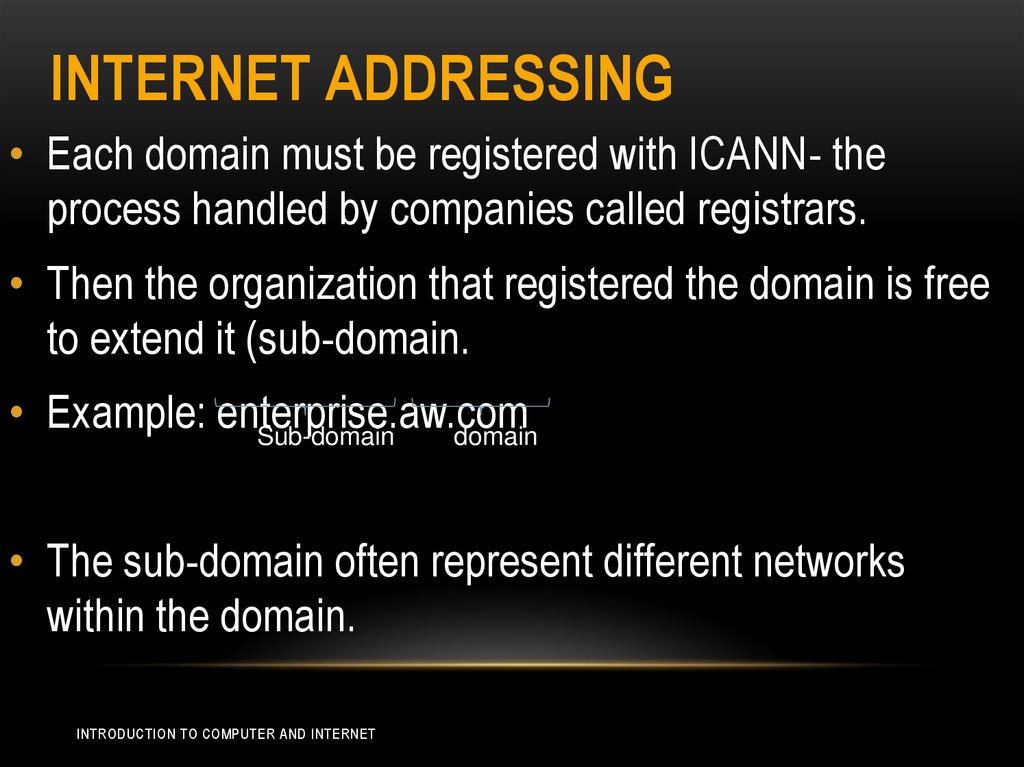
INTERNET ADDRESSING• Each domain must be registered with ICANN- the
process handled by companies called registrars.
• Then the organization that registered the domain is free
to extend it (sub-domain.
• Example: enterprise.aw.com
Sub-domain
domain
• The sub-domain often represent different networks
within the domain.
INTRODUCTION TO COMPUTER AND INTERNET
28. Internet Addressing
INTERNET ADDRESSING• For example: if nowhere university was assigned the
domain nowhere.edu, then an individual computer might
have a name such as r2.comp.nowhere.edu, meaning
that the computer r2 is in the sub-domain comp within
the domain nowhere.com
INTRODUCTION TO COMPUTER AND INTERNET
29. Electronic Mail
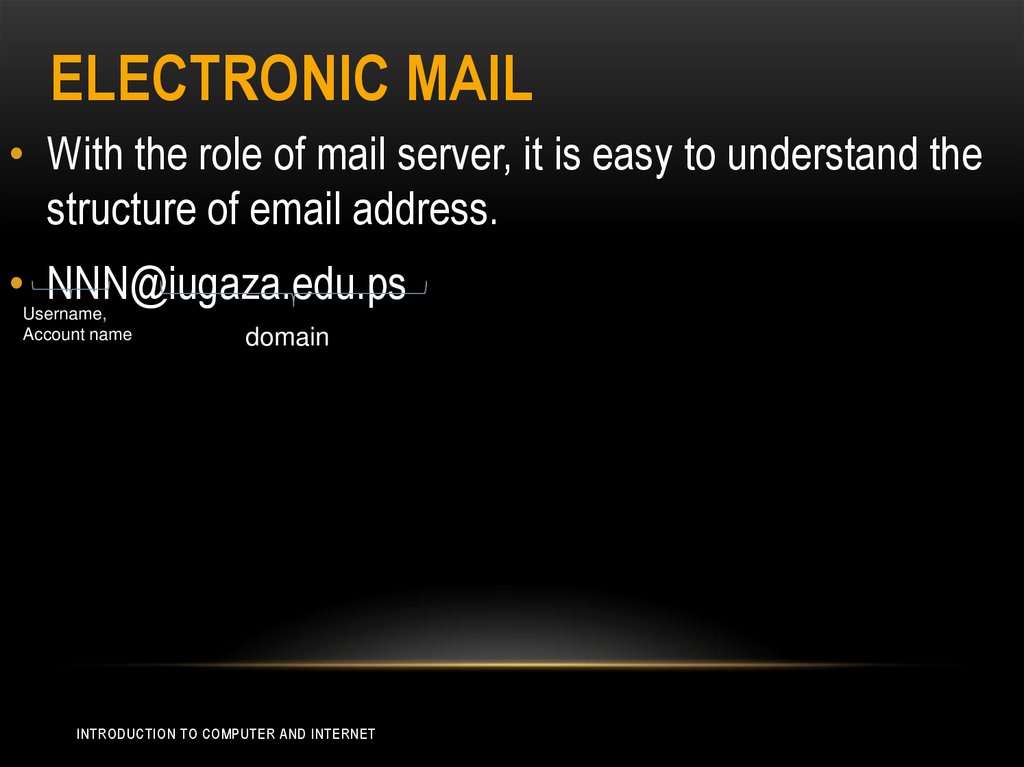
ELECTRONIC MAIL• With the role of mail server, it is easy to understand the
structure of email address.
• NNN@iugaza.edu.ps
Username,
Account name
domain
INTRODUCTION TO COMPUTER AND INTERNET
30. World Wide Web
WORLD WIDE WEB• The information is disseminated over the Internet based
on the concept of hypertext.
• Hypertext: referred to text document that contained links,
called hyperlink, to other documents.
• Hypertext ha been expanded to encompass images,
audio, and video, which called hypermedia.
INTRODUCTION TO COMPUTER AND INTERNET
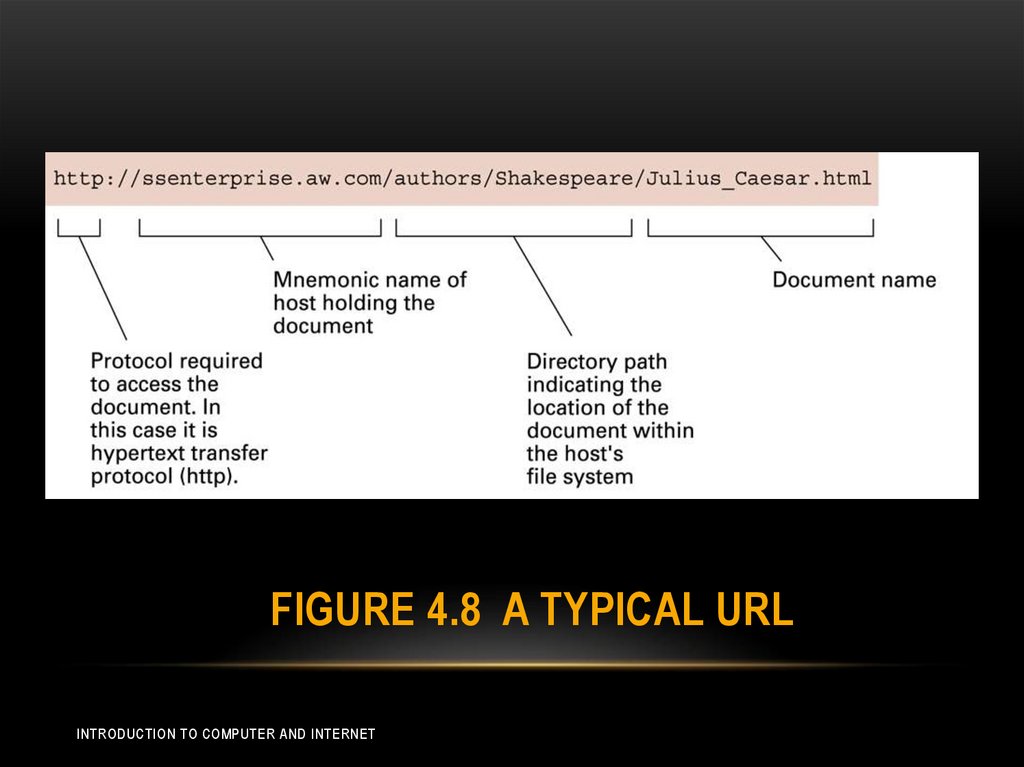
31. Figure 4.8 A Typical URL
FIGURE 4.8 A TYPICAL URLINTRODUCTION TO COMPUTER AND INTERNET
32. Client-side and server-side activities
CLIENT-SIDE AND SERVER-SIDEACTIVITIES
• There are some programs that control the client side
activities:
• Java script within the HTML code
• Applets
• System flash
• For the server side:
• CGI (common gateway interface) by which clients could
request the execution of programs stored at the server
• JSP
• ASP
INTRODUCTION TO COMPUTER AND INTERNET
33. Encryption
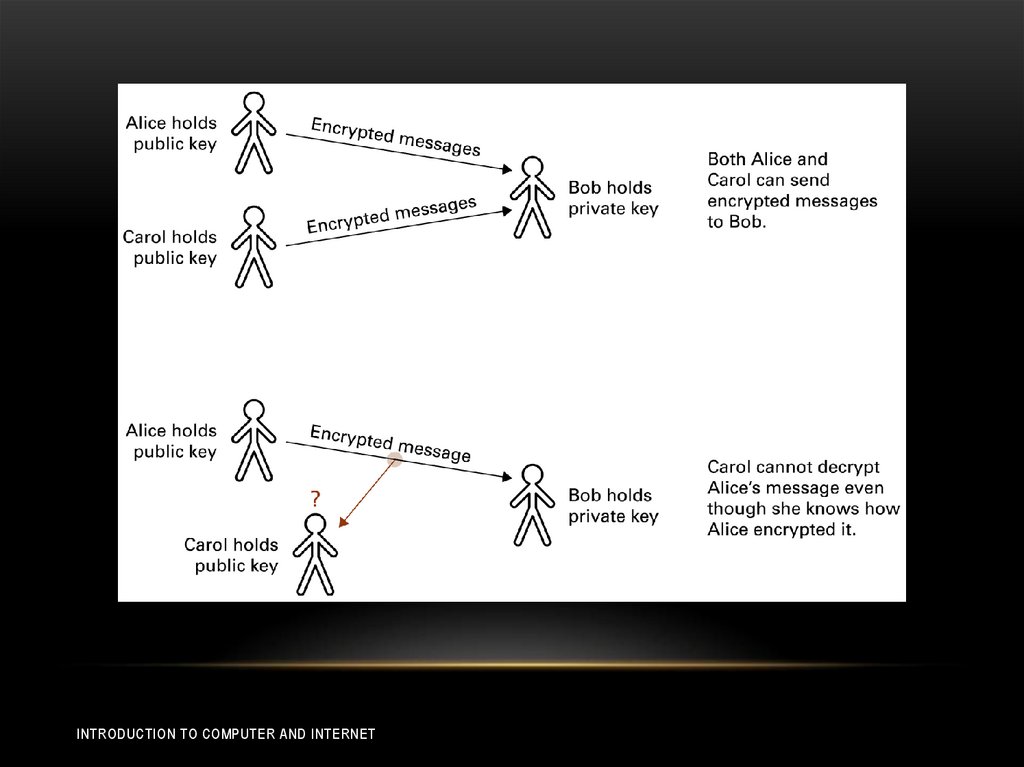
ENCRYPTION• FTPS which is a secure version of FTP, and SSH which
is the replacement for telnet.
• secure version of HTTP, known as HTTPS.
• The backbone of HTTPS is the protocol system known
as Secure Sockets Layer (SSL), which provide secure
communication links between Web clients and servers
INTRODUCTION TO COMPUTER AND INTERNET