
 Программное обеспечение
Похожие презентации:






MPG Parking Plus
1.
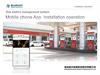
As an MPG monthly parker, you areautomatically enrolled in our Parking
Plus Program.
Enjoy an additional 15% off , daily
parking reservations when booked
though the MPG App or website.
To activate and use your Parking Plus
discount, please follow these steps:
1. Log in to the MPG App or Website
using the same credentials you use
for your monthly parking account.
2. Navigate to the start page on your
mobile device and select “Daily”
parking.
3. Choose your desired day and time
for the daily parking reservation
4. During checkout, select “Apply MPG
Parking Plus Discount”
Question for Magnus –
for step 4 do they
need to do this? I
thought it was
preselected for them.
Should you need additional assistance
please email
monthlyparking@mpgparking.com for more
information.
2.
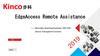
You're Invited to Enjoy More with MPG ParkingPlus
As a valued MPG Monthly Parking customer,
you're eligible for our exclusive Parking
Plus program — offering 15% off daily
parking reservations made through the MPG
App or our website.
To register and activate your discount:
Please complete the form below, including your
monthly parking location and account number.
If your location is not listed in the
dropdown menu or if you require assistance,
feel free to contact us at: